How to Sell Inside ChatGPT, Google AI Mode, and Microsoft Copilot Using Shopify Agentic Storefronts
Shopify agentic storefronts are sales channels that allow AI agents like ChatGPT, Google AI Mode and Gemini, and Microsoft Copilot to discover and sell your products. ChatGPT works as a discovery channel where customers complete purchase on your store checkout. Google AI Mode, Gemini, and Microsoft Copilot support built-in checkout where customers can buy directly inside the AI conversation without visiting your store. Products are surfaced through Shopify Catalog, which means your product titles, descriptions, images, and structured data directly determine whether AI agents find and recommend your products. There are no additional fees beyond standard payment processing. And there is a critical tracking implication: client-side pixels including Google Analytics and custom pixels do not fire in agentic storefront built-in checkouts, which means server-side tracking is the only reliable way to capture those conversions.
Shopify just made it possible for customers to discover and purchase your products without ever visiting your store. Through Shopify agentic storefronts, your products can now appear inside ChatGPT, Google AI Mode and Gemini, and Microsoft Copilot, and in some cases customers can complete the entire purchase without leaving their AI conversation.
It is live now for eligible stores active by default, and already generating orders that show up directly in your Shopify admin. Let’s get into it.
What Are The Shopify Agentic Storefronts
Shopify agentic storefronts are AI-powered sales channels that let customers discover and purchase your products through AI agents. When a user has a conversation with an AI agent and asks for product recommendations, the agent can search Shopify Catalog and return suggestions that match the user's needs, complete with pricing, availability, and product details.
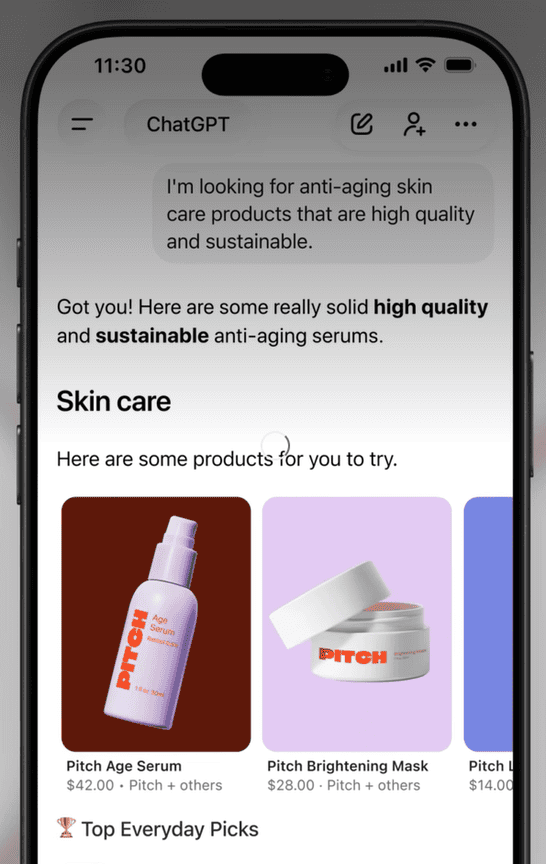 Image from: Shopify
There are two types of agentic storefronts with different checkout experiences.
- ChatGPT agentic storefront is a discovery-focused referrer channel. When ChatGPT recommends your product, the customer clicks through to your online store checkout to complete the purchase, either in a ChatGPT in-app browser or in a new tab. Your full store customizations, branding, payment methods, and checkout experience are all preserved.
- AI channels with built-in checkout include Google AI Mode and Gemini and Microsoft Copilot. These allow customers to complete their purchase directly inside the AI channel without visiting your store at all. The checkout is Shopify-powered but embedded inside the AI interface. Customers enter shipping and payment details and complete the transaction with a Pay Now button, all without leaving their conversation. Built-in checkout is in early access and not yet available for all stores.
For all agentic storefront orders, you retain full ownership of the customer relationship and post-purchase experience. Orders appear in your Shopify admin with channel or referrer attribution so you can track where they originated.
How Do AI Agents Find Your Products
This is the most important thing to understand about agentic storefronts, and it is where the connection to Aimerce's Catalog AI Enrichment feature is most direct.
AI agents discover and recommend your products through Shopify Catalog. Shopify Catalog is a comprehensive global catalog of eligible products sold by Shopify merchants. AI platforms, shopping sites, and AI agents search Shopify Catalog to display your product information including pricing, options, and availability in real time.
If your store and products meet Shopify's eligibility requirements (for both ChatGPT and AI Channels Storefront then your products are automatically included in Shopify Catalog. You do not need to manually submit them. But being included and being found are two different things.
Shopify is explicit about this, you can optimize your products so that AI platforms and shopping sites can recognize and display them more effectively. The product fields that AI agents use to match your products to customer queries are:
- Product title
- Product description
- Images
- Product organization details including type, vendor, collections, and tags
- Barcode including ISBN, UPC, and GTIN
- Variants including option names
A product titled "Weekend Bag" tells an AI agent almost nothing. A product titled "Waterproof Canvas Weekend Duffel Bag 40L with Separate Shoe Compartment" gives the agent specific attributes to match against a customer saying "I need a waterproof travel bag with a shoe compartment." The difference between showing up in AI recommendations and being invisible is almost entirely in the quality and completeness of your product data.
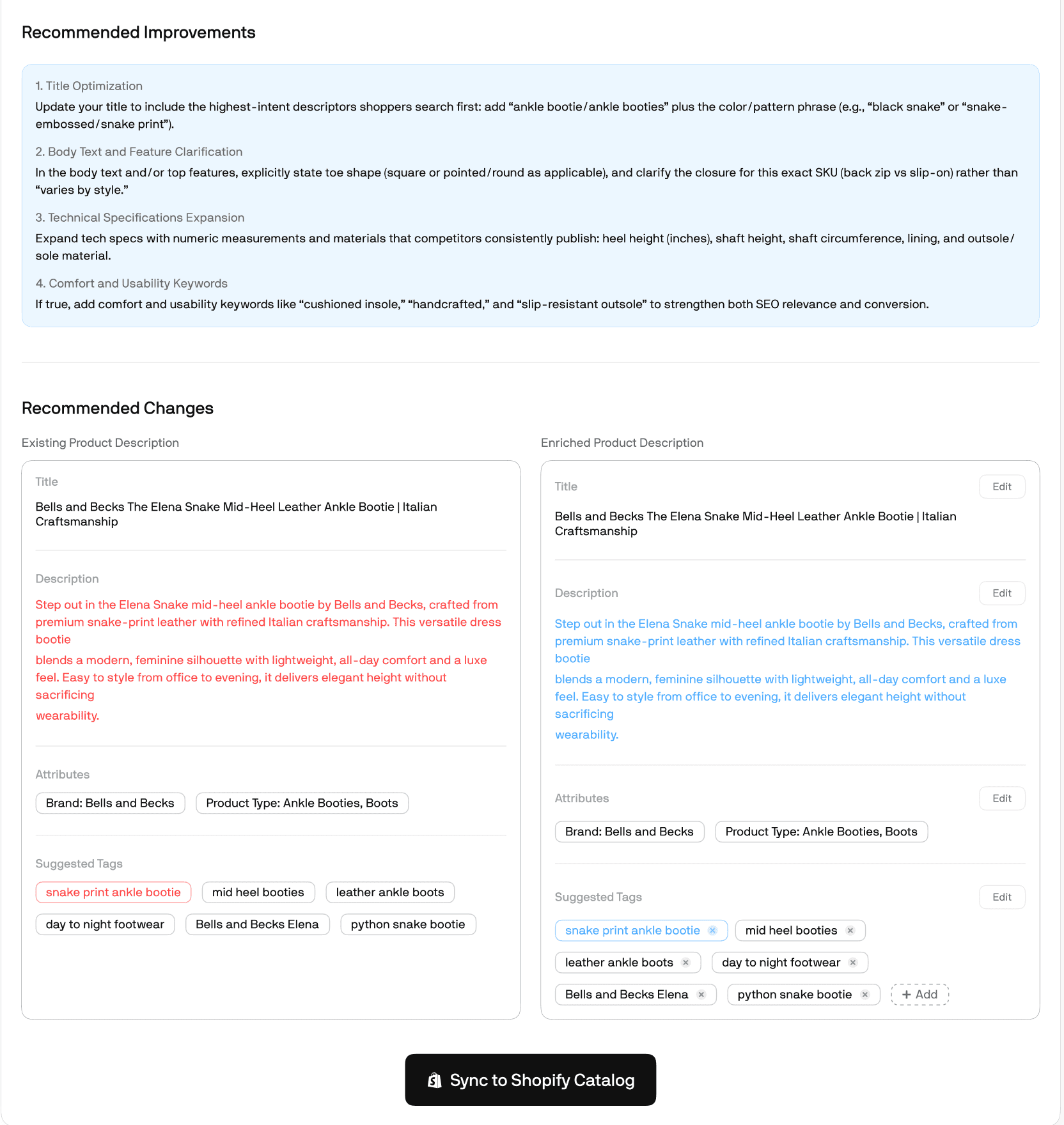
This is exactly what Aimerce's Catalog AI Enrichment feature addresses. It audits your existing product catalog against real AI agent query patterns, enriches your product titles, descriptions, and structured metadata, and syncs directly into Shopify Catalog so AI agents can find and recommend your products accurately. The brands that will capture the most revenue from agentic storefronts are the ones whose catalogs are optimized for how AI agents search, not just how human shoppers browse.
What Are the Requirements to Be Included in Shopify Catalog
Your store and products need to meet the following requirements to be automatically included in Shopify Catalog and discoverable through agentic storefronts:
- Your store must be on the Starter plan or higher and cannot be password-protected
- Products must have a title and at least one product image
- Products must have a price over $0 (free products are not included)
- Products must ship to the United States or Canada
- Products must be published to your online store, Hydrogen, or Headless channels
- Products cannot have Unlisted status or be hidden from search engines
- Products cannot contain sensitive or mature content
For ChatGPT specifically, your store must sell to customers in the United States, though your store can be based outside the US. You must also have your Terms of Service, Privacy Policy, and Return and Refund Policy completed in your Shopify admin settings.
There are no additional fees for selling through agentic storefronts. You pay only your standard payment processing fees.
What Happens During Checkout in Agentic Storefronts
The checkout experience differs between ChatGPT and the AI channels with built-in checkout, and understanding this difference matters for both your customer experience and your tracking setup.
- ChatGPT checkout happens on your own online store. The customer is redirected from ChatGPT to your store checkout in a ChatGPT in-app browser or a new tab. All your payment methods, checkout customizations, and branding are fully supported. Because the purchase completes on your store, your standard tracking setup applies.
- Built-in checkout for Google AI Mode, Gemini, and Microsoft Copilot is a Shopify-powered checkout embedded inside the AI channel. Customers never visit your store. They enter shipping and payment details directly in the AI interface and complete the purchase with a credit or debit card.
There are some limitations in built-in checkouts that are worth knowing before you rely on agentic storefront revenue at scale:
- Subscriptions, product bundles, digital products, customizable products, and B2B-only products are not supported
- Some checkout blocks including upsells, loyalty experiences, and informational content may not display
- Local delivery, pickup in store, and pickup points are not supported as delivery methods
- Customers cannot be required to sign in before checkout
Automatic discounts and discount codes are supported, which means your existing promotional setup carries through to agentic storefront purchases.
Why Client-Side Pixels Do Not Fire in Agentic Storefront Built-In Checkouts
Shopify's official documentation states clearly that Google Analytics and custom pixels will not fire in all agentic storefront built-in checkouts. The checkouts fire only server-to-server pixels. None of the standard or custom client-side pixels fire.
This means that if a customer discovers your product through Google AI Mode and completes a purchase in the built-in checkout, your Meta pixel does not see it. Your Google Analytics tag does not capture it. Your custom pixels do not fire. The only conversion signals that reach your ad platforms are those sent server-to-server.
For Shopify brands investing in Meta and Google campaigns, this creates a specific data gap. If a customer clicked a Meta ad, was retargeted through AI discovery, and completed a purchase in Google AI Mode's built-in checkout, Meta's pixel never sees the final conversion. The attribution chain breaks at the checkout layer.
Server-side tracking is the solution. When purchase events are captured from Shopify's backend via Webhooks after order confirmation, they fire regardless of where the checkout took place. It does not matter whether the customer checked out on your store, in a ChatGPT browser, or inside a Google AI Mode built-in checkout. The Webhook fires when Shopify confirms the order, and the server-side event reaches Meta, Google, and Klaviyo reliably.
Aimerce server-side tracking Shopify captures purchase events this way for Shopify brands by default. As agentic storefront orders grow as a share of total revenue, server-side tracking becomes not just a tool for recovering browser-blocked pixel events but the only mechanism that captures conversions happening entirely outside your storefront.
How to Optimize Your Shopify Store for Agentic Storefronts
- Optimize your product catalog for AI discovery. This is the highest-impact action you can take. Review every product title and ask whether an AI agent could match it to a natural language customer query. Add material, dimensions, use case, fit, and other relevant attributes to descriptions. Make sure barcodes including UPC and GTIN are filled in where available. These fields are what AI agents use to identify, categorize, and recommend your products. You don’t have to worry about Catalog AI Enrichment and Server-Side Tracking as Aimerce already handles those hard part for you.
- Complete your store policies. Shopify requires Terms of Service, Privacy Policy, and Return and Refund Policy to be complete before your store is eligible for agentic storefronts. These are also used by AI agents to answer customer questions, so accuracy matters beyond just eligibility.
- Use the Shopify Knowledge Base app. Shopify's Knowledge Base app lets you review and customize the facts and FAQs that AI platforms use to answer questions about your store. You can review automatically generated facts, see common questions shoppers ask, and create your own Q&A content to highlight what is unique about your store. This directly influences how accurately AI agents represent your brand in conversations.
- Use metafields for dual-purpose catalog management. If your brand uses short, memorable product names on your storefront, you can keep those as display names in a metafield while using descriptive, attribute-rich product titles for Shopify Catalog. Your storefront customers see the brand-friendly name. AI agents see the optimized, searchable version.
- Set up server-side tracking for both Meta and Google before agentic storefront revenue scales. Client-side pixels do not fire in built-in checkouts. As agentic storefronts grow as a share of your orders, a server-side tracking setup that captures purchase events from Shopify's backend becomes essential for maintaining complete conversion data across Meta, Google, and Klaviyo.
- Review your order attribution regularly. ChatGPT orders appear in your Shopify admin under Online Store channel attribution with ChatGPT as the referrer. Use the Total Sales by Referrer report in Analytics to track agentic storefront performance. For Google AI Mode, Gemini, and Microsoft Copilot orders, access them through Settings and then Sales Channels in your admin.
FAQ
What are Shopify agentic storefronts? Shopify agentic storefronts are sales channels that allow AI agents including ChatGPT, Google AI Mode and Gemini, and Microsoft Copilot to discover and sell your products. Products are surfaced through Shopify Catalog and customers can either be redirected to your store to complete checkout or purchase directly inside the AI channel through a Shopify-powered built-in checkout.
Do I need to do anything to get my products on ChatGPT or Google AI Mode? If your store and products meet Shopify Catalog requirements, your products are automatically included and discoverable by AI agents. Agentic storefronts with built-in checkout are also active by default for eligible stores. What you can do to improve your chances of appearing in AI recommendations is optimize your product titles, descriptions, and structured data to match how AI agents search.
Is there a fee for selling through Shopify agentic storefronts? No. There are no additional fees beyond your standard payment processing fees.
Why do client-side pixels not fire in agentic storefront built-in checkouts? Shopify's built-in checkouts for AI channels like Google AI Mode and Microsoft Copilot fire only server-to-server pixels. Standard and custom client-side pixels including Google Analytics and Meta pixel do not fire in these checkouts. This means purchases completed in built-in checkouts are invisible to any tracking system that relies on browser-side scripts.
How do I track orders from agentic storefronts? ChatGPT orders appear in your Shopify admin under Online Store channel attribution with ChatGPT as the referrer. Use the Total Sales by Referrer report to view them. For Google AI Mode, Gemini, and Microsoft Copilot orders, access them through Settings and then Sales Channels. For complete conversion tracking across all channels including agentic storefronts, server-side tracking via Shopify Webhooks is the most reliable approach since client-side pixels do not fire in built-in checkouts.
What product types are not supported in agentic storefront built-in checkouts? Subscriptions, product bundles, digital products, customizable products, and B2B-only products are not supported in built-in checkouts. Customers discovering these products through AI channels will be redirected to your online store to complete the purchase instead.
How does Shopify Catalog work and what is it? Shopify Catalog is a global catalog of eligible products sold by Shopify merchants that AI platforms, shopping sites, and AI agents search to display product information in real time. Your products are automatically included if they meet eligibility requirements. Optimizing your product data including titles, descriptions, images, and attributes improves how accurately AI agents match your products to customer queries.
How does Aimerce help with agentic storefronts? Aimerce helps in two ways. The Catalog AI Enrichment feature optimizes your product titles, descriptions, and structured metadata for Shopify Catalog so AI agents can find and accurately recommend your products. And Aimerce's server-side tracking captures purchase events from Shopify's backend via Webhooks after order confirmation, which means agentic storefront purchases that complete in built-in checkouts are captured and forwarded to Meta, Google, and Klaviyo even though client-side pixels do not fire in those checkouts.

Try Aimerce Pixel Risk-Free
for 30 Days
Most teams see results within 2 weeks.
Money-back guarantee.
It pays for itself, or you don't pay anything.
30-Day Aimerce Pixel Free Trial