
What is Meta’s Ads Library?
Meta Ads Library is a free tool that lets you search any advertiser's active and inactive ads. The new impressions sorting feature lets you identify which ads are actually receiving budget and performing well, rather than just which ones have been running the longest. Ads with high impressions that have been running for a long time are the closest thing to a confirmed best performer you can find without having access to a competitor's actual ad account. For Shopify and DTC brands doing creative research and competitive analysis, this is one of the most useful free tools available right now.
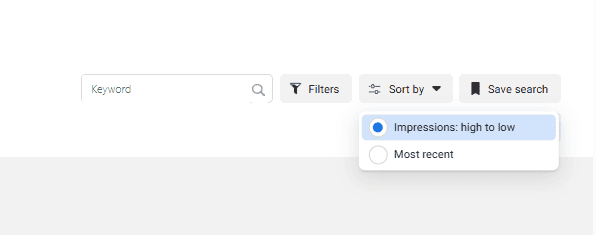
Meta Ads Library has always been a useful free tool for competitive research. But a recent update made it significantly more valuable for DTC brands and Shopify advertisers trying to understand what is actually working in their market. You can now sort competitor ads by impressions, high to low. That one feature solves the biggest problem the tool has always had.
How To Get Started
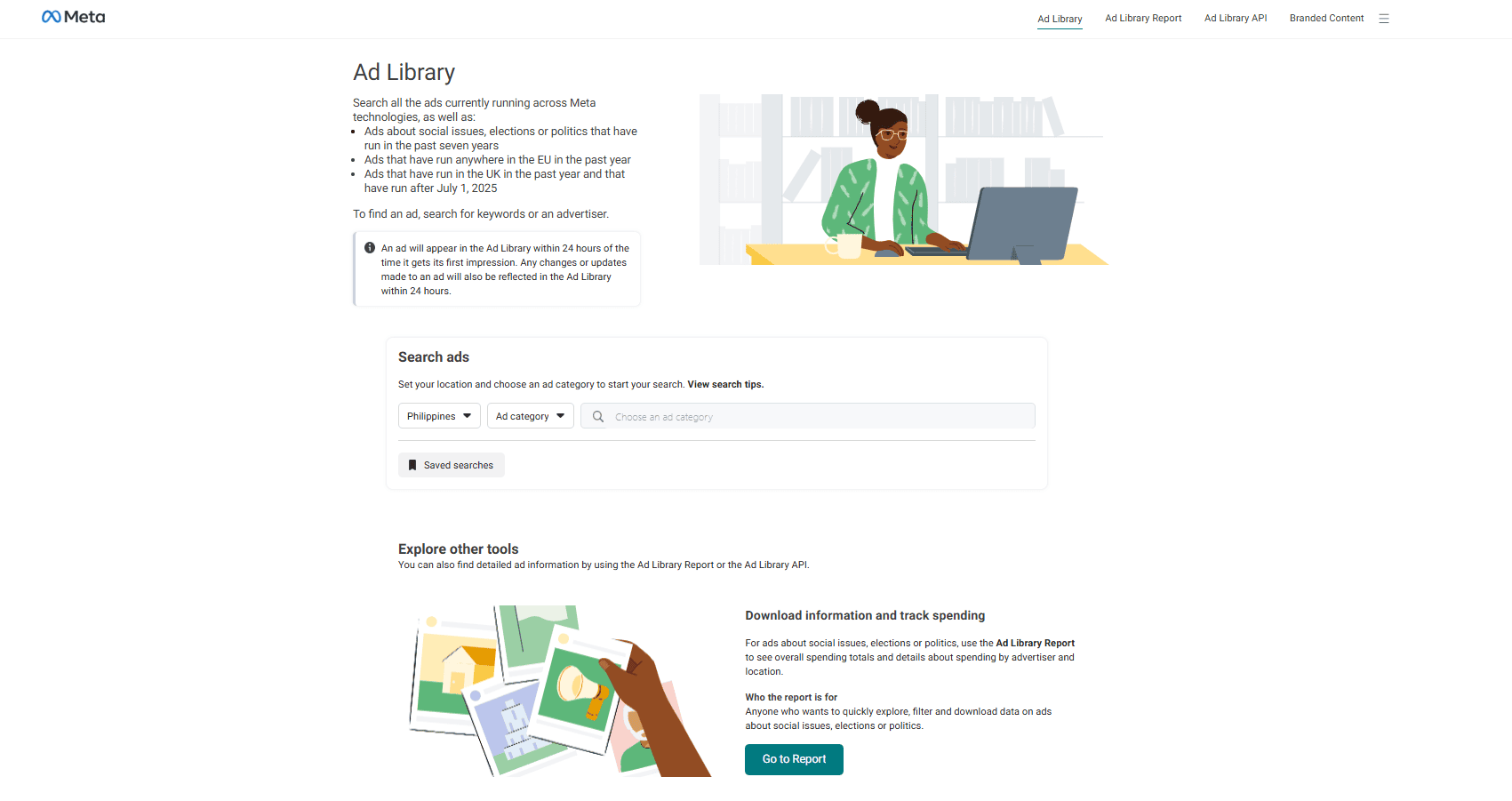
You can go here: https://www.facebook.com/ads/ or search for "Meta Ads Library" or "Facebook Ads Library" in your browser. Once you are in, you will see a search bar where you can look up ads by advertiser name or by keyword.
A few settings worth knowing before you search:
Location defaults to wherever Meta thinks you are based. This setting controls where the ads are being delivered, not where the advertiser is located. If you want to see what a competitor is running in the US, set the location to United States. If you want to see everything regardless of market, set it to All.
Ad category can be left as All Ads for most competitive research purposes unless you are specifically looking at political or issue-based advertising.
Active and inactive ads are both viewable now. Previously you could only see active ads. Now you can filter to include inactive ads as well, which is useful when you want to study ads a competitor ran in the past that may no longer be live.
The Old Way of Finding Competitor Best Performers
Before the impressions update, the standard advice for finding a competitor's best performing ads was to look for ads that had been running the longest. If an ad has been active for six months or a year, the advertiser is probably keeping it running because it is working.
The problem is that Meta's delivery system does not work that way anymore.
When you run multiple ads inside a single ad set, Meta allocates spend to the ads it predicts will perform best. The others stay active but receive little to no spend. An ad can technically be active for 18 months but have received almost no impressions because it was consistently passed over by the algorithm in favor of other ads in the same ad set.
If you were using run time as your signal for best performers, you were likely studying ads that had never actually been tested at meaningful scale. You were modeling from idle creative, not proven creative.
How Does the New Impressions Sorting Feature Fix This?
The new ability to sort ads by impressions, high to low, gives you a signal that actually reflects where budget was allocated.
If an ad has a high impression count, Meta put money behind it. That means the algorithm decided, across a real auction environment with real budget, that this ad was worth serving to people. Combined with a long run time, it becomes a much stronger indicator of actual performance.
Here is why both signals matter together:
An ad with high impressions but a short run time might just be a big budget test that was turned off after a week. An ad with a long run time but low impressions is probably the idle creative problem described above. An ad with high impressions and a long run time is the one worth studying. Either the algorithm kept choosing it over alternatives, or the advertiser kept it running because results justified it. Most likely both.
How to Find a Competitor's Best Performing Ads Step by Step
- Go to Meta Ads Library and search for your competitor - Search by their business or brand name. If multiple accounts appear, look for the verified one or the one that matches their main Facebook page. Click through to their ad library.
- Set location to All or your target market - If you want to see everything they are running globally, select All. If you only care about a specific market, filter to that country.
- Sort by impressions, high to low - This is the new feature. Switch the sort order from Most Recent to impressions high to low. The ads that surface at the top are the ones that received the most delivery. ****
- Filter for active and inactive - Include both. Some of a competitor's best performing ads may no longer be active but are still worth studying for creative direction, offer structure, and messaging.
- Look at run time alongside impressions - Click into individual ads to see the date range they ran. Cross-reference high impressions with a long run time. These are your priority ads to analyze.
- Go deeper than just the ad creative - Click the call to action button within the ad. It takes you to the landing page the advertiser was sending traffic to. This gives you visibility into their full funnel, not just the top of it. What offer are they making? What does the landing page structure look like? Is it a lead magnet, a direct product page, a video sales letter? All of this is visible.
What Should You Actually Do With This Information?
The goal is not to copy. It is to understand what is resonating in your market so you can create something informed by proven signals rather than guesswork.
Start with the ads that have the highest impressions and longest run time. These are the ones your competitor has effectively validated through real spend. Look at the hook, the format, the offer framing, the call to action, and the landing page structure. What patterns do you notice across their top performers? Are they leading with a problem? A social proof angle? A demonstration?
Then look at whether you can create something that captures the same underlying principle in your own voice and with your own creative.
If you look at large competitors and their top ads involve professional video production or major influencer partnerships you cannot replicate, skip them for now and look at smaller competitors whose production scale is closer to yours. The goal is to find ads you can actually learn from and adapt, not ones that are technically impressive but operationally out of reach.
Also look at multiple competitors, not just one. Patterns that show up across several advertisers in your category are stronger signals than anything you find in a single account.
What Does This Mean for Your Own Ad Account?
This tool is most useful for creative direction and offer research, but it also has implications for how you think about your own ad testing.
If your top DTC brand competitors are consistently running certain formats or offer structures at high impression volume, that is market-level validation that those approaches are working with your shared audience. You do not need to spend months testing from scratch to find what works when competitors have already done that work for you.
The fastest growing DTC brands in most categories are not reinventing creative from nothing. They are studying what is working, applying it with their own positioning, and iterating from a validated starting point.
FAQ
What is Meta Ads Library? Meta Ads Library is a free tool from Meta that lets anyone search and view ads running across Meta's platforms including Facebook and Instagram. You can search by advertiser name or keyword, filter by location and ad status, and view both active and inactive ads. You need to be logged into a Meta account to use it.
What is the new Meta Ads Library update? Meta added the ability to sort ads by impressions, high to low. Previously you could only sort by most recent. The impressions sort shows you which ads actually received significant delivery, which is a much stronger indicator of performance than run time alone.
Why is sorting by impressions better than sorting by run time? Run time alone does not confirm an ad received meaningful spend. Meta's delivery system allocates budget to the best predicted performers within an ad set, leaving other active ads with little to no impressions. An ad can be technically active for over a year without ever receiving significant spend. Sorting by impressions shows you which ads Meta actually chose to deliver at scale.
Can I see inactive ads in Meta Ads Library? Yes. Meta recently made inactive ads viewable in the library. In your filter settings, make sure you have both active and inactive status selected to see a competitor's full ad history, not just what they are currently running.
How do I find my competitor's best performing ads? Search for their advertiser account in Meta Ads Library, sort by impressions high to low, and filter to include both active and inactive ads. Look for ads with high impression counts and long run times. Click into individual ads to see the date range, platforms, creative, and landing page destination.
Should I copy my competitor's ads? No. The goal is to understand what is working in your market so you can create something informed by proven signals. Study the hook, format, offer framing, and funnel structure of high-performing competitor ads, then create your own version that captures the same underlying approach with your own voice and positioning.
What else can I learn from Meta Ads Library beyond the ad creative? You can click the call to action button within any ad to visit the landing page the advertiser is sending traffic to. This gives you visibility into their full funnel including offer structure, landing page format, and conversion mechanism. Combined with the ad creative itself, this lets you understand how a competitor is structuring their entire acquisition funnel, not just their top of funnel messaging.

Try Aimerce Pixel Risk-Free
for 30 Days
Most teams see results within 2 weeks.
Money-back guarantee.
It pays for itself, or you don't pay anything.
30-Day Aimerce Pixel Free Trial