
Quick Answer: This is the first Black Friday where AI agents inside ChatGPT, Gemini, Copilot, Meta, and Google can buy on shoppers' behalf, sometimes without the shopper ever landing on your site. Across 1,000+ Shopify stores running Aimerce, ChatGPT's share of store pageviews nearly doubled in a year, and its median order is about 25% higher than orders with no AI referral. To get ready: count ChatGPT traffic by referrer or utm_source, fix your Shopify Catalog data and store policies, treat Shopify orders as your source of truth, tag agentic orders, set up server-to-server tracking, and decide which AI channels and products you actually want live before BFCM.
Key Takeaways
- AI shopping is still small but growing fast: ChatGPT's share of store pageviews nearly doubled (1.97x) in a year, and 96.3% of stores got ChatGPT traffic in August.
- Your analytics probably undercount it by about 5x, because ChatGPT strips the referrer on 81.8% of clicks.
- Direct checkout inside Google AI Mode, Gemini, Meta Muse, and Copilot doesn't fire your pixels. Only server-to-server tracking sees those orders.
- Direct checkout doesn't support subscriptions, bundles, custom configurations, or local pickup, so check your BFCM offers against it.
- You have more control than most people realize: you can turn off channels, turn off direct checkout per channel, and keep specific products out of AI agents.
This is the first Black Friday where AI agents are already live inside ChatGPT, Gemini, Copilot, and Google, buying on your customers' behalf without them ever landing on your site.
Over the last few months I've written about pieces of this separately: UCP, Shopify's agentic storefronts, Google's checkout layer, the new AI connector apps. This is everything in one place to get ready for BFCM.
How big is AI shopping, really?
We measured AI-assistant traffic and orders across 1,000+ Shopify stores running Aimerce. It's still small, but it's growing fast.
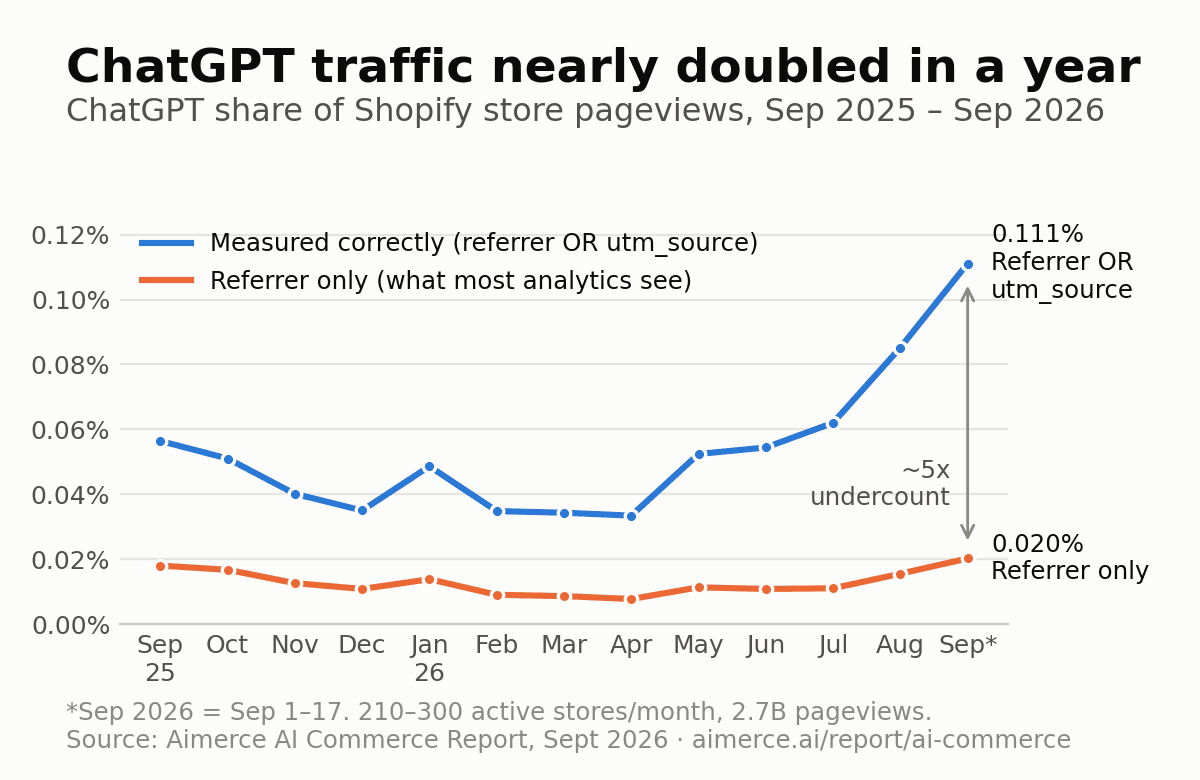
- ChatGPT's share of store pageviews nearly doubled (1.97x) in a year, and the jump started in August 2026.
- 96.3% of stores got ChatGPT traffic in August. This isn't a niche channel.
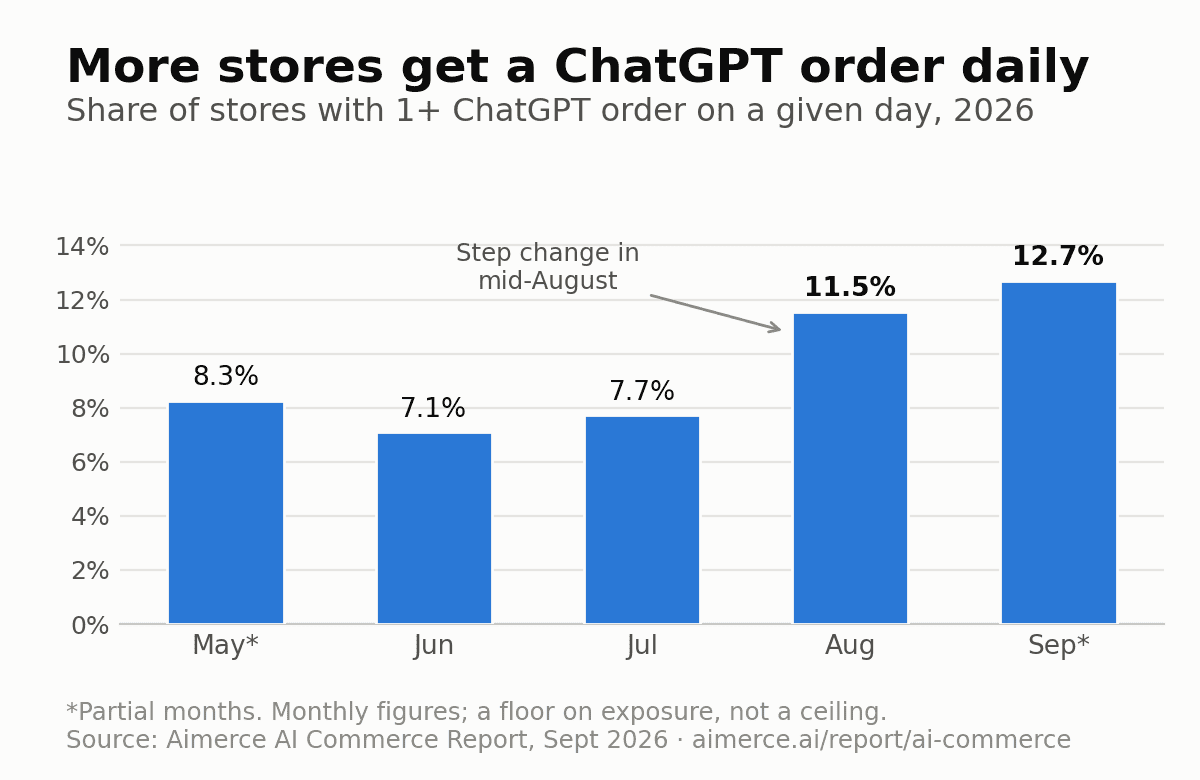
- On a given day in early September, 12.96% of stores took at least one ChatGPT order, up from 8.54% in late May.
- ChatGPT is almost all of it: 96.9% of AI-assistant pageviews and 95.6% of AI-attributed orders.
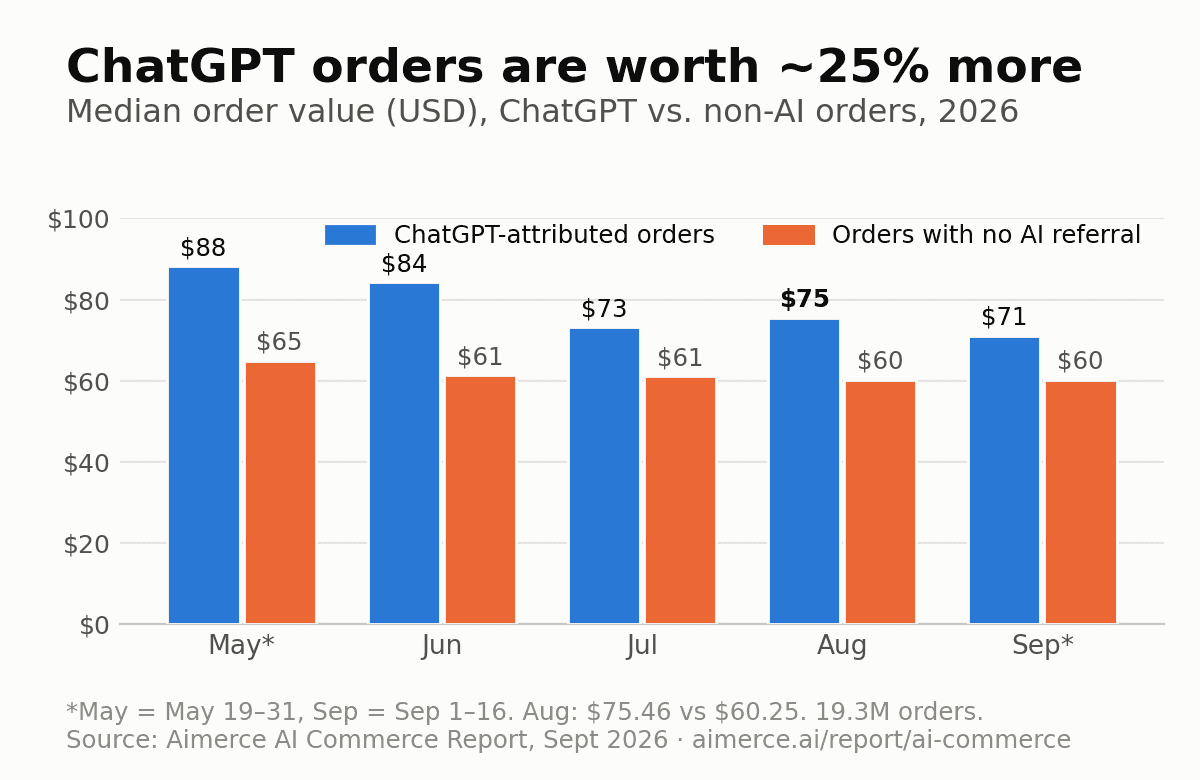
ChatGPT shoppers also spend more. The median ChatGPT order was $75.46 in August, against $60.25 for orders with no AI referral, about 25% higher.
Why can't your analytics see most of it?
ChatGPT strips the referrer on most clicks, so 81.8% of its traffic shows up as "direct." It adds utm_source=chatgpt.com instead. If you only look at the referrer, you undercount ChatGPT by about 5x, and you'll think it's flat while it's actually doubling.
Before BFCM, in your analytics, count a visit as ChatGPT if the referrer or the utm_source says ChatGPT.
And remember, these numbers only cover shoppers who clicked through to your site. Purchases made inside an AI chat never touch your domain at all. More on that below.
Read the full AI Commerce Report
How do AI agents discover your products?
Shopify's Catalog feature does the heavy lifting by syncing and organizing your products automatically. AI agents can pull details like pricing and variants without you managing feeds. If you use custom fields or metaobjects, Shopify Catalog Mapping keeps your data consistent across AI channels.
If your store is eligible, agentic storefronts are already on by default, so you've been opted in automatically.
Not all AI channels work the same way:
| Channel | Where products come from | Checkout in the chat? | Who can buy there | Your pixels fire? |
|---|---|---|---|---|
| ChatGPT | Shopify Catalog | No, always redirects to your checkout | Not applicable | Yes, it's your real checkout |
| Google AI Mode & Gemini | Your Google & YouTube channel feed | Yes, on by default (early access) | US customers only | No, server-to-server only |
| Meta (Muse) | Shopify Catalog | Yes, inside Muse with Shop Pay | US, Canada, Mexico shipping | No, server-to-server only |
| Microsoft Copilot | Shopify Catalog | Yes, on by default | US customers | No, server-to-server only |
How do you fix your Catalog before building BFCM offers?
Direct checkout doesn't support subscriptions, bundles, custom configurations, or local pickup, which is all the stuff you're likely leaning on for BFCM. Those products still show up in AI search, but customers get sent to your normal checkout to finish.
Here's where I'd start:
- Fill out your store policies. Confirm your Terms, Privacy, and Return & Refund policies are complete under Settings > Policies.
- Move holiday legal language up. Put any holiday-specific legal language in the first 6,000 characters of your product description.
- Audit wholesale SKUs. Check them if you run wholesale pricing through a third-party app or custom theme logic instead of Shopify B2B natively.
- Write titles AI agents can use. AI agents and product feeds work better when titles include what the product is plus its key attributes, so make sure every product has its attributes filled in.
If you don't want to do that last step by hand, Catalog AI Enrichment is now available in your Aimerce dashboard. Here's what it does:
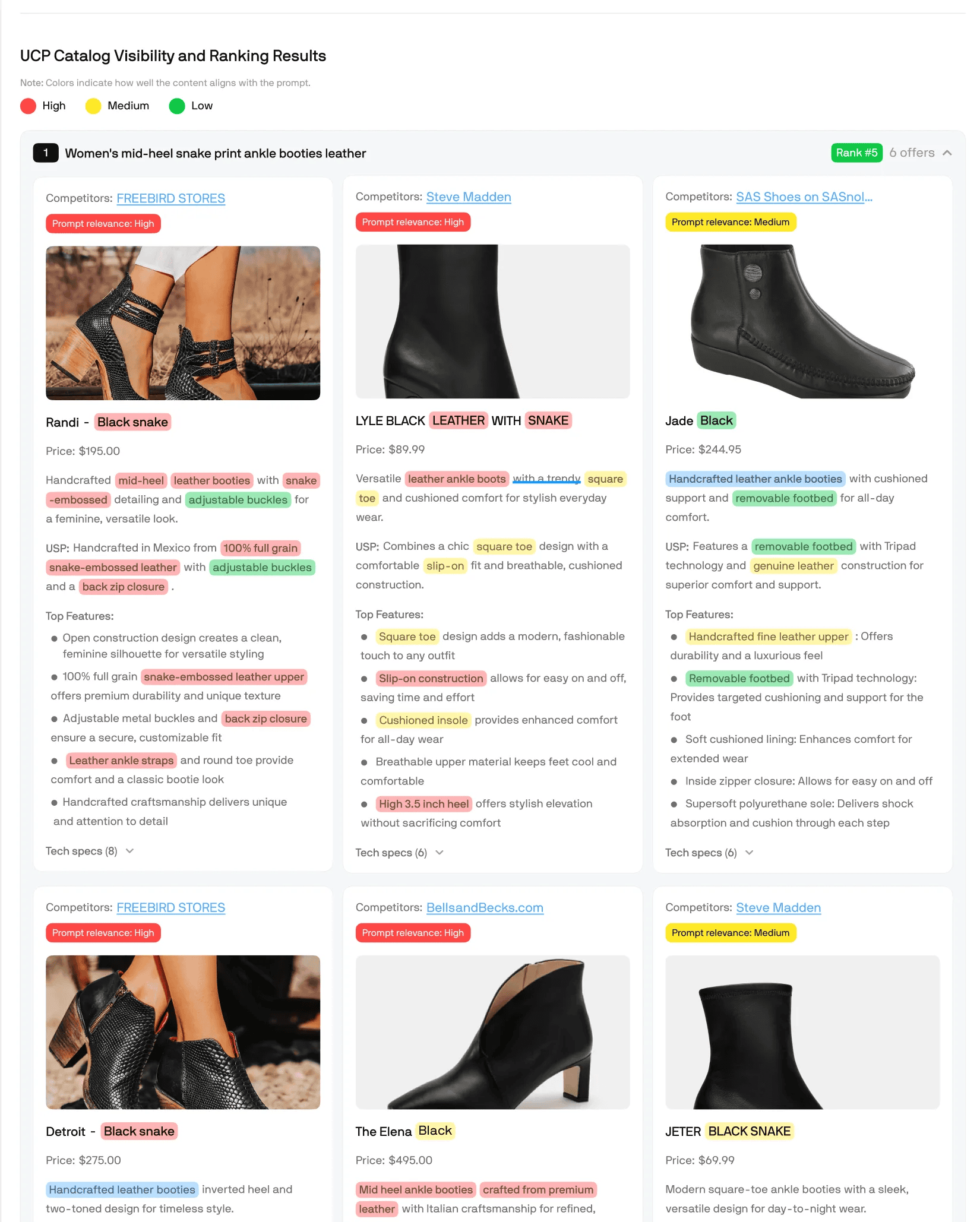
- Audits your product catalog against UCP requirements and real AI agent query patterns, and shows you exactly how your products rank against competitors inside UCP
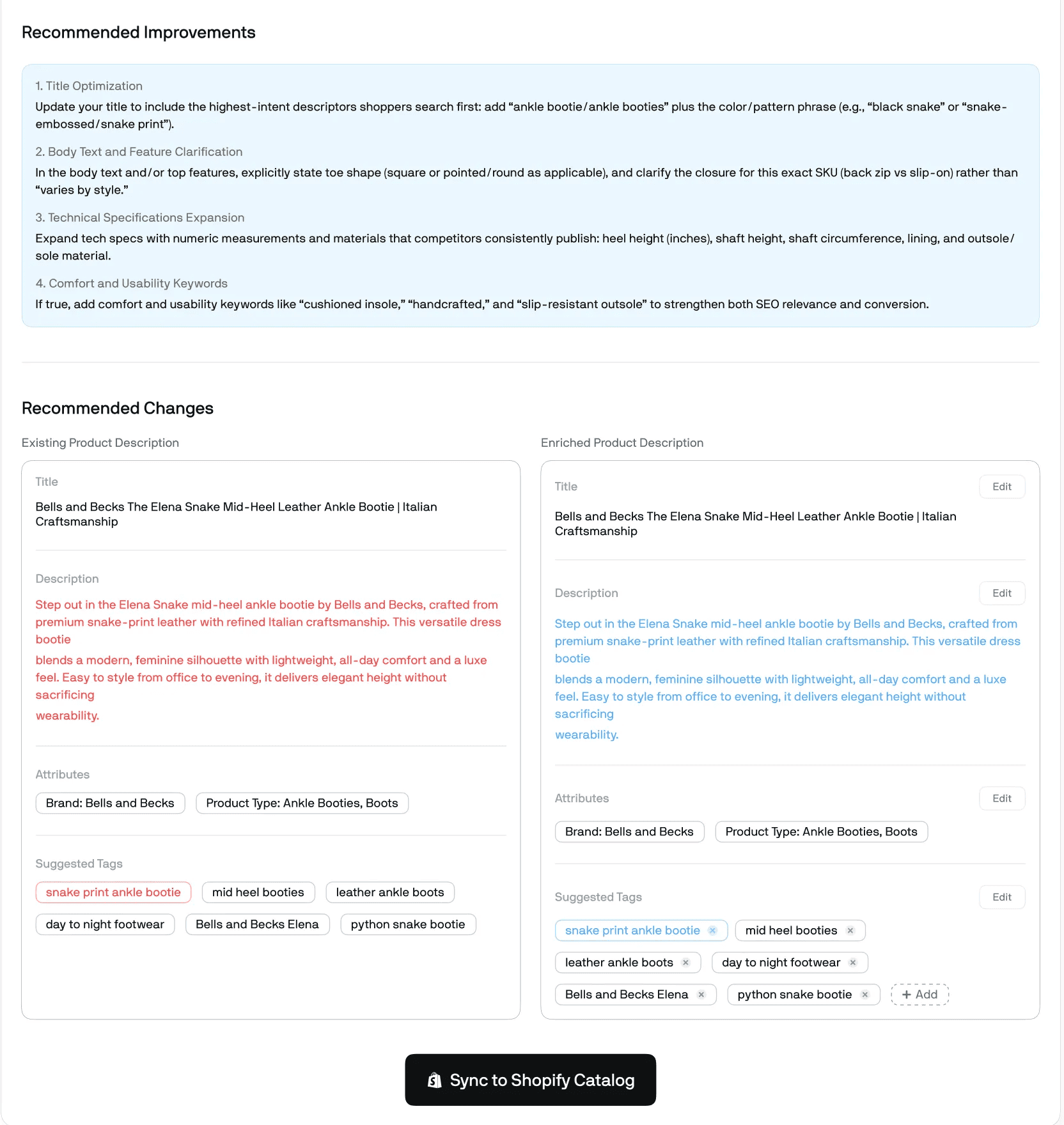
- Enriches your titles, descriptions, tags, and structured metadata automatically
- Generates HTML-formatted descriptions you can copy and paste straight into Shopify with no cleanup needed
- Syncs your enriched catalog directly into UCP so agents can surface your products in real time
How to get started with Catalog AI Enrichment
Step 1. Install Aimerce on Shopify and find the feature in your dashboard.
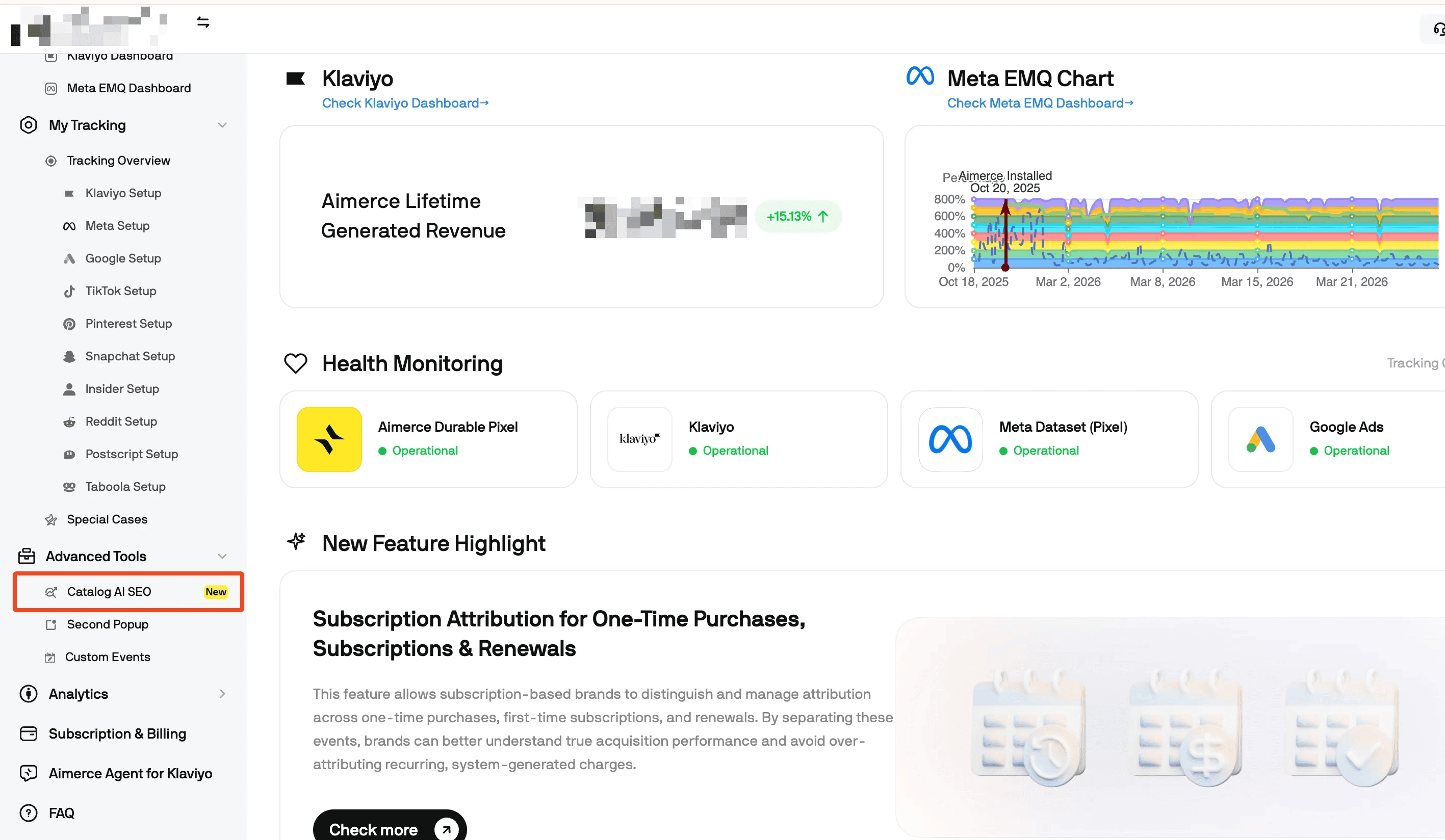
Step 2. Aimerce fetches your top 5 products, or you can search for specific ones by product URL or variant ID.
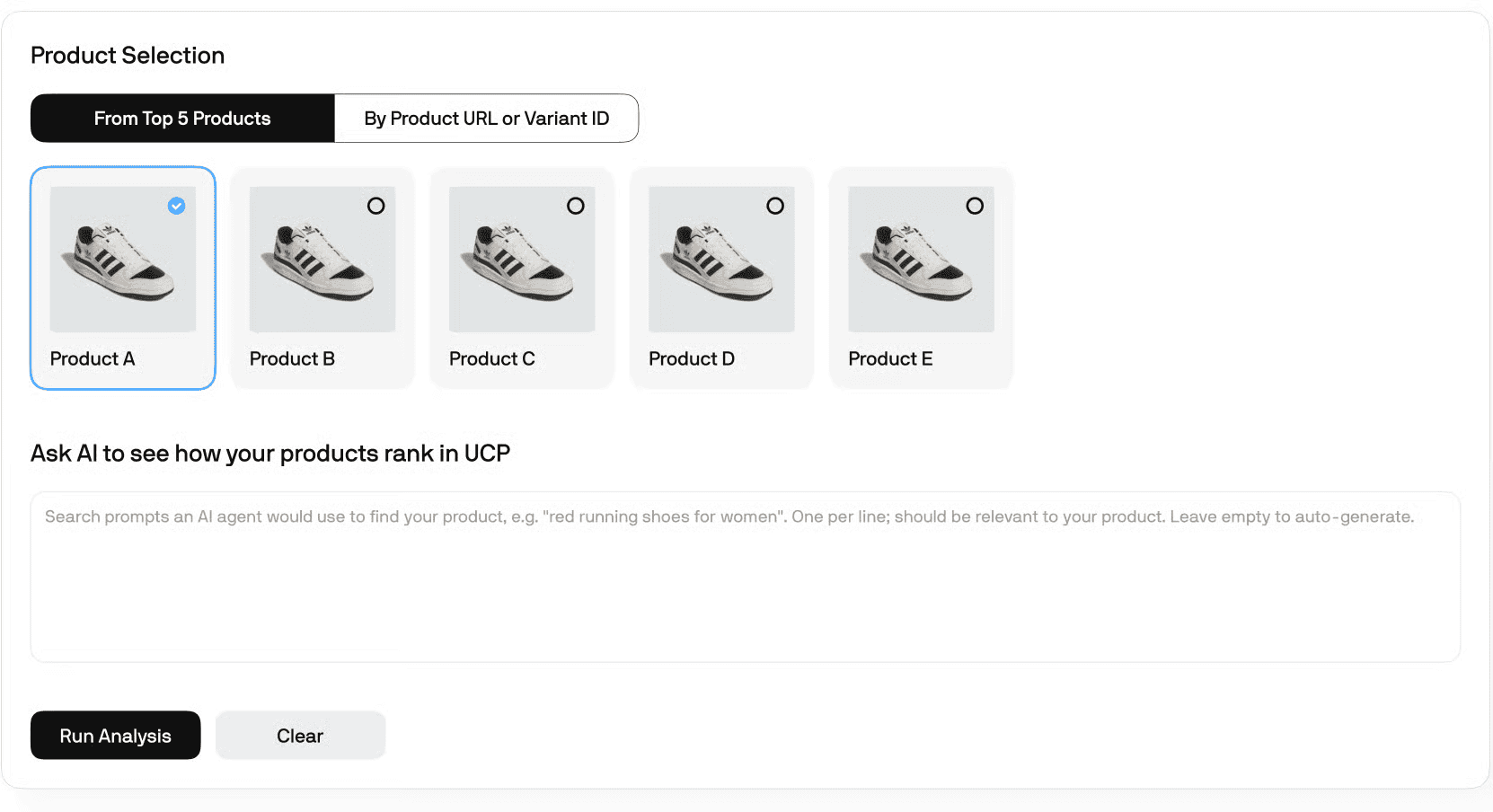
Step 3. We generate related prompts and test how your products rank against your competitors inside UCP. You see exactly where you stand.
Step 4. We make specific recommendations to your product titles, descriptions, and tags. You review them, edit if you want, approve, and sync directly to Shopify.
How do you get attribution right before BFCM?
A few things I'd handle first:
- Treat Shopify orders as the source of truth, not Merchant Center.
- Plan a separate re-engagement path for agentic buyers. Klaviyo's server-side sync handles orders and customers fine. But the onsite events (Viewed Product, Added to Cart, Started Checkout) never run for an agentic sale, so your abandoned cart flow has nothing to trigger on. Route tagged buyers into post-purchase flows built for them.
- Tag UCP and agentic orders in Shopify, so they sync into Klaviyo as a segmentable property and you don't count the same sale twice across Google, Meta, and Klaviyo.
- Get a server-to-server event pipeline running. For every channel in the table above where pixels don't fire, it's the only way those purchases reach your ad platforms at all. Our guide to server-side tracking on Shopify walks through it.
What should you decide in the next two weeks?
You have more control here than most people realize:
- ChatGPT and Copilot access can be turned off entirely at the Shopify Catalog level, under Sales channels > Agentic.
- Direct checkout for Google, Meta, and Copilot can be turned off per channel. Customers are sent to your normal checkout instead.
- BFCM inventory you don't want an AI agent recommending should be marked Unlisted. Disabling Catalog access on its own won't do it.
- Review who has access to your Shopify ChatGPT and Claude connectors:
- Once you authorize one, your data leaves Shopify and is governed by OpenAI's or Anthropic's terms.
- You can't reduce the access scope later without uninstalling.
- Shopify doesn't review what the AI does, so if it makes a wrong change, you're responsible.
- Some write actions may not ask for confirmation.
What Aimerce handles for you going into BFCM
- Real-time event processing
- Parameter formatting and validation
- Deduplication across every event
- Express checkout tracking
- Cross-device stitching
- Edge cases that only show up at volume
- Catalog AI Enrichment
- AI data analysis
This playbook is part of our BFCM Klaviyo & Meta Academy, a free series for DTC brands running through mid-December, with new sessions every week. Join the BFCM Academy.
FAQ
What is agentic commerce on Shopify? Agentic commerce is shopping done by AI agents on a shopper's behalf. On Shopify, eligible stores are opted into agentic storefronts by default, so products from Shopify Catalog can appear in ChatGPT, Microsoft Copilot, and Meta's Muse, while Google AI Mode and Gemini use your Google & YouTube channel feed.
How much traffic do AI assistants send Shopify stores? Still a small share, but growing fast. Across 1,000+ Shopify stores in Aimerce's AI Commerce Report, ChatGPT's share of store pageviews nearly doubled (1.97x) in a year, 96.3% of stores got ChatGPT traffic in August 2026, and ChatGPT accounted for about 96% of AI assistant pageviews and orders.
Why does ChatGPT traffic show up as direct in my analytics? ChatGPT strips the referrer on most clicks, 81.8% in Aimerce's AI Commerce Report, so that traffic appears as direct. It adds utm_source=chatgpt.com instead, so count a visit as ChatGPT if either the referrer or the utm_source says ChatGPT.
Do my tracking pixels fire on AI agent checkouts? It depends on the channel. ChatGPT redirects shoppers to your real checkout, so your pixels fire. Direct checkout inside Google AI Mode and Gemini, Meta Muse, and Microsoft Copilot is server-to-server only, so your pixels don't fire and you need server-side tracking to see those orders.
Which products can't use AI direct checkout? Direct checkout doesn't support subscriptions, bundles, custom configurations, or local pickup. Those products still show up in AI search, but shoppers are sent to your normal checkout to finish.
Can I turn off AI agent checkout on Shopify? Yes. ChatGPT and Copilot access can be turned off at the Shopify Catalog level under Sales channels > Agentic, and direct checkout for Google, Meta, and Copilot can be turned off per channel.
How do I keep specific products out of AI agents? Mark them Unlisted. Disabling Catalog access on its own won't keep a product from being recommended.
Sources
[1] Aimerce, "ChatGPT is now a measurable sales channel for Shopify stores,"
[2] Aimerce, "How to Set Up Server-Side Tracking for Shopify,"
[3] Shopify App Store, "Aimerce First-Party Pixel,"
Related reading

Try Aimerce Pixel Risk-Free
for 30 Days
Most teams see results within 2 weeks.
Money-back guarantee.
It pays for itself, or you don't pay anything.
30-Day Aimerce Pixel Free Trial