How to Audit Klaviyo Flows and Fix Errors Without Spending Hours
How long does it take you to audit a Klaviyo account? Check filters, verify UTM tracking, hunt down broken links, confirm triggers are firing correctly... If you are like most email marketers and agencies, it takes hours. Sometimes an entire workday. And of course, as human, you can still miss things.
That's exactly the problem Aimerce Klaviyo Chrome Extension set out to fix.
The AIM Chrome extension (by Aimerce) for Klaviyo is a browser-based AI assistant that lives right inside your Klaviyo account. No separate dashboard to log into, no switching tabs. You install it, open a flow, and it gets to work. It's already used by 900+ active users, has a 5.0 rating on the Chrome Web Store, and has collectively saved over 50,000 hours of manual work. For agencies and Shopify brands managing multiple accounts, the ROI is immediate.
This post covers how the AIM Klaviyo extension works, what each AI personality does, and why it's becoming the go-to Klaviyo audit tool for agencies and ecommerce marketers worldwide.

Try Aimerce Pixel Risk-Free
for 30 Days
Most teams see results within 2 weeks.
Money-back guarantee.
It pays for itself, or you don't pay anything.
Why Auditing Klaviyo Flows Takes Way Too Long
Manual audits are slow. Anyone who's done them knows the drill: open a flow, check the trigger, scroll through every email, verify the filters, confirm UTMs, look for broken links, move to the next flow, repeat.
If you're managing 10+ flows across multiple accounts, that's hours gone every single week.
The most common mistakes Aimerce found after auditing 900+ Klaviyo accounts? They're not complicated. They're things like:
- No profile filters on flows, so customers in Checkout Abandonment also get Browse Abandonment emails
- Broken product links in Cart Abandonment emails pulling from the wrong event variables
- UTM tracking not enabled on individual flow emails, even when it's turned on at the account level
- Flows that simply aren't firing because the trigger stopped receiving data months ago
These are fixable in minutes. The problem is finding them in the first place.
The Aimerce Agents Chrome extension automates the entire Klaviyo flow review checklist, flags each issue, and in most cases lets you apply the fix with one click. That's the whole pitch, and it works.
Meet the AI Personalities Inside AIM
One of the things that makes the AIM Klaviyo extension different is how it's organized. Instead of one generic AI chat, it gives you dedicated AI profiles, each built for a specific job.
Kara - Your Klaviyo Flow Audit Tool
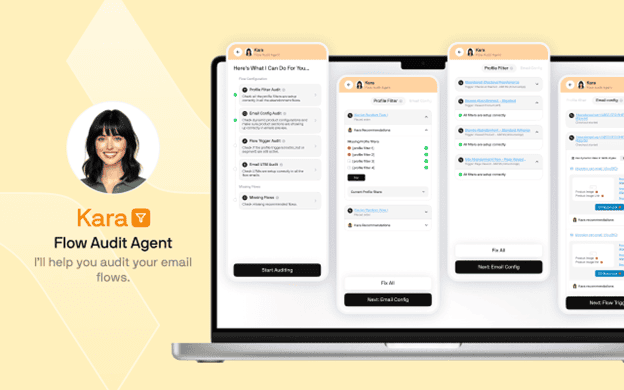
Kara is the profile most Klaviyo operators use the most. Click it, hit "Start Auditing," and it runs through your flows automatically, checking for:
- Incorrect or missing profile filters (like failing to exclude customers who already placed an order)
- Trigger misconfigurations that could cause flows to fire at the wrong time
- UTM tracking gaps at both the account and individual email level
- Missing flows entirely, like a Cart Abandonment flow that was never set up separately from Checkout Abandonment
When KA spots a problem, it flags it clearly and gives you a one-click fix option. No digging through Klaviyo's interface. No second-guessing what needs to change. This is what a Klaviyo flow errors checker should look like.
David - The AI Klaviyo Flow Builder
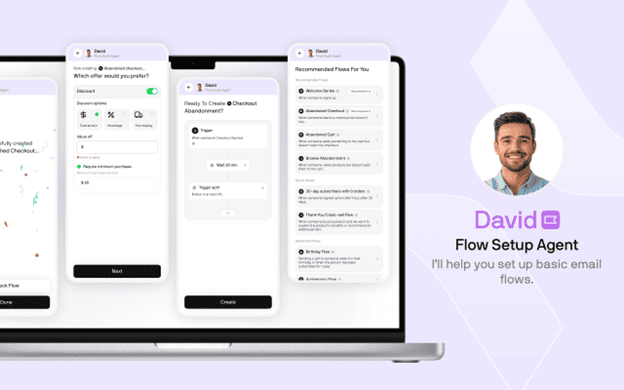
David handles flow creation. Select a flow type from the recommended list, click create, and a complete flow structure appears in your Klaviyo account in under 10 seconds. It includes email steps, suggested subject lines, and preview text you can auto-apply once your template is ready.
Is David going to replace a senior strategist who wants advanced conditional splits based on purchase history? Not quite. But for getting a solid baseline flow live fast, especially for smaller brands or agencies onboarding new clients, it genuinely saves time. Think of it as the fastest way to speed up Klaviyo setup without starting from scratch every time.
Carla - AI Campaign Setup for Klaviyo
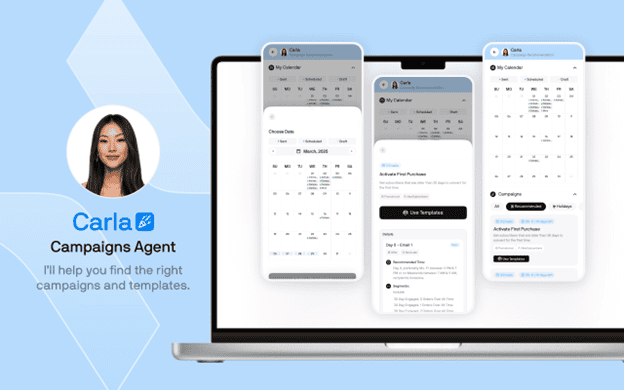
Carla handles campaigns. Open her tab and you get a content calendar with recommended send dates, holiday campaigns, and promotional ideas. More importantly, she builds the segments for you.
Click a campaign template and Carla creates a ready-to-use segment: subscribers who joined 30+ days ago, can receive email, and have never purchased. That's a clean first-purchase activation segment built automatically. The campaign gets scheduled with that segment attached, and you're done.
This is generative AI for email marketing in a practical, no-fluff form.
Aimerce Agents vs. Manual Klaviyo Auditing
How does using the AIM Chrome extension actually compare to doing things manually? Here's a straightforward breakdown:
| Feature | Manual Auditing | Aimerce Agents (AIM) |
|---|---|---|
| Flow audit speed | 30-60 min per account | Under 2 minutes |
| UTM tracking check | Manual, email by email | Automated across all flows |
| Broken link detection | Easy to miss | Flagged automatically in bulk audit |
| Filter error detection | Requires deep Klaviyo knowledge | AI flags and one-click fix |
| Missing flow detection | Relies on memory | Checks all flows systematically |
| Segment creation | Built one by one | Bulk import across accounts |
| Multi-account management | Tab switching, time-consuming | Unified via extension |
| Analytics (AOV, LTV, etc.) | Buried in Klaviyo | Surfaced in one view |
| GDPR compliance | Manual review | Built into flow creation |
| Cost | Time only | From $49/month (free for Pixel users) |
The time difference alone makes the case. But add in the revenue impact of fixing broken links, wrong filters, and missing UTMs, and the extension pays for itself fast.
Fix Broken Links and Boost Revenue with the Aimerce Pixel
The Aimerce Chrome extension works as a standalone tool. But if you're already an Aimerce Pixel customer, you get the Agents included at no extra cost.
The Aimerce Pixel is a server-side tracking solution built for Shopify brands. It improves first-party data accuracy for Google and Meta Ads, which directly improves attribution and ad performance. According to Aimerce, it's designed to increase flow revenue by around 10% by sending more accurate event data back to Klaviyo.
The Pixel and Agents together cover both sides of the performance equation: better data coming in, and better flows going out.
One practical feature that Agents adds on top of the Pixel is bulk flow auditing. This scans every flow at once and flags broken links automatically. No clicking through flows one by one. For agencies running Klaviyo Shopify integrations across multiple client accounts, this single feature saves hours per week.
Why Klaviyo Agencies Need This Tool
How long does it take your team to onboard a new Klaviyo account? For most agencies, it's a long process: audit the existing flows, identify what's broken, set up missing flows, create segments, check GDPR compliance, and verify UTM tracking.
With Aimerce Agents, that process looks different:
- Install the Klaviyo auditing Chrome extension and open the client's account
- Run KA to audit all flows and flag issues in under 2 minutes
- Apply one-click fixes for filter errors and UTM gaps
- Use David to build any missing flows from templates
- Use Carla to set up the first campaign with a proper segment
- Run a bulk segment import for your agency's proven segment templates
- Check the Analytics tab for Klaviyo hidden analytics like AOV, LTV, and engaged profile counts
That's a full account setup completed in a fraction of the usual time. And because AIM supports Klaviyo multi-account management, you can do this across every client account from a single extension.
The shared knowledge base feature takes it further. Save your best-performing flows and segment templates once, then bulk import them into any client account. Your whole team can access and use them, live. That's real email marketing agency productivity built into the tool.
Start Saving Hours on Klaviyo Today
The AIM Chrome extension by Aimerce is one of those tools that's hard to go back from once you've used it. It removes the tedious parts of Klaviyo management without removing your control. You still make the strategic calls. It just handles the checking, fixing, and setup that shouldn't take a human 30 minutes per account.
Here's how to get started:
- Head to the Chrome Web Store and search "AIM by Aimerce" or visit aimerce.ai/agents
- Click "Add to Chrome" (install takes about 2 minutes)
- Open any Klaviyo account in your browser
- Click the AIM icon in your toolbar and select a profile (start with KA for your first audit)
- Hit "Start Auditing" and see what comes up
If you're already an Aimerce Pixel subscriber, the extension is free for you. If not, there's a 14-day free trial available, no commitment required.
1000+ email marketers onboarded in 60 days. 50,000+ hours saved. Over $30,000/month in recovered Klaviyo billing costs across their user base. The numbers speak for themselves.
Install the AIM Klaviyo Chrome extension today and run your first audit.
30-Day Aimerce Pixel Free Trial