
For many DTC ****startups and established retailers alike, the launch of Meta’s Andromeda update felt like the lights went out in the middle of a high stakes game. Strategies that worked flawlessly for years suddenly stopped delivering. The reliability of the ad auction wavered. Marketers found themselves staring at volatile CPMs and inconsistent results.
If you have been refreshing Ads Manager hoping things will go back to normal, you are waiting for a train that has already left the station. The Andromeda update has fundamentally shifted how Facebook retrieves and ranks ads. It prioritizes speed, efficiency, and above all, creative diversity.
The days of duplicating an ad set and changing a button color are over. If you want to survive and scale in this new landscape, you need to understand how the machine works now.
Let’s find out how to test creatives in the post-Andromeda world, how to leverage tools like Aimerce for accurate data, and how to ensure your attribution tracking is actually telling you the truth.
The Andromeda Update Explained
To fix your testing strategy, you first have to understand what broke it. Andromeda is the internal codename for a massive overhaul of Meta’s ad retrieval system. Its primary goal is efficiency. It allows Meta to process ad candidates faster and more effectively using AI.
In the past, you could run five variations of an ad that were 90% identical. Maybe you changed the headline or swapped a static image for a slight zoom. The old algorithm would treat these as separate entities and give them a fair shake in the auction.
Andromeda is smarter and more ruthless. It groups similar ads together. If you upload three ads that look visually similar, Andromeda’s AI identifies them as the same concept. It will likely pick one winner immediately and suppress the others. This is great for Meta’s server efficiency but terrible for advertisers who rely on granular testing.
This shift has forced a move toward radical creative diversity. You cannot just test tweaks anymore. You need to test entirely different concepts, formats, and angles. Whether you use an AI scene generator to build new backgrounds or film entirely new UGC hooks, the visual data inputs must be distinct.
However, diversity creates a new problem. How do you test a subtle change, like a new hook on a winning video, without Andromeda crushing it before it gets any spend? The answer lies in a specific tool hidden inside Ads Manager.
The Mechanics of the Meta Auction
Before we dive into the tool, let's look at the math. The Facebook ad auction is not just about who pays the most. It is determined by "Total Value."
Total Value = Bid + Estimated Action Rate + Ad Quality
Your bid is what you are willing to pay. Ad quality is how people react to your creative. But the Estimated Action Rate is where things get tricky, especially for DTC startups and top DTC companies. This is Meta’s prediction of how likely a user is to convert.
If your tracking is broken, Meta’s prediction is wrong.
This is where server-side tracking Shopify setups become non-negotiable. If you are relying on browser pixels, you are feeding the auction incomplete data. Browser restrictions and ad blockers sever the link between the click and the conversion. If Meta cannot see the conversion, it lowers your Estimated Action Rate. That means you have to bid more to win the same customer.
To win the auction in 2025, you need a pristine data pipeline. You need bot filtering to ensure you aren't optimizing for click farms. You need server-side tagging if you’re on Shopify to catch every sale. If your data is dirty, no amount of creative testing will save you.
The Creative Testing Tool: A Step-by-Step Guide
Stop running "tests" by just launching a new CBO campaign and hoping for the best. To test effectively in post-Andromeda, you need to use the dedicated Creative Testing Tool within Ads Manager. This tool forces Meta to separate delivery, ensuring each ad gets a fair shot regardless of how similar they look.
Here is how to set it up:
1. Navigate to the Ad Level
Go to your campaign in Ads Manager. You can use an existing campaign or start a new one. Navigate down to the specific Ad level.
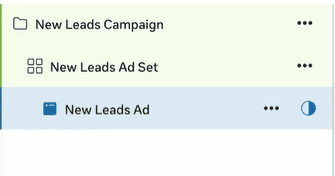
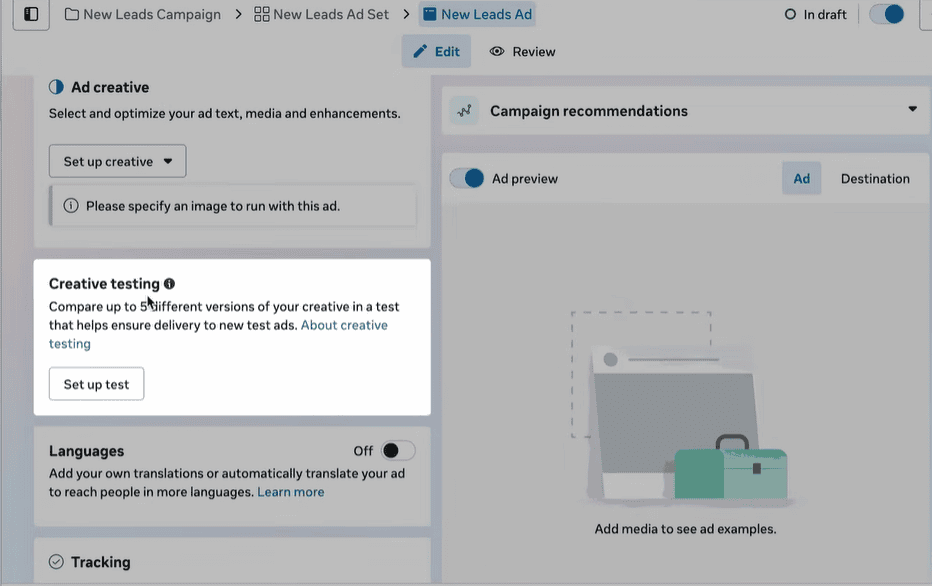
2. Locate "Creative Testing"
Scroll down below the ad setup section. You will see a section labeled "Creative Testing." It is easy to miss if you aren't looking for it. It usually says something like "Compare up to 5 versions of your creative."
3. Click "Get Started"
This opens the testing interface. Here, you can select up to five different ads to test against each other.
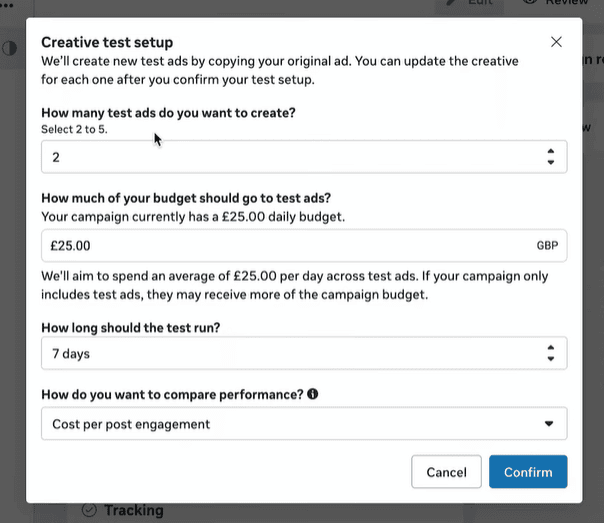
4. Select Your Variables
You are not limited to testing totally different images. Because this tool isolates delivery, this is the only safe way to test subtle variations post-Andromeda. You can test a black-and-white image vs. a color one. You can test a video with Hook A vs. Hook B.
5. Define the Budget and Duration
The tool will ask how much of your budget to allocate to the test and how long to run it. We will cover the strategy for this in the next section.
By using this tool, you are essentially telling Andromeda to back off. You are forcing the system to gather data on all variations, giving you the empirical evidence you need to make decisions.
Defining Your Testing Parameters
A test is only as good as its structure. Many list of direct to consumer brands fail here because they either test too many variables or don't spend enough to get statistical significance.
The Magic Number: 2 to 5 Ads
Do not try to test 20 ads at once. The tool allows for up to five, and that is a solid upper limit. If you are testing hooks, pick your top 3-4 distinct hooks. If you are testing formats, pit a static image against a carousel and a video.
Budget Allocation
Meta recommends using about 20% of your budget for testing, but for fastest growing dtc brands that are aggressive about growth, this might need to be higher. You need enough spend to generate meaningful results.
If you are selling a high-ticket item like a luxury toy x, you will need a larger budget to get enough conversion data compared to a brand selling $10 socks. A good rule of thumb is to budget for at least 50 conversion events per ad variation over the course of the test.
Duration
The default suggestion is often 7 days. This is usually sufficient for high-volume accounts. However, if your budget is lower or your product has a longer consideration phase, you may need to extend this.
Selecting Meaningful Metrics
This is the most critical part of the setup. By default, Meta might suggest optimizing for "Cost per Engagement" or "Cost per Click."
Do not do this.
You cannot pay your rent with likes. You cannot restock inventory with link clicks. The most popular DTC brands know that vanity metrics are a trap.
You must optimize your test for the business objective that matters. For most e-commerce brands, this is "Cost per Purchase" or "Cost per Lead."
This brings us back to data accuracy. If you are optimizing for purchases, but your Shopify server-side tracking is leaking data, your test results will be a lie. You might turn off a winning ad because Meta didn't attribute the sales to it.
This is why tracking pixel audits are essential before running heavy tests. Using a tool like Aimerce can help you bridge the gap between client-side failures and server-side truth. Aimer marketing professionals know that without an offline conversions APIor robust server-side setup, you are flying blind.
Analyzing Results and Scaling
Once the test concludes, you will have a clear winner based on your core metric (CPA or ROAS). Now comes the graduation phase.
The "Graduation" Process
The Creative Testing Tool separates delivery during the test. Once the test is over, that protection ends. You need to take your winning creative and move it into your main scaling campaigns.
However, do not be surprised if performance fluctuates slightly when you move it. The main auction is a wilder beast than the controlled testing environment. But because you have proven the concept with data, you can scale with confidence.
The Role of Aimerce in Scaling
As you scale spend, data discrepancies get magnified. A 10% data loss at $100/day is annoying. A 10% data loss at $10,000/day is a disaster.
Aimerce provides the infrastructure to scale safely. By utilizing server-side tagging Shopify integrations, and advanced bot filtering, Aimerce ensures that the signals you send back to Meta are clean. This improves your Estimated Action Rate, lowers your CPMs, and helps you win more auctions.
Brands that ignore this layer of infrastructure, the tech for direct-to-consumer brands often hit a glass ceiling. They cannot scale past a certain point because their ROAS degrades. Often, the ads are fine. The tracking is the bottleneck.
Why You Need to Audit Now
The landscape of e-commerce conversion tracking is shifting rapidly. Browser privacy updates are constant. What worked for tracking and attribution six months ago might be obsolete today.
If you haven't looked at your data pipeline recently, it is time for auditing tracking pixels. Check your match quality scores. Look at the discrepancy between Shopify backend sales and Ads Manager reports.
Yiqi Wu, the founder of Aimerce, often emphasizes that attribution is not a passive setting. It is an active strategy. The aimers community marketers dedicated to precision tracking understands that in 2025, the technical setup is just as important as the creative.
Adapt or Perish
The Andromeda update was a wake-up call. It forced advertisers to stop being lazy with variations and start being rigorous with data.
To win now, you need a two-pronged approach:
- Creative Rigor: Use the Creative Testing Tool to isolate variables and find true winners without getting suppressed by the algorithm.
- Data Integrity: Use aimerce and how to implement server sided tracking to ensure every dollar you spend is accounted for.
Whether you are trying to grow NYC ecommerce sales or expand a global brand, the fundamentals are the same. Feed the algorithm better creative and better data, and it will reward you with lower costs and higher growth.
Don't let the algorithm guess. Force it to learn.
30-Day Aimerce Pixel Free Trial