What Did Meta Change About Attribution?
Meta made two significant changes to how conversions are counted. First, the definition of a click for click-through attribution has narrowed. Previously, any interaction with an ad including likes, comments, shares, and video views counted as a click that could trigger a conversion window. Going forward, only actual link clicks count. Second, Meta created a new attribution category called Engage Through Attribution to capture those social and media interactions that no longer qualify as click-through conversions. Most advertisers will see their reported conversion numbers drop as a result, not because performance got worse, but because the measurement changed. Always check your Shopify backend before drawing any conclusions.

Try Aimerce Pixel Risk-Free
for 30 Days
Most teams see results within 2 weeks.
Money-back guarantee.
It pays for itself, or you don't pay anything.
Meta has made changes to how it counts conversions, and most advertisers are noticing the impact without fully understanding what caused it.
The good news is this change makes Meta's reporting more accurate, not less. The bad news is that if you are comparing current results against historical benchmarks, you are comparing two different measurement systems. That is a recipe for bad decisions if you do not understand what changed and why.
Here is the full picture.
What Changed About Click-Through Attribution?
Until recently, Meta defined a click broadly. Any interaction with your ad could trigger a click-through conversion window. That included likes, comments, shares, clicking to expand the primary text, and clicking to watch more of a video. If someone took any of those actions and then purchased within 7 days, Meta counted it as a click-through conversion.
The problem with that definition is significant. Someone who liked your video ad and then bought from a Google search three days later was being counted as a Meta click-through conversion. Someone who commented on your post and then converted through an email link within a week was attributed to your Meta campaign. Those conversions were real, but whether Meta caused them is a much harder question to answer.
Meta has now changed the definition. From this point forward, a click-through conversion requires an actual link click. The person must have clicked through to your destination, whether that is your website, a landing page, your Instagram profile, or WhatsApp. Engagement actions like likes, comments, shares, and video views no longer trigger the click-through window.
Why This Is a Bigger Deal Than It Sounds
The gap between total clicks and link clicks on most Meta campaigns is substantial. On video-heavy campaigns in particular, total clicks can run two to three times higher than actual link clicks. Every one of those non-link interactions previously had the potential to generate a click-through attributed conversion. None of them do now.
For image-heavy campaigns the gap is smaller. For video campaigns running with long primary text, it is significant. The exact impact on your account depends on your creative mix, your sales cycle length, and how many of your historical conversions were being attributed to social and media clicks rather than genuine link clicks.
What Is Engage Through Attribution?
Engage Through Attribution is the new category Meta created to house the interactions that no longer qualify as click-through conversions.
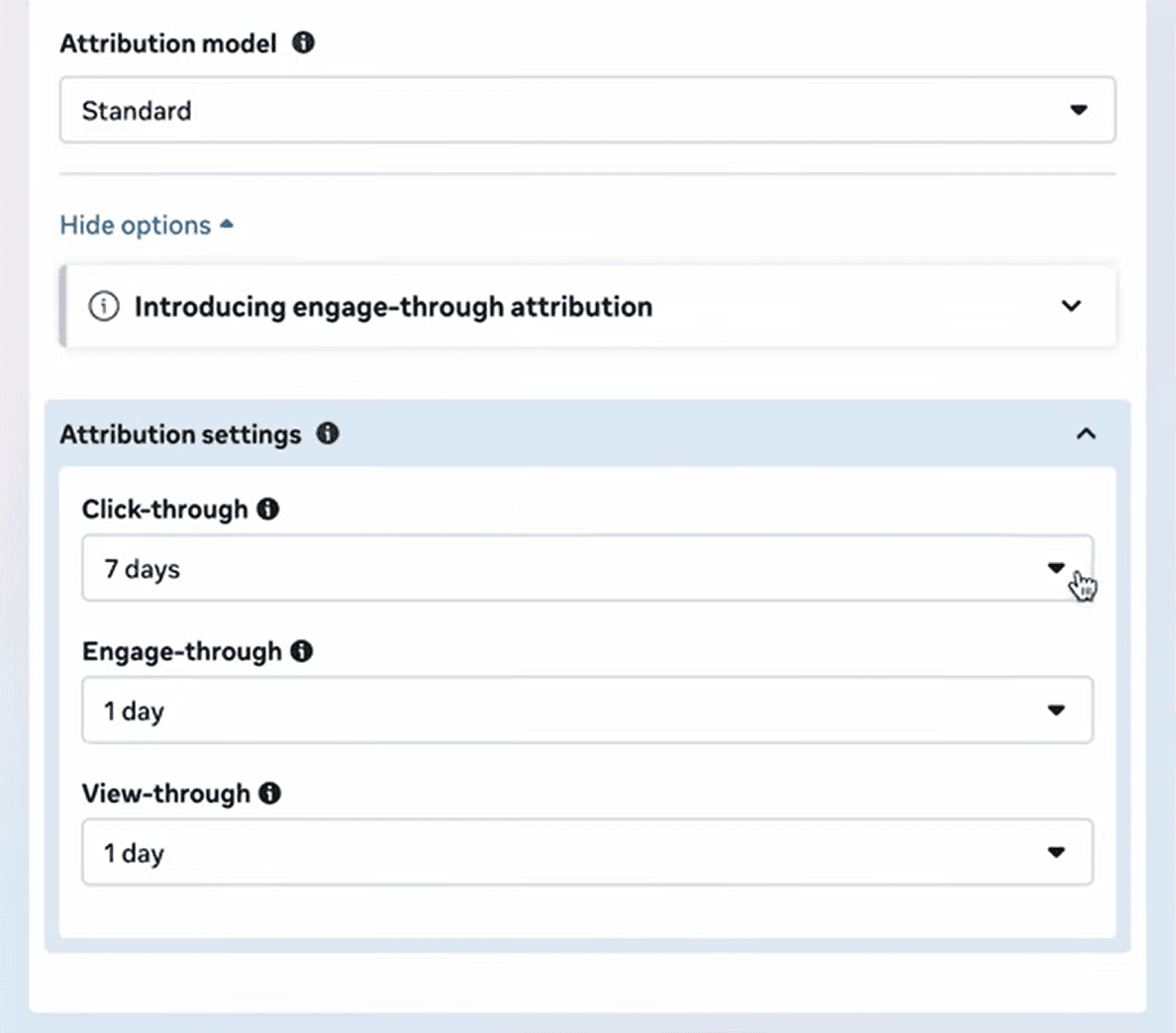
The three attribution types now sit on a clear spectrum:
| Attribution Type | What Qualifies | Default Window |
|---|---|---|
| Click Through | Actual link click to your destination | 7 days |
| Engage Through | Like, comment, share, video view over 5 seconds, clicking to read more | 1 day |
| View Through | Ad impression with no click or engagement | 1 day |
A few details worth noting about Engage Through specifically. A video view qualifies if the video was played for at least 5 seconds, or for 97 percent of its total length if the video is shorter than 5 seconds. These interactions previously fell under click-through attribution. They now have their own category with a shorter 1-day window by default.
For most accounts, seeing this data broken out separately for the first time will reveal something useful: how many conversions were genuinely driven by link clicks versus softer engagement signals. That is information that was always technically available but buried inside your click-through numbers.
What Does This Mean for Your Reported Results?
Most advertisers will see reported conversions drop after these changes take effect. Before you interpret that as a performance decline, check three things.
Check your Shopify backend first. If your Shopify order count is unchanged and your Meta-reported conversions dropped, the drop is a measurement change, not a real decline. The sales happened. Meta is just not counting some of them the same way it used to.
Do not compare old campaigns to new campaigns directly. Campaigns running under the old attribution settings and campaigns running under the new settings are being measured differently. A direct comparison will make newer campaigns look weaker than they actually are. Use Shopify revenue as your consistent benchmark across both periods.
Understand that Google Analytics may now align more closely with Meta. One of the side effects of this change is that Meta's click-through attribution now looks more like last-click attribution models used by other platforms. If you have been frustrated by the gap between what Meta reports and what Google Analytics shows, that gap should narrow.
Should You Change Your Attribution Settings?
Meta still gives you the ability to customize your attribution window settings at the ad set level. You can find them under the attribution section in ad set settings by clicking "show more options."
The general principle for most DTC brands: keep your attribution windows as wide as possible. Wider windows give Meta more conversion data to learn from, which helps campaigns exit the learning phase faster and optimize more accurately. Narrowing windows to get "cleaner" data reduces the signal Meta uses to make delivery decisions.
The one scenario where narrowing makes sense is when you are running heavy multi-channel marketing and you believe Meta is claiming credit for conversions driven by other channels like email or organic search. In that case, shortening the click-through window or removing view-through attribution gives you a more conservative number. Just understand you are trading data volume for measurement precision, and that trade-off affects optimization quality.
Attribution Setting Guide for DTC Brands
| Your Situation | Recommended Setting | Why |
|---|---|---|
| Single channel or Meta-primary | Default (7-day click, 1-day engage, 1-day view) | Maximizes learning signal |
| Heavy email marketing running simultaneously | 7-day click, remove view through | Reduces email-Meta overlap attribution |
| Short consideration cycle, impulse products | 1-day click | Purchase decision is immediate; longer windows overcredit |
| Long consideration cycle, high AOV | Default or longer | Buyers need more time; shorter windows miss real conversions |
| Running incrementality tests | Follow test setup requirements | Consistency with your measurement methodology matters more |
Why Your Tracking Infrastructure Determines How Much This Affects You
Here is what most coverage of this attribution change misses. The impact of these changes on your account is directly proportional to how complete your conversion data is.
If your pixel is only capturing 60 to 70 percent of actual purchases due to iOS restrictions, Safari ITP, and ad blockers, Meta is making attribution decisions, including the new click-through versus engage-through distinctions, based on an incomplete event stream. The link click that preceded a purchase may have been captured. Or it may not have been, depending on whether the browser allowed the event to fire.
When purchase events are missing from your event stream, Meta cannot accurately assign them to the right attribution category. Some genuine link-click conversions end up uncounted. Some engage-through conversions that did lead to real purchases never reach Meta at all. The attribution change Meta just made is designed to produce more accurate results, but it only produces more accurate results when the underlying conversion data is complete.
This is where server-side tracking directly affects the quality of your attribution data. Aimerce sends purchase events from Shopify's backend directly to Meta via the Conversions API, bypassing the browser entirely. iOS settings, ad blockers, and early page closes cannot intercept a server-to-server event. Every purchase that happens reaches Meta with the correct event data attached, including the link click identifiers that now determine whether a conversion counts as click-through or engage-through.
The result is that the new attribution categories Meta just introduced produce accurate breakdowns rather than incomplete ones. You can actually trust the distinction between click-through and engage-through conversions in your data because the events feeding those categories are complete.
What to Do Right Now
Step 1: Check if your account has the new settings. Go to ad set level, scroll to the attribution section, and click "show more options." If you see Engage Through as an option, the new settings are available in your account. If not, the rollout has not reached you yet but will shortly.
Step 2: Compare your Shopify order count against Meta Events Manager. This is your baseline health check before interpreting any changes in reported conversions. A gap within 5 to 10 percent is normal. A larger gap means you have a tracking problem that will distort how the new attribution categories appear in your data.
Step 3: Pull an attribution breakdown on your current campaigns. Go to Breakdown in Ads Manager and select Attribution Settings. This shows how your existing conversions are distributed across click-through, engage-through, and view-through. This tells you how exposed you are to the change and which campaigns will see the biggest shift.
Step 4: Set a new performance baseline going forward. Do not use historical Meta conversion numbers as your benchmark for evaluating new campaigns. Use Shopify revenue for consistent comparison across periods. Meta conversion numbers from before and after this change are not directly comparable.
Step 5: Confirm your server-side tracking is active. The new attribution distinctions are only meaningful if your conversion data is complete. If you are running browser-only pixel tracking, the engage-through and click-through categories in your data will be incomplete by design.
FAQ: Meta Attribution Changes for DTC Brands
Why did my Meta conversions drop recently?
The most likely cause is Meta's attribution change that narrowed the definition of a click-through conversion. Social and media interactions like likes, comments, shares, and video views no longer trigger a click-through conversion window. They now fall under the new Engage Through category with a shorter 1-day window. Check your Shopify backend to confirm actual revenue has not changed before assuming performance declined.
What is Engage Through Attribution on Meta?
Engage Through Attribution is a new category Meta created to track conversions from people who interacted with your ad through likes, comments, shares, video views over 5 seconds, or clicking to read more, but did not click the ad's link. These interactions previously counted as click-through conversions. They now have their own category with a default 1-day window.
Will the Meta attribution change make results look worse?
Reported conversions in Meta Ads Manager will likely decrease for most accounts, particularly those running video-heavy campaigns where the gap between total clicks and link clicks is largest. This does not mean actual performance got worse. It means Meta is measuring differently. Always validate against Shopify revenue before adjusting strategy or budget.
Should you remove view-through attribution from your Meta campaigns?
Not by default. View-through attribution adds conversion data that helps Meta optimize. Removing it reduces the signal Meta uses for learning, which can slow down campaign optimization and make it harder to exit the learning phase. Remove it only if you have a specific multi-channel attribution reason for doing so and you understand the trade-off on optimization quality.
How does server-side tracking affect the new Meta attribution categories?
The new attribution categories, click-through, engage-through, and view-through, are only as accurate as the conversion data feeding them. When browser pixels miss purchase events due to iOS restrictions and ad blockers, Meta cannot correctly assign those conversions to the right category. Server-side tracking ensures all purchases reach Meta with complete event data, including the link click signals that determine which attribution category applies.
How do you see your conversion breakdown by attribution type in Meta Ads Manager?
Go to any campaign, ad set, or ad in Ads Manager. Click Breakdown and select Attribution Settings. This shows you how your conversions split across click-through, engage-through, and view-through categories, giving you a clear picture of how your buyers are actually interacting with your ads before converting.
Final Thoughts
Meta's attribution update makes the platform's reporting more honest. Conversions that were previously credited to clicks that were not actually clicks are now categorized separately. For DTC brands that check their Shopify backend, understand what changed, and have complete conversion data flowing through server-side tracking, this change makes optimization cleaner, not harder.
30-Day Aimerce Pixel Free Trial