
If your Meta reporting looks wrong, server events running 2 to 3 times higher than browser events, match quality warnings you cannot explain, purchases that do not line up with Shopify, your first instinct is probably that the Conversions API is broken.
It almost never is. I spent years as an engineer at Meta, and I can tell you the API does exactly what it is told. The problem is what it is being told. Messy pixel data is almost always one of three things: duplication, missing identifiers, or inconsistent event wiring. And on Shopify, the root cause behind all three is usually the same which is too many tools sending events through too many pipes.
This guide walks through the cleanup. By the end you will know whether your setup can be repaired in an afternoon, or whether the smarter move is to replace the plumbing entirely.
Why Meta Pixel plus Conversions API gets messy on Shopify
A typical Shopify tracking stack accumulates over time. A Meta Pixel in the theme. Another injected by an app. A server side GTM container hosted on Stape or a custom endpoint. A landing page builder with its own script. Maybe a previous agency's handiwork still firing from a subdomain nobody remembers.
Each piece was a reasonable decision at the time. Together, they produce:
More than one server side sender for the same dataset. Multiple client side pixel installs across theme, app, checkout, and landing pages. Events sent from both browser and server without deduplication, so everything double counts. Server events missing browser identifiers like fbp, which tanks match quality and, eventually, Meta ROAS, because the algorithm is optimizing on distorted signal.
To fix this you need to make the whole pipeline coherent. There are two ways to get there
- clean up the stack you have, or
- consolidate to a single managed pipeline.
I will show you both.
Path 1 - The manual cleanup
1. map every place events are being sent from
Before changing anything, list every sender of Meta events. For each surface (storefront, checkout, landing pages, content funnel), note the domain or subdomain, whether a browser pixel fires there, whether a server sender covers it, and which tool or person owns it.
If you do not know how many pipes are sending events, you cannot fix duplication or missing fields. Quick tells that you have multiple senders: server PageView volume running 2 to 3 times browser volume, one part of the site behaving fine while another is chaotic, or match quality warnings that do not match what you observe in the browser.
2. eliminate double sending
Over reporting is the number one reason pixel data looks like a mess. Two server senders covering the same dataset, the browser pixel installed twice through theme plus app plus manual script, or server events duplicating browser events with no dedupe configured.
Pick one server side sender per dataset. Make sure the browser pixel fires once per page. Do not try to average the inflation out in your reporting. Remove the overlap at the source.
3. get deduplication right
If you intentionally send an event from both browser and server, Meta can dedupe, but only with the right signals: the same event_name and the same event_id on both sides. If event_id differs or is missing on one side, you get inflated conversions and confusing attribution.
For Purchase, use a stable ID like order_id or checkout_id. For AddToCart, something like cart token plus a timestamp bucket. If you are resource constrained, focus dedupe effort on InitiateCheckout and Purchase first. A perfect PageView stream will not save you if Purchase is double counted.
4. fix fbp and fbc collection
Two identifiers cause most of the confusion. fbp is the browser identifier tied to the Meta cookie. fbc is derived from ad click information and only appears when someone arrives via a Meta ad click. An empty fbc on organic traffic is normal. An empty fbp on server events, when your browser pixel sees a valid one, is a problem: your server sender is not reading the cookie correctly, your subdomains are breaking cookie scope, or events fire from a backend context that never had browser access.
This is also where Safari quietly sabotages you. Even a correctly forwarded fbp resets when Safari expires the cookie after 7 days, so your most loyal returning shoppers show up as strangers. Forwarding the identifier is necessary but not sufficient. The identifier itself has to survive.
5. validate payloads and align environments
Run the boring checks on ViewContent, AddToCart, InitiateCheckout, and Purchase: correct timestamps, currency and value present on revenue events, content IDs matching your catalog, action source consistent, and test events separated from production. Then confirm each surface sends to the intended dataset and staging is blocked or isolated.
Express checkout is the step most cleanups miss
Here is the gap I see even in carefully maintained setups. Shop Pay, Apple Pay, and PayPal express buttons let shoppers skip the standard cart and checkout pages where your tracking fires. These are your highest intent buyers, and in many stacks their InitiateCheckout events simply never exist. No amount of dedupe hygiene fixes an event that was never captured. If your express checkout share is meaningful, and on most Shopify stores it now is, this blind spot alone can distort what Meta's algorithm learns about your best customers.
Path 2. Replace the plumbing
Everything above is doable. The honest question is whether you want to keep doing it.
A DIY stack built on server side GTM, whether self hosted or running on Stape, makes you the maintainer of every dedupe rule, every identifier mapping, every container update, forever. Each new app, theme change, or subdomain reopens the audit. For teams with dedicated engineers, that trade can be fine. For most Shopify merchants, it is a tax.
This is exactly why we built Aimerce as a one click Stape alternative. Instead of you wiring GTM containers and maintaining event logic, Aimerce integrates directly with Shopify's infrastructure as a single server side pipeline. Deduplication is handled. Browser identifiers are captured and forwarded correctly, with cookie life extended to 1 year so Safari's 7 day limit stops resetting your shoppers' identity. Express checkout events from Shop Pay, Apple Pay, and PayPal are captured. And the same clean, stitched signal flows to Meta via the Conversions API, to Google, and to Klaviyo, so you fix the pipeline once instead of three times.
A GTM based setup relays whatever the browser managed to collect. Aimerce captures first party data at the source, server side, then enriches it with cross device identity before delivery.
What clean signal did for Aurum Brothers
Aurum Brothers, a premium men’s jewelry brand, is a useful test case precisely because they were not starting from zero. They already ran TripleWhale Sonar for tracking. Their data was never absent but it was incomplete in the ways this article describes (identity loss across sessions and devices, and events Meta never received).
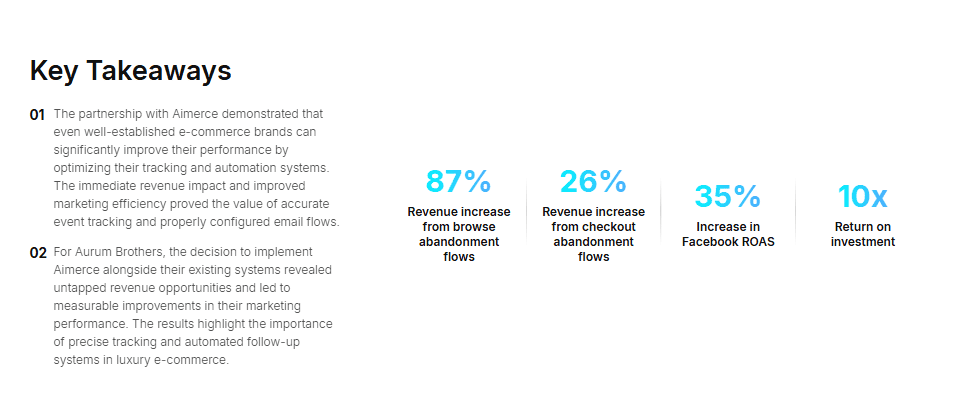
They switched to Aimerce just recently and here’s their result in just 16 days: Facebook ROAS improved 35%, browse abandonment flow revenue rose 87%, checkout abandonment flow revenue rose 26%, and the app paid for itself 10 times over within the first 16 days.
Meta's algorithm is not underperforming because your budget is wrong or your creative is stale. It is underperforming because it is learning from a distorted picture of who your buyers are.
FAQ
Why are my server events so much higher than my browser events?
Some gap is expected, because server events fire even when browser scripts are blocked by ad blockers or privacy features. But a 2 to 3 times gap on basic events like PageView usually means duplication: multiple server senders covering the same traffic, or browser and server events firing without matching event_id values for deduplication.
Should I worry if fbc is empty on my Conversions API events?
Not necessarily. fbc comes from Meta ad click data, so organic and direct traffic will not have it. Worry instead about fbp: if your browser pixel sees a valid fbp but your server events are missing it, your pipeline is dropping identifiers, and your match quality and Meta ROAS will suffer for it.
Can I improve event match quality just by sending more customer parameters?
Sometimes, but it is not the reliable lever. The bigger wins come from removing duplicate senders, deduplicating browser and server events correctly, and making identifiers persist, especially past Safari's 7 day cookie limit. Aurum Brothers saw match quality and a 35% Facebook ROAS improvement primarily through identity persistence, not parameter stuffing.
Do I need both the Meta Pixel and the Conversions API?
Most stores benefit from both: the browser pixel provides real time context and the server side stream provides consistent delivery. The requirement is correct deduplication with shared event_id values. A managed pipeline like Aimerce runs both sides for you with dedupe handled, which is the main reason merchants choose it over wiring the pair manually.
Is there a Stape alternative that does not require managing GTM containers?
Yes. Stape hosts server side Google Tag Manager, which still leaves you building and maintaining the tagging logic, dedupe rules, and identifier forwarding yourself. Aimerce is a one click Stape alternative for Shopify that replaces the GTM layer entirely: it captures first party data directly from Shopify's infrastructure, handles deduplication and identity stitching automatically, and delivers enriched events to Meta, Google, and Klaviyo without container maintenance.

Try Aimerce Pixel Risk-Free
for 30 Days
Most teams see results within 2 weeks.
Money-back guarantee.
It pays for itself, or you don't pay anything.
30-Day Aimerce Pixel Free Trial