
There is a powerful optimization lever inside Meta Ads Manager that other advertisers don’t even know it exist. It isn't a new creative format or a secret audience hack but a simple setting that dictates exactly who Meta shows your ads to.
If you are running Sales or Leads campaigns and you haven't adjusted this specific performance goal, you might be leaving money on the table.
The default settings in Meta often prioritize quantity over quality. While seeing a high number of conversions in your dashboard feels good, it doesn't always translate to the highest possible profit. By understanding the nuance between "Maximize number of conversions" and "Maximize value of conversions," you can fundamentally change the trajectory of your ecommerce conversion tracking and profitability.
Here is how to find this hidden setting, why you might be blocked from using it, and how to set it up correctly.
The "Website and Calls" Trap
When you create a new Sales or Leads campaign in Ads Manager, Meta tries to be helpful by offering versatile conversion locations. Recently, many ad accounts have seen the "Conversion Location" default to Website and calls.
On the surface, this looks great. It allows you to drive traffic to your site while also giving people the option to call your business. However, this convenience comes with a significant trade-off.
When Website and calls is selected as your conversion location, Meta locks your performance goal to "Maximize number of conversions." You cannot change it. The algorithm is strictly told to find the cheapest possible conversions—whether that’s a phone call or a website action—regardless of the actual revenue that action generates.
How to Unlock the Feature
To access the more advanced performance goals, you need to change your conversion location from the "multiple" option (Website and calls) to a "single" option.
- Go to the Ad Set level of your campaign.
- Look at the Conversion section.
- Change the conversion location to Website only.
- Once you make this switch, the "Performance Goal" dropdown menu unlocks, revealing the option that can transform your ROAS: Maximize value of conversions.
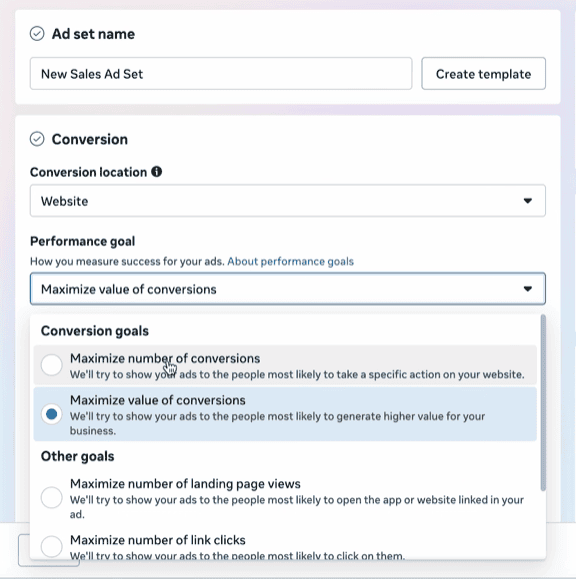
Maximize Number vs. Maximize Value
Why does this switch matter so much? It comes down to intent and spending power.
When you stick with the default Maximize number of conversions, you are telling Meta’s algorithm: "Get me as many sales as possible for the lowest cost."
Meta will dutifully go out and find the "low-hanging fruit." These are often customers who buy your cheapest items, impulsive clickers, or people who convert easily but rarely return.
However, when you select Maximize value of conversions, the instruction changes. You are telling Meta: "Find me the people who will generate the highest Return on Ad Spend (ROAS)."
$20 vs. $200 Customer
Let’s look at a practical example. Imagine you run a store selling children's products.
- Customer A clicks your ad and buys a small accessory for $20.
- Customer B clicks your ad and buys a premium luxury toy bundle for $200.
If you optimize for number of conversions, Meta views Customer A and Customer B as equal. They are both "1 conversion." In fact, Meta might prefer Customer A because they are cheaper to acquire.
If you optimize for value, Meta recognizes that Customer B is worth 10x more to your business. The algorithm will then bid higher to reach more people like Customer B, even if the Cost Per Acquisition (CPA) is slightly higher, because the overall profitability is far greater.
For DTC startups and established brands alike, this shift is critical. You don't just want sales; you want profitable revenue.
Prerequisites (You Need Clean Data)
You cannot simply toggle this switch and expect magic. The "Maximize value" strategy relies entirely on the data you feed back to Meta. If your tracking is broken, the algorithm flies blind.
To use value-based optimization effectively, Meta requires a few things:
- Functional Pixel & CAPI: You must have the Meta Pixel installed, and ideally, the Conversions API (CAPI) active.
- Passing Values: Your purchase events must pass the dynamic currency value (e.g., sending "$200.00" back to Meta, not just a generic "purchase" signal).
- Data Volume: Generally, Meta needs about 30 attributed purchases with value data in a 7-day period to optimize effectively.
In 2024 and beyond, relying solely on browser-based pixels is risky due to ad blockers and iOS privacy changes. This is where shopify server side tracking (or server side tagging shopify) becomes non-negotiable.
If your data is fragmented, Meta can’t see which customers are the high spenders. This is why many top DTC brands are turning to advanced attribution solutions like Aimerce.
Tools like Aimerce help bridge the gap between your store and your ad platforms. By implementing server side tracking shopify integrations, you ensure that every dollar earned is reported back to Meta. This improved data quality allows the algorithm to distinguish between low-value and high-value shoppers accurately.
Furthermore, advanced tracking helps with bot filtering. Bots can skew your conversion data, making it look like you have traffic that never converts. Clean data ensures you aren't optimizing for ghost traffic.
Applying This to Lead Generation
While this strategy is obvious for e-commerce, it is equally powerful for service businesses generating leads.
If you run a roofing company, for example, not all leads are created equal.
- Lead A wants a simple tile repair ($200 value).
- Lead B needs a full roof replacement ($20,000 value).
Using the default "Maximize number of conversions," Meta will find you thousands of Lead As. To use "Maximize value," you need a way to tell Meta which leads are worth more.
You can achieve this by using Offline Conversions API or by setting up a funnel that qualifies users. For example, if a user selects "Budget: Over $10k" on your form, you can route them to a specific thank-you page that fires a conversion event with a higher assigned value.
Why Attribution Tracking Matters?
Scaling is about growth without losing profitability. It needs structure, data, and alignment. If you don't know where your high-value customers are coming from, you can't scale.
Attribution tracking is the backbone of the "Maximize value" strategy. You need to verify that the ads Meta claims are driving high value are actually driving high value.
Conducting regular tracking pixel audits and ensuring your tracking and attribution software is communicating with your ad platform is essential. Whether you are using Klaviyo conversion tracking for email or Aimerce for server-side accuracy, the goal is a unified view of your data.
Best Next Steps for Advertisers
If you are ready to move beyond vanity metrics and focus on profit, here is your checklist:
- Check your settings: Open Ads Manager and ensure you aren't stuck on "Website and calls." Switch to "Website" to unlock value optimization.
- Audit your data: Are you passing purchase values? Is your shopify server side tracking active?
- Test the switch: If you have enough transaction volume, A/B test a campaign optimizing for value against one optimizing for numbers.
- Clean your signal: Consider tools like Aimerce to handle auditing tracking pixels and ensure accurate server-side data delivery.
The platform is becoming more sophisticated. By feeding it the right data and selecting the right goals, you turn Meta from a traffic source into a profit generator.
Try Aimerce Pixel Risk-Free for 30 Days
Here to help you win! ✌️
Yiqi Wu
30-Day Aimerce Pixel Free Trial