
Quick Answer: Since spring 2026, Meta has turned several AI features on by default, removed some manual controls, and changed what your reports show. Before BFCM, review nine settings: whether Advantage+ creative is rewriting the text on your ad images, combined social proof for new ads, percentage-based minimum spend for new creative, value rules for your best customers, placement controls now that ad set exclusions are going away, the "Acquire new customers" option, how you read click, view, and engage-through attribution, whether you need Meta's one-click Conversions API, and which tools and AI agents can change your budgets.
Key Takeaways
- Advantage+ creative can now read the text in your images and rewrite it. Turn that off for BFCM offer creative.
- Combined social proof and percentage-based minimum spend help new holiday ads compete with your proven evergreen ads.
- Placement value rules lower your bid but don't block a placement. Use account-level Placement Controls to block one.
- Likes, comments, and shares no longer count as clicks. They sit in a separate engage-through bucket.
- AI agents connected to your ad account can edit budgets and campaigns. Give them only the permissions they need.
In January I wrote that Ads Manager is more powerful than you know. That's still true. Since spring, Meta has switched several AI features on by default, removed some manual controls, and changed what your reports show.
Let's talk about the most important Meta ad settings I would review before BFCM.
1. Is Advantage+ rewriting the text on your ad images?
Probably, if you haven't turned it off. Meta updated the Advantage+ creative Text step so that it reads your uploaded image and rewrites the headline text inside it.
Previously, Meta only mixed and matched the text you had already written. Now, Meta may create new wording itself by reading the text in your image and placing a rewritten version directly onto the image.
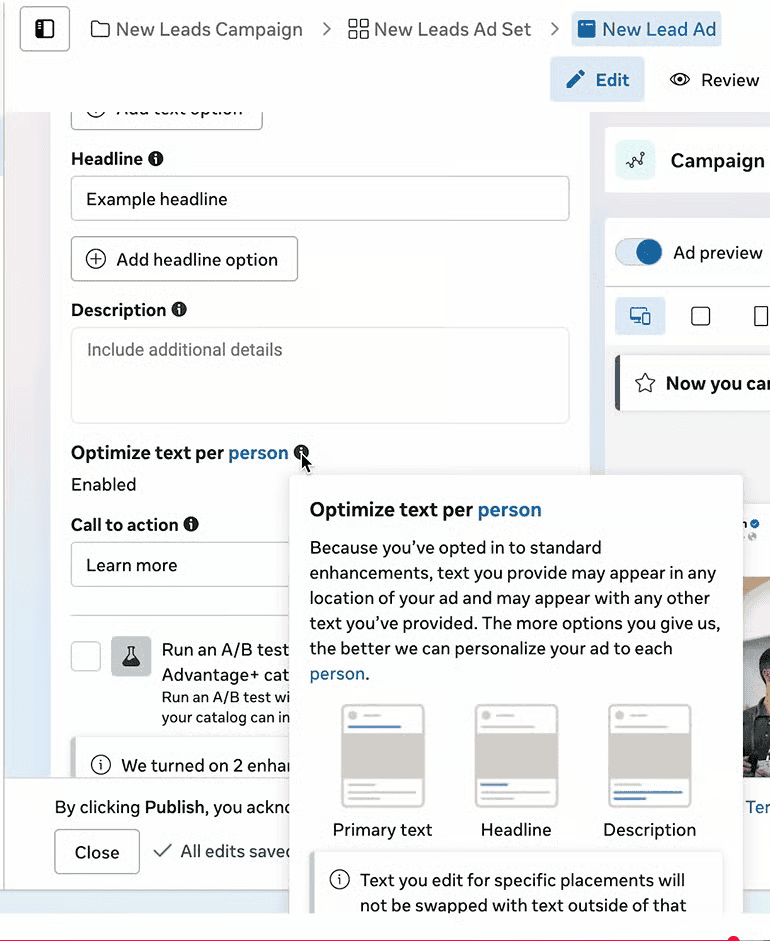
Yiqi's thoughts: This is one thing I would NOT let AI touch, especially in peak season. Your offer is the ad. If the image says "40% off sitewide" and Meta rewrites it into something your landing page doesn't support, you pay for the click that won't convert. Our post "Should Your DTC Brand Use Meta's Advantage+ Creative?" covers the rest of the enhancements.
2. How do you give new BFCM ads social proof from day one?
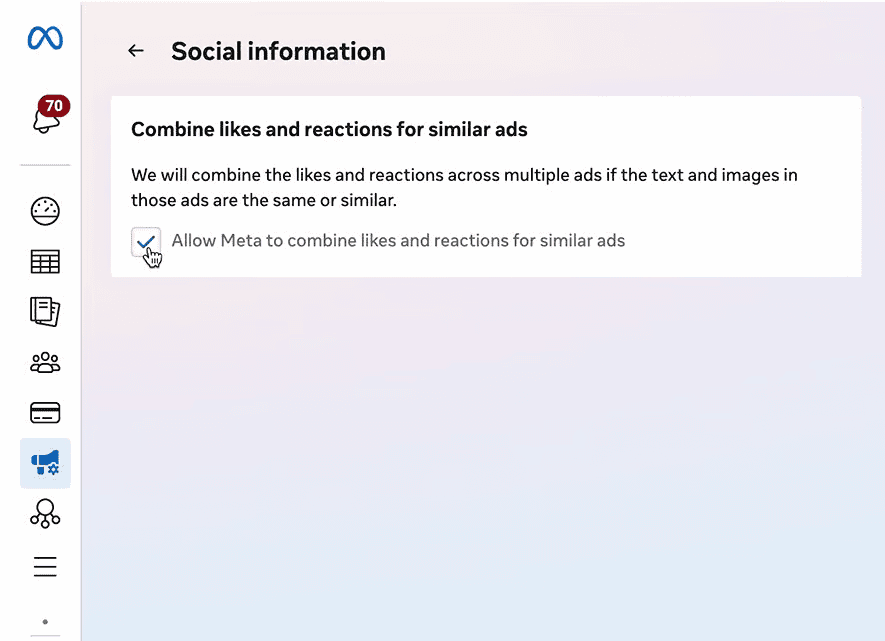
New BFCM ads start with zero likes. Combining engagement across similar ads means your holiday creative launches with the social proof your evergreen ads have already built.
3. How do you make sure new BFCM ads actually get budget?
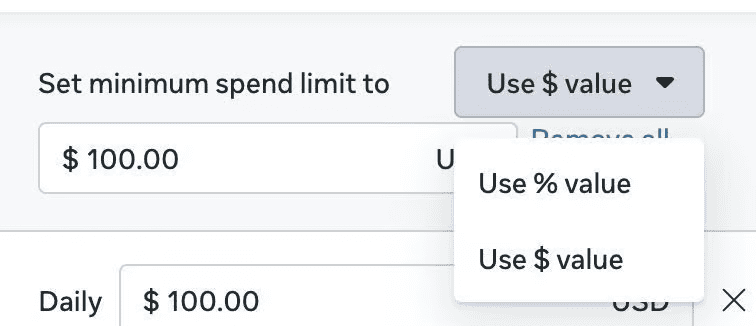
Use percentage-based minimum spend to make sure new BFCM ads receive budget and testing instead of being overshadowed by existing winning ads.
4. How do you bid more for your best customers?
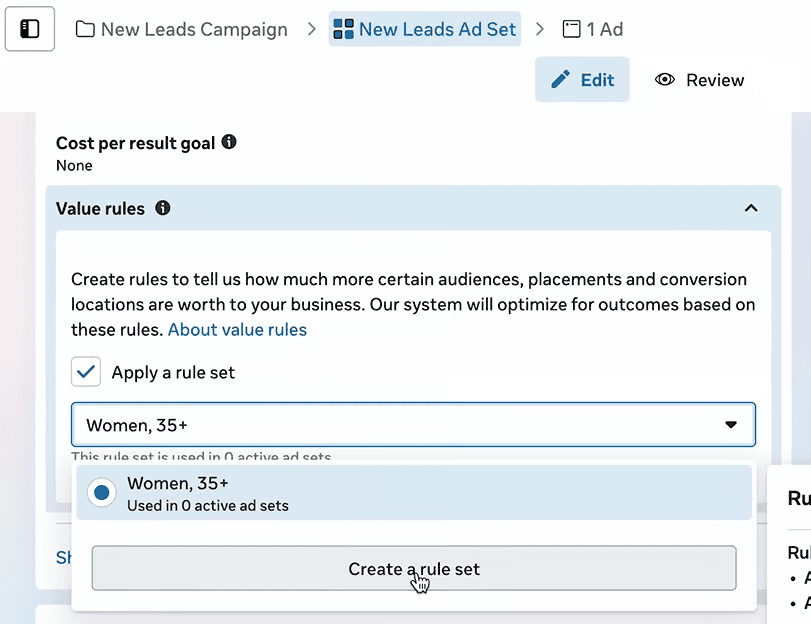
Value rules let you tell Meta which customers are worth more to you. If a segment has a higher AOV or converts better, like women 35+ in my January example, raise your bid for it before auction prices climb.
5. Can you still exclude placements?
Not at the ad set level for much longer. Meta is removing ad set-level exclusions for placements, platforms, devices, and operating systems, and replacing them with placement value rules.
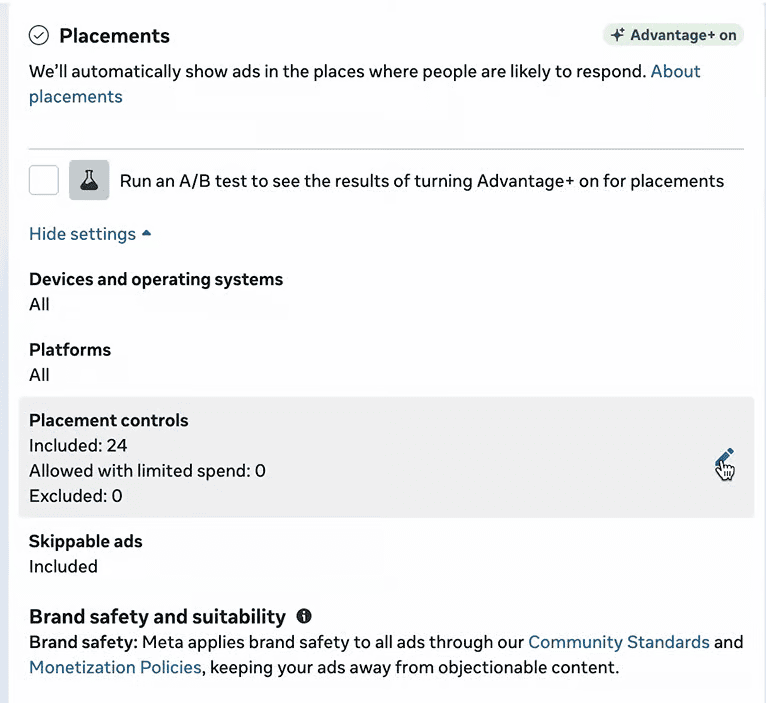
At the ad set level, placements you'd like to avoid now show as "Allowed with limited spend."
Yiqi's thoughts: A value rule can lower your bid for a placement, but it doesn't block it. If the placement is cheap enough, Meta can still win the auction, so unwanted placements can still take some of your budget.
If you truly want to block a placement, use Advertising Settings, then Account Controls, then Placement Controls. Just know it applies to your whole account.
6. Should you switch on "Acquire new customers"?
When you set up your Sales campaigns, you'll need to decide between the default "Reach new and existing customers" and "Acquire new customers." If you go with "Acquire," keep in mind it relies on your existing customer segments to filter out past buyers, so if that data isn't set up right, it won't actually exclude them.
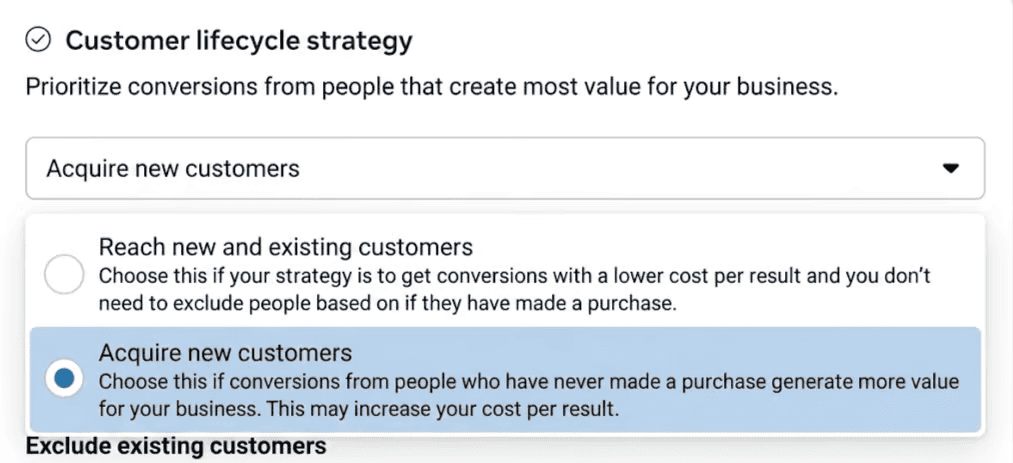
Yiqi's thoughts: Verify your Existing Customers segments before enabling "Acquire new customers," because Meta doesn't always respect exclusion boundaries. So honestly, this one doesn't make much difference. We go deeper in "Meta Customer Lifecycle Strategy Needs Clean Customer Data."
7. How should you read attribution during BFCM?
As I wrote in April, engage-through attribution replaced engaged-view. Likes, comments, and shares no longer count as click-through. They sit in their own engage-through bucket.
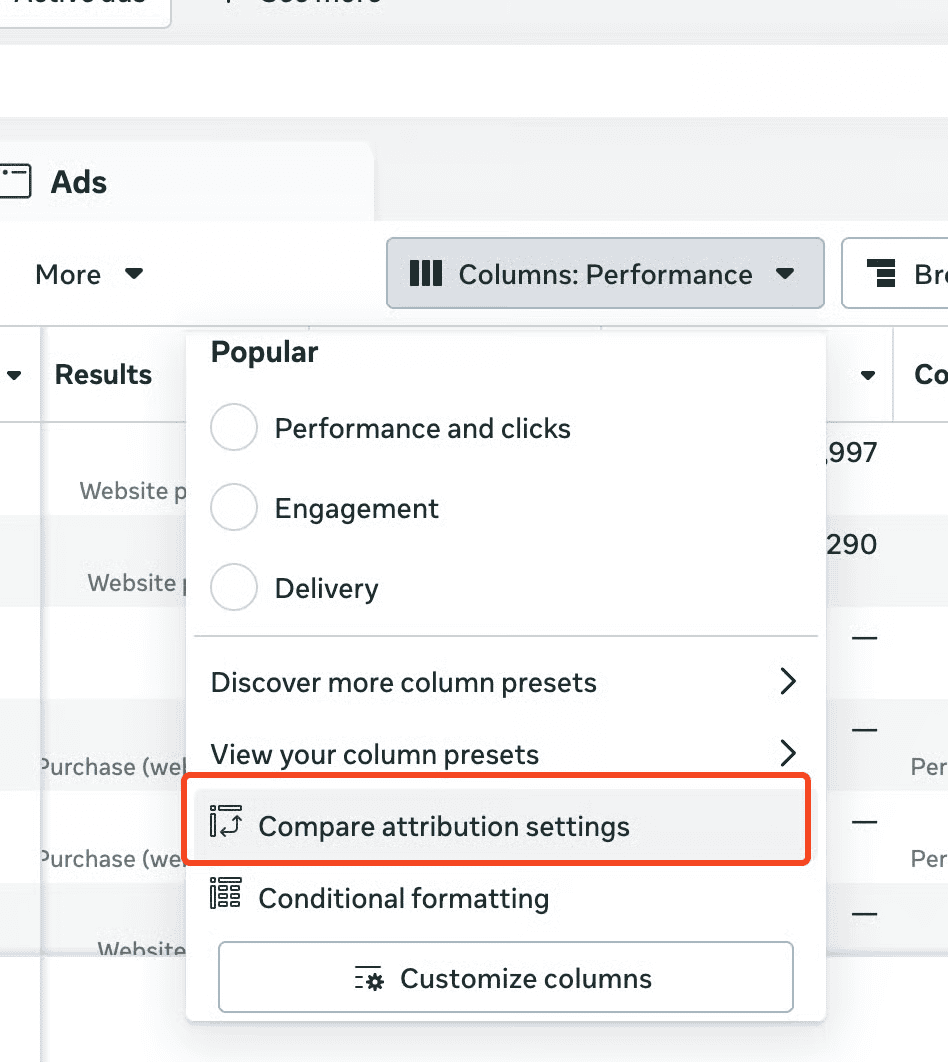
Yiqi's thoughts: Before the sale starts, open Compare attribution settings and look at how much of your attributed revenue comes from 7-day click compared with 1-day view and 1-day engagement. If you have a big organic channel, a lot of returning customers, or subscription rebills, I'd consider removing view and engage attribution from your BFCM prospecting ad sets so the algorithm has to find click-based purchases.
If you run subscriptions, fix the source too. Automatic rebills shouldn't reach Meta as new purchases in the first place, or Meta will take credit for renewals it had nothing to do with. Aimerce has a built-in setting for subscription brands that removes system-generated renewals from Meta and sends separate One-Time Purchase, Subscribe, and Renewal events.
If you want a more conservative read, incremental attribution is worth running alongside. In our testing, it usually lands between 7-day click and 1-day click. For more on separating new and returning buyers, see New vs. Returning Customer ROAS in Meta Ads Manager.
8. Should you turn on Meta's AI Pixel and one-click CAPI?
Meta updated tracking in April by adding AI Pixel Enrichment and a one-click Conversions API setup that requires no developer work.
If you don't have server-side tracking yet, turning on one-click CAPI before BFCM would help, and it's a good starting point.
If you already run the Conversions API or a partner integration like Aimerce, you don't need it.
9. Who else has access to your budget?
In January I recommended automated rules for scaling budgets and pausing ads when frequency gets too high. That's still good advice for BFCM.
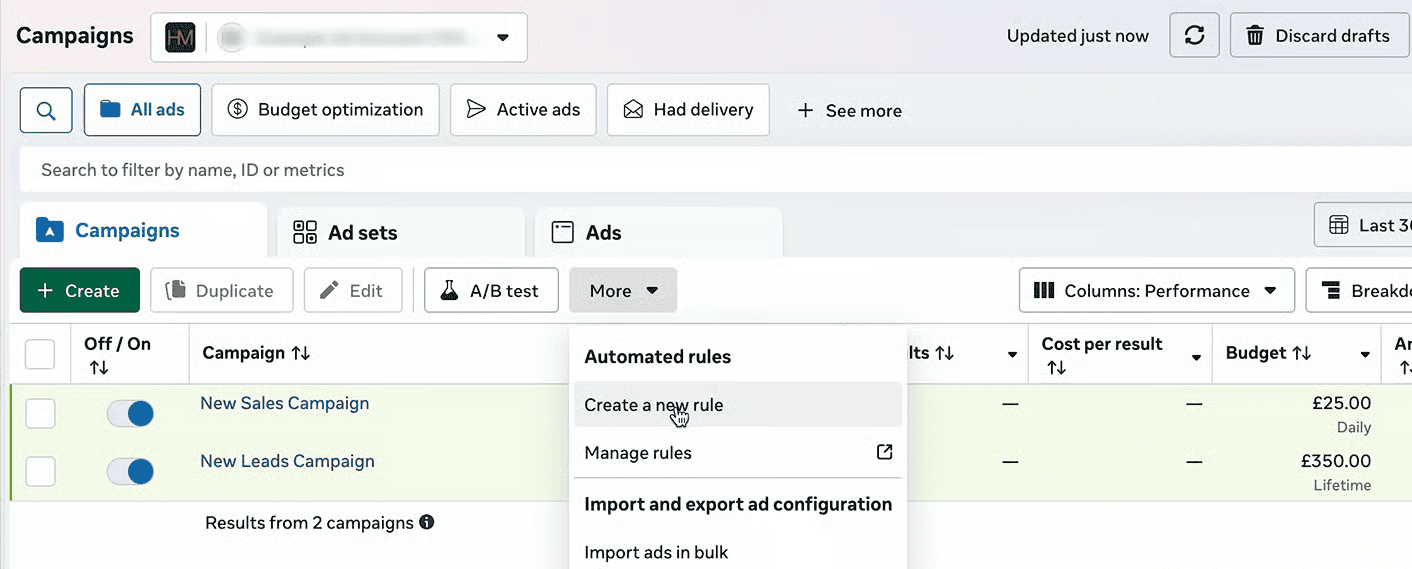
What's new is AI agents. If you've connected one to your ad account, check its permissions. Meta added a permissions panel for its ads MCP server at Business Settings, then Integrations, then Ads MCP Server. Connected agents can edit budgets, create campaigns, ad sets, and ads, and edit targeting, creative, and status.
Yiqi's thoughts: I'd be careful about giving full permissions. A reporting tool doesn't need to create campaigns or change budgets.
This playbook is part of our BFCM Klaviyo & Meta Academy, a free series for DTC brands running through mid-December, with new sessions every week. Join the BFCM Academy
The 9 settings at a glance
| Setting | What to do before BFCM |
|---|---|
| Advantage+ creative image text | Turn off text rewriting on offer creative |
| Combined social proof | Turn on so new ads launch with existing engagement |
| Percentage-based minimum spend | Use it so new BFCM ads get tested |
| Value rules | Raise bids for higher-value segments |
| Placement controls | Block placements at the account level if you need them blocked |
| Acquire new customers | Verify your Existing Customers segments first |
| Attribution | Compare click, view, and engage-through; consider click-only for prospecting |
| One-click CAPI | Turn on only if you have no server-side tracking yet |
| Budget access | Review automated rules and AI agent permissions |
FAQ
Is Meta rewriting the text in my ad images? It can. Meta updated the Advantage+ creative Text step so it reads the text in your uploaded image and can place a rewritten version onto the image. Turn it off if you don't want your offer wording changed.
Can I still exclude placements in Meta ads? Meta is removing ad set-level exclusions for placements, platforms, devices, and operating systems and replacing them with placement value rules, which lower your bid but don't block the placement. To fully block one, use Placement Controls in Advertising Settings, which applies to your whole account.
What is engage-through attribution in Meta? A separate attribution bucket for likes, comments, and shares, which no longer count as click-through. It replaced engaged-view attribution.
Do I need Meta's one-click Conversions API? Only if you don't have server-side tracking yet. If you already run the Conversions API or a partner integration like Aimerce, you don't need it.
Should AI agents have full access to my Meta ad account? Usually not. Connected agents can edit budgets, campaigns, targeting, and creative. Check permissions at Business Settings, Integrations, Ads MCP Server, and give reporting tools read-only access.
How do I make sure new BFCM ads get budget? Use percentage-based minimum spend, so new ads get tested instead of being overshadowed by existing winners.
Sources
[1] Aimerce, "Ads Manager Is More Powerful Than You Know," [2] Aimerce, "Meta Updates Early 2026 and Yiqi's Thoughts," [3] Aimerce, "The Ultimate 2026 BFCM Meta AI Ads Manager Playbook: Settings You Didn't Know Existed,"
Related reading

Try Aimerce Pixel Risk-Free
for 30 Days
Most teams see results within 2 weeks.
Money-back guarantee.
It pays for itself, or you don't pay anything.
30-Day Aimerce Pixel Free Trial