What is Server-Side Tracking?
Server-side tracking is a data collection method where your website sends information to a private server you control before forwarding it to marketing platforms like Meta or Google. Traditionally, tracking happens in the user’s browser (Client-Side). However, modern privacy updates like Safari’s ITP and ad-blockers often stop these browser-based scripts from working, leading to "missing" data. Server side tracking is the most reliable foundation for accurate attribution tracking especially if you are in e-commerce. Aimerce handles this entire setup for Shopify brands using Shopify Webhooks and Web Pixels, with no developer or server infrastructure required.
How Does Server-Side Tracking Work?
With standard browser tracking, your customer's browser is doing all the heavy lifting. Every time someone views a product or completes a purchase, their browser fires separate requests to Meta, Google, Klaviyo, and any other tool you have installed. If anything gets in the way, like an ad blocker, a slow connection, or Safari's cookie restrictions, the data is gone.
Server-side tracking changes who sends the data. Instead of the browser talking directly to your marketing platforms, it sends one request to a server you control. That server then handles everything else.
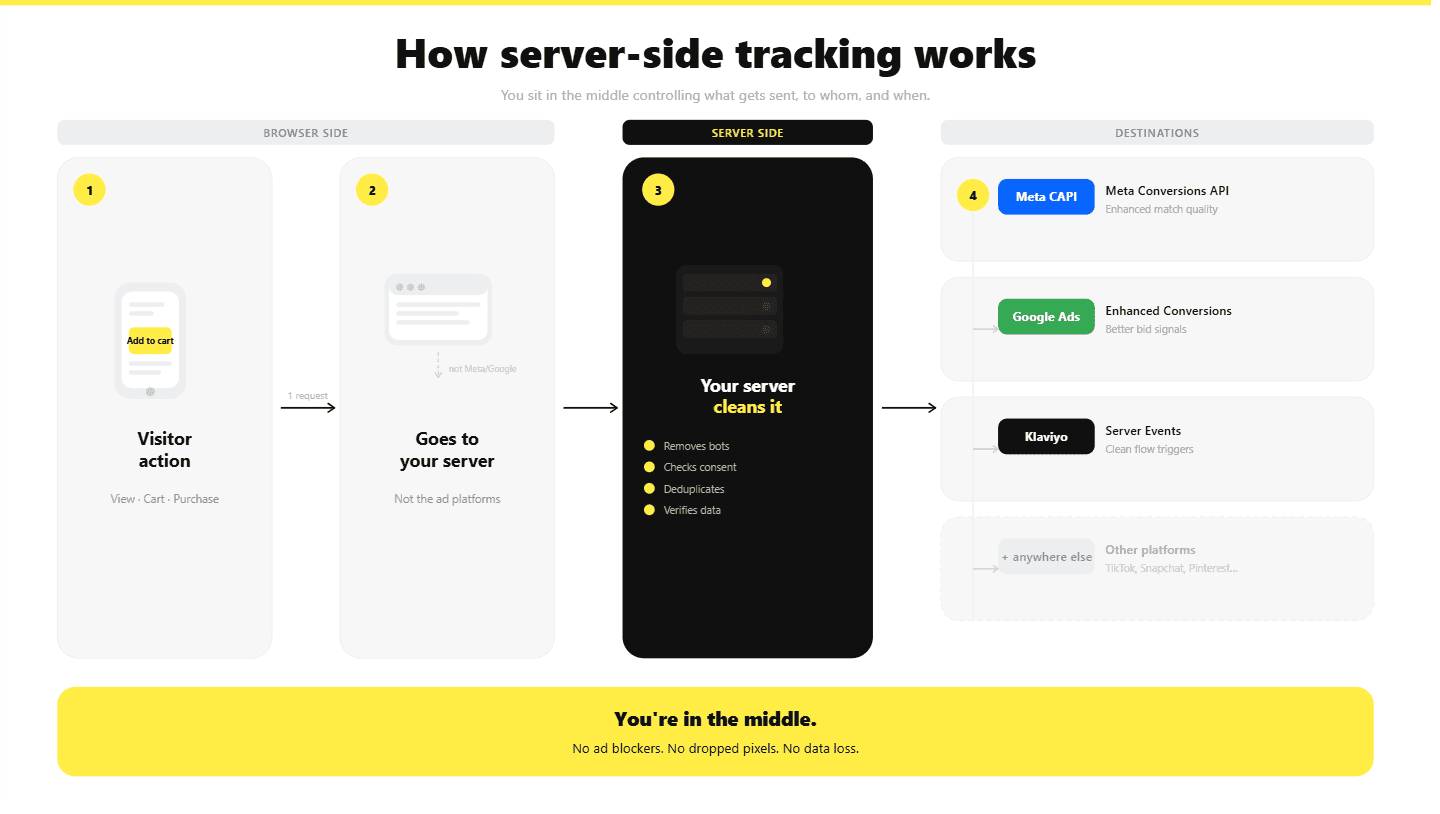
Here’s what the journey looks like:
- A visitor takes an action on your store, a product view, an add to cart, a purchase
- That event goes to your server first, not directly to Meta or Google
- Your server cleans the data, removes bot traffic, and checks consent before doing anything with it
- Your server forwards the verified event to Meta Conversions API, Google Enhanced Conversions, Klaviyo, and anywhere else it needs to go
The biggest difference is control. You decide what data leaves your server, where it goes, and in what format. Nothing gets sent without passing through your own rules first.
If you are running on Shopify, the setup is a bit different from a standard server-side implementation. We cover exactly what to look for in our guide on choosing server-side tracking for Shopify that actually works.
What’s The Difference Between Server-Side Tracking and Client-Side Tracking?
The primary difference between server-side and client-side tracking lies in where the data is processed before it reaches your marketing platforms (like Meta or Google Ads). Here’s the difference to understand the two better:
-
Client-side tracking - also known as "browser-side tracking" is the traditional method of data collection. It uses small snippets of JavaScript code pixels or tags placed directly on your website. When a user visits your site, their browser executes these scripts and sends data directly to third-party platforms (like Meta, Google Ads, or TikTok. It is easy to implement, low cost, and great for capturing surface-level interactions like clicks and scrolls but highly vulnerable to ad-blockers and privacy settings
-
Server-side tracking - Instead of the browser sending data to everyone, it sends data to one destination: your own private server. Your website sends data to your own server (e.g., via Aimerce) then, your server then cleans, validates, and forwards that data to ad platforms. It bypasses ad-blockers, extends cookie life, improves site performance, and gives you 100% control over data privacy.
Most high-performing e-commerce brands no longer choose one or the other. Instead, they use a Hybrid Setup that uses both browser side and server side. Aimerce side tracking on Shopify handles that perfectly if you are looking to obtain 100% accurate data sent to ad platforms.
| Factor | Browser Tracking | Server-Side Tracking |
|---|---|---|
| Data source | Customer's browser | Your server |
| Blocked by ad blockers | Yes, frequently | Rarely, uses first-party domain |
| Cookie lifespan | 7 days on Safari and Firefox | Extended with server-set first-party cookies |
| First-party data control | Limited, scripts run on page | Full, you validate and route data |
| Bot filtering | Difficult, happens at platform level | Enforced server-side before forwarding |
| Attribution tracking accuracy | Degrading with each browser update | More consistent with durable identifiers |
| Conversion API support | Browser dependent | Native server-to-server |
| Deduplication | Manual, error-prone | Enforced via event ID at server level |
| Privacy compliance | Harder to enforce across scripts | Centralized consent management |
| Page load impact | High with multiple third-party scripts | Low, one lightweight client-side request |
Why Client-side Tracking Is No Longer Reliable?
Client-side tracking used to work because browsers were cooperative and cookies lasted a long time. Both of those things have changed, and they changed permanently. And, here is why:
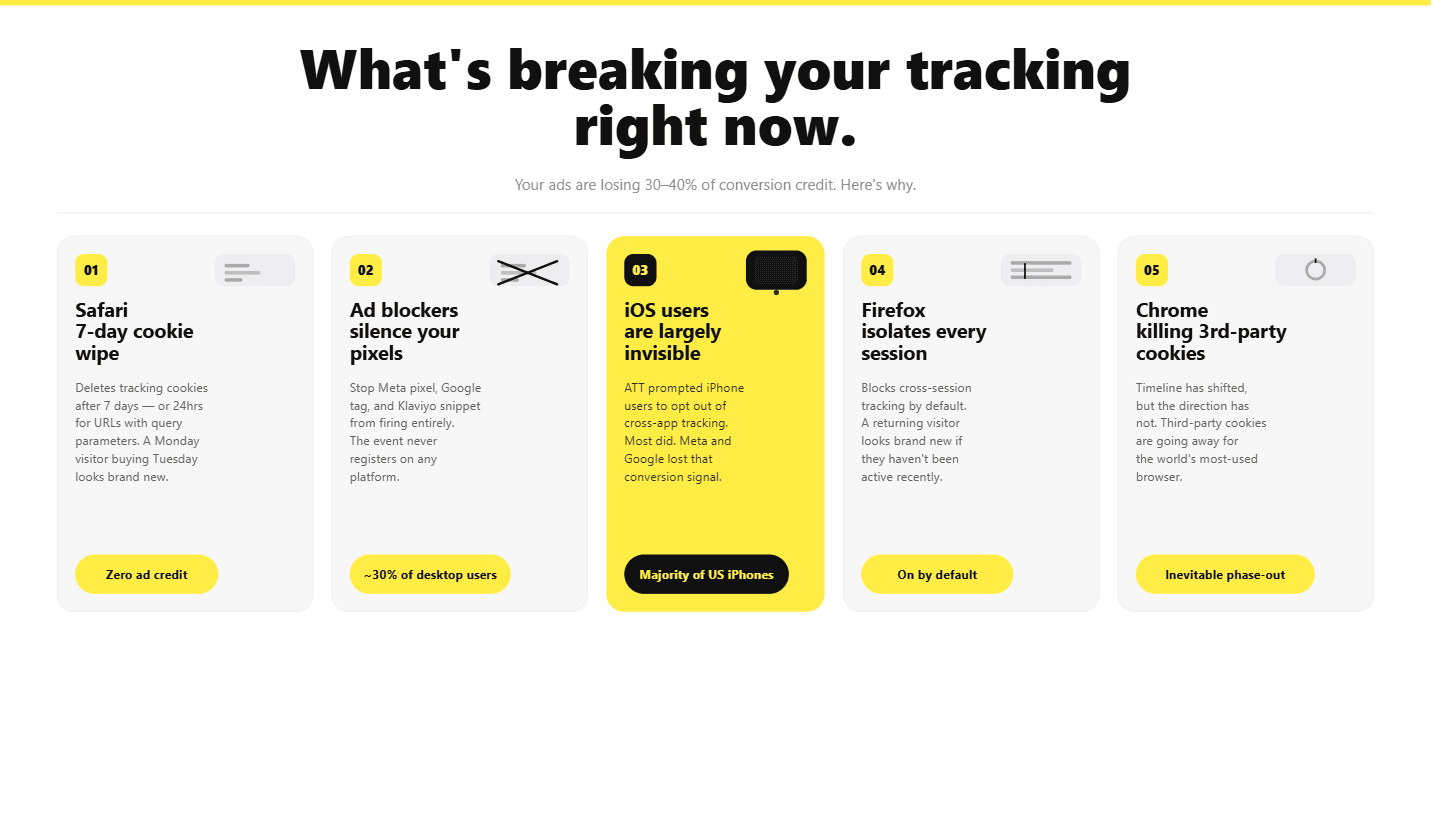
- Safari deletes your tracking cookies after 7 days or 24 hours for URLs with query parameters. If a customer visits your store on Monday and buys the following Tuesday, Safari treats them as a brand new visitor. Your ads get zero credit for that sale.
- Ad blockers stop pixels from firing entirely. Around 30 percent of desktop users run an ad blocker. When they do, your Meta pixel, Google tag, and Klaviyo snippet never load. The event never happens as far as your platforms are concerned.
- iOS users are largely invisible to client-side tracking. Apple's App Tracking Transparency prompted iPhone users to opt out of cross-app tracking. Most did. Meta and Google lost that conversion signal for the majority of US iPhone users.
- Firefox blocks cross-session tracking by default. Firefox isolates cookies by site, which means a returning visitor can look like a new one if they have not been active recently.
- Chrome is phasing out third-party cookies. The timeline has shifted, but the direction has not. Third-party cookies are going away.
The result is a growing gap between what your ad platforms report as conversions and what Shopify shows as actual orders. For most DTC brands that gap is 30 to 40 percent. That is not a reporting quirk. That is misallocated budget and broken campaign optimization.
How to Prevent Double Counting (Deduplication)
When you run browser-side and server-side tracking at the same time, both can fire an event for the same customer action. A customer completes a purchase, your Meta pixel fires a purchase event from the browser, and your server fires another purchase event from the backend. Meta receives two purchase signals for one order.
Without deduplication, that inflates your reported conversions, overstates revenue in your ad platform reporting, and trains Meta and Google's optimization algorithms on inaccurate data. Campaigns start optimizing toward the wrong signals.
Deduplication prevents this by assigning a consistent event ID to each action. When the same event ID arrives at Meta or Google twice, the platform discards the duplicate and counts it once. The event ID needs to be generated at the time of the action and passed identically from both the browser and server event for deduplication to work correctly.
This is one of the most common implementation mistakes in Shopify server side tracking setups. Brands enable server-side tracking, see their reported conversions jump overnight, and assume performance improved. What actually happened is double counting. Always validate your purchase counts against Shopify order records before concluding that your server-side setup is working correctly.
Which Ecommerce Events Should You Prioritize for Server-Side Tracking?
Not every event needs to move server-side on day one. Prioritize by business impact.
| Event | Priority | Why It Matters |
|---|---|---|
| Purchase | Critical | Highest-value signal for Meta and Google bidding optimization |
| Initiate Checkout | High | Strong purchase intent, improves funnel visibility |
| Add to Cart | High | Essential for retargeting and lookalike audience building |
| View Content / Product View | Medium | Product interest signals for top-of-funnel optimization |
| Page View | Lower | Broad audience data, useful but not critical server-side |
| Subscription Created | High if applicable | Recurring revenue attribution |
| Offline Purchase | High if applicable | Connects in-store or phone sales to online campaigns via Offline Conversions API |
Every purchase event should include order ID, value, currency, and hashed customer email where consented. These fields are the foundation of accurate attribution tracking and high Event Match Quality scores in Meta's Events Manager.
What Are the Most Common Use Cases for Server-Side Tracking?
- Meta Conversions API Setup - When a customer completes a purchase on your Shopify store, your browser pixel tries to fire a purchase event to Meta. If an ad blocker is running, or Safari has cleared the cookie, or the page unloads too quickly, that event never arrives. Meta does not see the conversion, and your campaign gets no credit for the sale. The Meta Conversions API fixes this by sending the purchase event directly from your server to Meta, after Shopify confirms the order. The browser is no longer involved at that point, so blockers and browser restrictions cannot interfere. The practical metric to watch is Event Match Quality. A browser-only pixel typically scores between 4.0 and 6.0. When you add server-side events with hashed customer email and phone number, that score moves to the 8.6 to 9.3 range. A higher EMQ means Meta can match more of your conversions to real user profiles, which gives the algorithm better data to optimize your campaigns against.
- Google Ads Enhanced Conversions - Enhanced Conversions is Google's way of improving conversion matching when cookies are unavailable. Instead of relying solely on a cookie to connect an ad click to a purchase, it sends a hashed version of the customer's email alongside the conversion event. Google then matches that hashed email to a logged-in Google account. The browser-based version of this has a reliability problem: it depends on a script reading the customer's email from a form field before the page unloads. That is a fragile moment. Server-side Enhanced Conversions pulls the email directly from the confirmed Shopify order, which is far more consistent. The result is a higher conversion match rate and better data for Google's Smart Bidding to work with.
- TikTok Events API - TikTok's Events API works the same way Meta's Conversions API does. Instead of relying on the browser-side TikTok pixel, it sends ecommerce events directly from your server to TikTok. Ad blockers cannot intercept it. iOS restrictions do not apply. TikTok also supports event deduplication via a consistent event ID, so if both your pixel and server event fire for the same purchase, TikTok discards the duplicate. You also get the option to pass hashed customer data alongside events, which improves how accurately TikTok can match conversions to user profiles and build lookalike audiences from your buyers.
- Offline Conversion Tracking - Not every sale happens through your online checkout. Phone orders, in-store purchases, and wholesale transactions are completely invisible to browser-based tracking. Your ads can drive those sales and never get credit for them. The Offline Conversions API lets you send those backend transactions directly to Meta and Google so they can be attributed to the campaigns that drove them. This also applies to a common Shopify-specific problem: checkout redirects. When a customer pays through Shop Pay or PayPal, they leave your domain during the payment process. Browser pixels often lose attribution at that point. Because Aimerce captures the purchase event from Shopify's backend after the order is confirmed, it does not matter which payment method the customer used. The conversion gets recorded correctly either way.
- Server-Side Google Analytics 4 - GA4 has the same browser-side vulnerabilities as any other pixel. Ad blockers prevent it from loading. Safari shortens the cookies it relies on. The result is undercounted sessions and funnel data that does not reflect what is actually happening in your store. Moving GA4 event forwarding server-side produces more complete data across the board: session counts, returning visitor identification, and purchase funnel analysis all become more accurate. One thing to watch out for: GA4 does not deduplicate events natively. If you run browser-side and server-side GA4 tracking for the same events at the same time, you will double-count sessions and conversions. The standard approach is to route those events through the server layer only and turn off the browser-side GA4 tags for them.
What Are First-Party Identifiers and Why Do They Matter for Attribution?
Browser tracking relies on cookies that expire or get blocked. Server-side tracking uses more durable first-party identifiers that persist across sessions and devices.
Common first-party identifiers include customer email captured at checkout or account login, phone number provided during checkout, and internal customer ID from your Shopify customer database. Hashed versions of these are used for privacy-safe transmission to ad platforms.
When a customer clicks your Meta ad on mobile on Tuesday and completes a purchase on desktop the following Monday, browser cookies likely treat these as two completely separate sessions. Server-side tracking with a durable first-party identifier connects them, giving Meta and Google accurate attribution data for that conversion.
This requires legitimate collection and proper consent. Server-side tracking does not bypass privacy regulations. It gives you better infrastructure to enforce them.
You can find in this dedicated blog post on how long do first party cookies last.
Most Common Server-Side Tracking Implementation Mistakes
| Mistake | What Goes Wrong | Fix |
|---|---|---|
| No deduplication | Browser pixel and server event both report the same purchase, doubling conversions | Assign matching event ID to both browser and server events |
| Skipping consent checks | Data forwarded to ad platforms without user consent | Implement consent verification server-side before any event leaves your infrastructure |
| Inconsistent event naming | Purchase sent to Meta, OrderCompleted sent to Google | Standardize event names server-side with a platform mapping layer |
| No bot filtering | Bot traffic inflates conversion signals and pollutes audiences | Filter known bot patterns and suspicious user agents server-side before forwarding |
| No monitoring | Silent failures when events stop flowing | Set alerts for event volume drops, schema errors, and platform delivery failures |
Should You Build Server-Side Tracking Yourself or Use a Managed Platform?
There are two implementation paths and the right choice depends on your technical resources and how much customization you genuinely need.
- DIY with Google Tag Manager server-side means deploying a server container on Google Cloud, configuring tags and triggers manually, and managing your own infrastructure. You get full control. You also need two to four weeks of developer time to implement properly, plus ongoing maintenance. Deduplication, bot filtering, and consent logic all need to be configured from scratch. For Shopify brands specifically, GTM server containers run into architectural limits at checkout because Shopify's hosted checkout does not allow standard GTM containers to execute reliably on checkout pages.
- Managed platforms like Aimerce handle server infrastructure, platform integrations, bot filtering, deduplication, and monitoring so your team focuses on strategy rather than DevOps. Unlike Google Tag Manager (GTM), setup takes minutes rather than weeks. Aimerce uses Shopify Webhooks for backend-confirmed purchase events and Shopify Web Pixels for storefront interactions, which gives complete ecommerce event coverage across the full customer journey including checkout pages that GTM server containers cannot reliably access.
For most ecommerce teams, the opportunity cost of delayed implementation and ongoing maintenance outweighs the monthly cost of a managed platform. GTM and Aimerce are solid but similar to all of the things in the world, both also have advantages and disadvantages.
What is the Best Server-Side Tracking Shopify?
Aimerce handles server-side tracking by moving away from "fragile" browser scripts and utilizing a direct, backend-to-platform connection. Instead of relying on a user's browser to report a sale, Aimerce listens directly to your Shopify store's heartbeat.
- Meta and Google Ads optimization: Directly sends purchase events to Meta Conversions API and Google Ads, improving EMQ scores to 8.6 to 9.0+ and stabilizing campaign learning phases faster after budget or creative changes.
- Recovering lost conversions: Bypasses browser-side ad blockers and Safari ITP, capturing 40 percent or more of conversion events that standard pixels miss.
- Extending first-party cookie lifetime: Extends cookie duration to one year instead of Safari's default seven-day limit, which is crucial for accurate attribution on longer sales cycles.
- Klaviyo and email revenue enhancement: Enriches visitor profiles to increase cart abandonment flow reach and identify returning customers on new devices, boosting email revenue by up to 60 percent.
- One-click Shopify setup: Enables server-side tracking for all major platforms without server management or GTM expertise. Live in under 15 minutes.
Case Study: How Fanka Achieved 71x ROI With Aimerce
Fanka is a fast-growing women's apparel brand built around performance fabrics and innovative design. As the brand scaled, it ran into three tracking problems limiting growth which are Klaviyo cart abandonment flows were underperforming due to iOS tracking issues, Meta remarketing efficiency was declining as pixel match quality degraded, and maintaining accurate attribution across high traffic was becoming increasingly difficult.
 The challenge: iOS updates fragmented Klaviyo's ability to identify visitors and match them to email profiles, reducing the reach of abandoned cart flows. Meta's pixel-reported conversions drifted further from Shopify's actual order count, which degraded campaign optimization and increased customer acquisition costs. First-party data was not being captured or activated effectively despite high site traffic.
The solution: Fanka implemented Aimerce's server-side tracking on Shopify, combining optimized Klaviyo identification using first-party data with server-confirmed Meta purchase events and improved Event Match Quality scoring.
The results:
| Metric | Result |
|---|---|
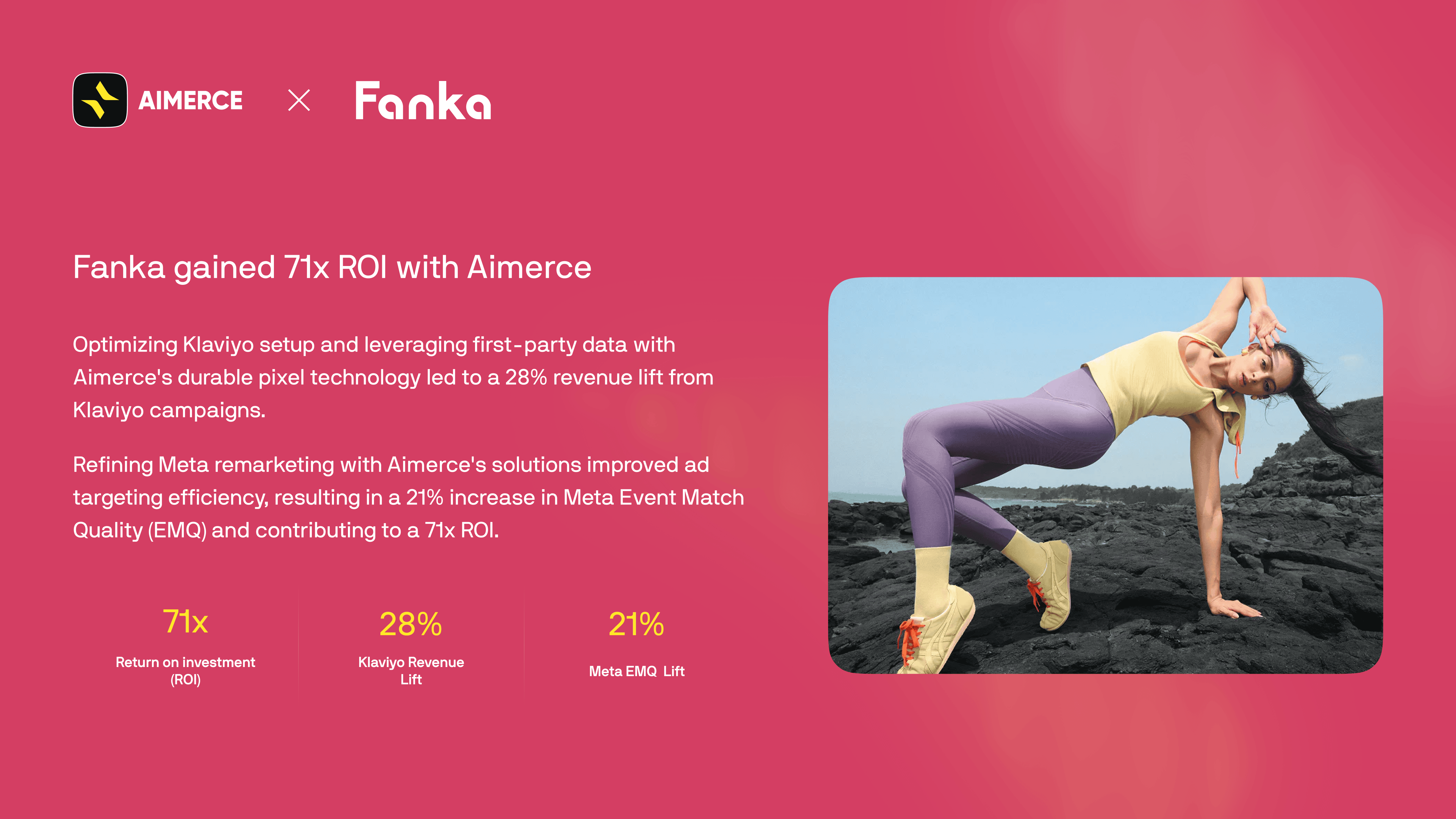
| Return on Investment | 71x |
| Klaviyo Revenue Lift | 28% |
| Meta Event Match Quality Improvement | 21% |
You can read Fanka’s successs story with Aimerce here: https://www.aimerce.ai/success-stories/new/fanka
FAQ
What is server-side tracking in plain terms? Server-side tracking captures ecommerce events on a server you control before forwarding them to advertising and analytics platforms. Instead of relying on browser JavaScript tags that ad blockers can stop and Safari can limit, your server sends verified first-party data directly to Meta via Conversions API, Google Enhanced Conversions, and Klaviyo.
Is server-side tracking the same as first-party tracking? They are related but distinct. First-party tracking describes the data relationship, meaning data collected directly by your business from your customers. Server-side tracking describes the architecture, meaning events routed through a server rather than a browser. Most server-side setups support first-party data strategies, but the terms are not interchangeable.
Do I still need browser pixels if I use server-side tracking? Most teams use a hybrid approach. Server-side events handle critical conversions like purchases and checkouts. Browser-side tags remain useful for on-page behavior, A/B testing tools, and remarketing audience signals that require real-time browser context. Proper deduplication via event ID prevents double-counting when both run simultaneously.
What ecommerce events should I implement server-side first? Start with Purchase. It has the highest business impact, is the easiest to validate against Shopify order data, and is the primary optimization signal for Meta and Google campaign bidding. Add Initiate Checkout and Add to Cart once Purchase is confirmed accurate.
How does server-side tracking improve attribution tracking accuracy? By capturing events your browser pixel misses due to ad blockers and iOS restrictions, using durable first-party identifiers to connect cross-device sessions, and sending hashed customer data to Meta and Google for Enhanced Matching. The result is more complete conversion data with higher Event Match Quality scores, which directly improves how ad platforms attribute and optimize campaigns.
What is Event Match Quality and why does it matter? Event Match Quality is Meta's score for how accurately your conversion events can be matched to real user profiles. A score of 6.0 is the minimum for reliable optimization. Scores of 8.0 and above indicate strong matching, typically achieved by passing hashed customer email and phone alongside purchase events. Server-side tracking through a first-party infrastructure is the most reliable way to consistently pass these identifiers.
How is Aimerce different from setting up server-side GTM for Shopify? GTM server containers are designed for custom web stacks with full server control. On Shopify, they run into architectural limits at checkout because Shopify's hosted checkout restricts which scripts can execute on checkout pages. Aimerce is built specifically for Shopify using Webhooks and Web Pixels, which means purchase events are captured from Shopify's backend after order confirmation, not from a browser script that can be blocked at the checkout page. Setup takes under 15 minutes with no infrastructure to manage.
Aimerce offers a 30-day risk-free trial for Shopify brands ready to move their ecommerce conversion tracking server-side. No developer required. No infrastructure to manage. Live in under 15 minutes.

Try Aimerce Pixel Risk-Free
for 30 Days
Most teams see results within 2 weeks.
Money-back guarantee.
It pays for itself, or you don't pay anything.
30-Day Aimerce Pixel Free Trial