Quick Answer: Beyond losing Additional Scripts, Shopify's checkout upgrade changes the Thank You page URL from /thank_you to /thank-you, confirmed directly by Shopify's own engineering team, and complicates pixel tracking on the Order status page depending on your customer accounts domain setup. Neither is fixed by the standard "migrate to Web Pixels" advice alone.
Key Takeaways
- The Thank You page URL is changing from /checkouts/
/thank_you to /checkouts/ /thank-you, confirmed directly by Shopify's own Director of Engineering. Any hardcoded tracking URL or redirect rule pointing at the old slug needs updating. - Pixels don't reliably fire on the new customer-account Order status page, a gap Shopify itself has described as still in development, not something automatically solved by moving your customer accounts to a subdomain.
- App and custom pixels only track with customer consent, unlike the old Additional Scripts, which fired regardless. If your old setup was tracking every visitor regardless of consent, the "gap" you might see after migrating could be a correction of previous overcounting, not new data loss.
- Server-side purchase capture from Shopify's order webhook doesn't depend on either the Thank You page URL format or the Order status page's pixel behavior, since it's triggered by the order being created, not by a script executing on either page.
- Checking where you stand takes one click: Settings > Checkout > Configurations. A banner there means you're still on the legacy pages.
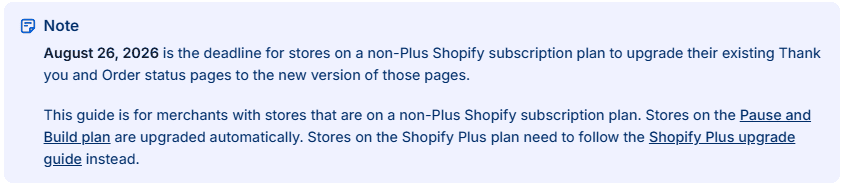
Shopify is forcing an upgrade on all non-Plus stores by August 26, 2026. After that date, the legacy Thank You and Order Status pages are gone for good, and whatever you've got sitting in the Additional Scripts box just stops running.
Good. It should stop running.
Plus stores already went through this. As of August 28, 2025, their Additional Scripts and checkout.liquid became view-only, and PII access on the legacy pages got locked down. Shopify started auto-upgrading the stragglers in batches starting January 2026, with each store getting 30 days' notice before its pages got force-replaced and every existing customization wiped for good.
Non-Plus stores get one deadline: August 26, 2026. Miss it, and Shopify upgrades you automatically with no extra warning beyond whatever's already sitting in your admin. For the full picture on incompatible apps, the revert window, and how Custom Pixels differ from app pixels, that's covered in depth separately. This piece focuses on two specific things that break and don't get much attention.
Why does the URL slug change matter?
Because any tracking setup, redirect rule, or reporting script that hardcodes the old Thank You page URL will silently stop matching once the new page goes live.
The Thank You page URL is changing from /checkouts/
Why does the customer accounts domain matter for tracking on the Order status page?
Because the Order status page now lives on a different domain than checkout, your customer accounts domain, and pixel behavior there has been a genuine, acknowledged gap, not just a configuration detail to get right.
Shopify's help center documents the mechanism: you can connect a custom subdomain, like account.yourstore.com, for customer account pages, which is where the Order status page now lives. But the same engineering AMA that confirmed the URL slug change also confirmed something else worth knowing: pixels don't reliably fire on the new customer-account Order status page at all, described at the time as a gap still in development, not something the subdomain setup alone was confirmed to resolve. If you're relying on Order status page tracking specifically, verify it's actually firing rather than assuming the domain setup alone takes care of it.
Are you actually losing data, or were you overcounting before?
Worth checking before assuming the worst. App and custom pixels only track with customer consent, which is different from how Additional Scripts behaved.
Shopify says this can mean fewer recorded events than the old scripts, which fired regardless of what a visitor had actually consented to. If your Additional Scripts pixel was tracking every visitor no matter what they'd consented to, you were probably overcounting before, not undercounting now. A drop in raw event volume after migrating isn't automatically a tracking failure, it might be your numbers becoming more accurate for the first time.
Legacy Pages vs. New Checkout Extensibility
| Aspect | Legacy (Additional Scripts) | New (Checkout Extensibility) |
|---|---|---|
| Thank You page URL | /checkouts/id/thank_you | /checkouts/id/thank-you |
| Tracking respects consent | Not necessarily, scripts fired regardless | Yes, app and custom pixels only track with consent |
| Order status page domain | Same as checkout | Customer accounts domain, can be a custom subdomain |
| Pixel reliability on Order status page | N/A, scripts ran directly | An acknowledged gap as of recent Shopify engineering commentary |
| Server-side purchase capture (order webhook) | Unaffected either way | Unaffected either way |
How do you check where you stand?
Go to Settings > Checkout > Configurations. If there's a banner prompting you to upgrade, you're still on the legacy pages. Click it and Shopify hands you a personalized guide listing exactly which apps and scripts need replacing before you hit Upgrade.
If you pause your store before August 26, your pages upgrade immediately whether you're ready or not.
Common mistakes to avoid
- Assuming "migrate to Web Pixels" covers everything. The URL slug change and the Order status page pixel gap are separate issues that survive a standard Web Pixel migration if nobody checks for them specifically.
- Panicking at a drop in raw event volume without checking why. Consent-respecting pixels recording fewer events than consent-ignoring scripts isn't automatically a tracking failure.
- Hardcoding the old thank_you URL anywhere in reporting or redirect logic. It'll quietly stop matching once the new page is live, with no error to flag it.
- Assuming a customer-accounts subdomain automatically fixes Order status page tracking. Verify it's actually firing rather than assuming the domain setup alone resolves it.
FAQ
Is the Shopify Thank You page URL actually changing? Yes. It's changing from /checkouts/id/thank_you to /checkouts/id/thank-you, confirmed directly by Shopify's own Director of Engineering. Anything hardcoding the old URL needs updating.
Will my tracking numbers drop after this migration? Possibly, but not necessarily because of data loss. App and custom pixels only track with customer consent, unlike Additional Scripts, which fired regardless. A drop in raw volume can reflect more accurate, consent-respecting counting rather than a tracking failure.
Does moving my customer accounts to a subdomain fix pixel tracking on the Order status page? Not confirmed to on its own. Shopify's own engineering team has described pixels not firing reliably on the new customer-account Order status page as a gap still being worked on, separate from the domain setup itself.
Does server-side purchase tracking get affected by any of this? No. Purchase capture triggered from Shopify's order webhook doesn't depend on the Thank You page URL format or the Order status page's pixel behavior, since it's triggered by order creation, not a script running on either page.
How do I know if I'm still on the legacy Thank You and Order Status pages? Go to Settings > Checkout > Configurations in your Shopify admin. A banner prompting an upgrade means you're still on the legacy version.
Sources
[1] Shopify Community, Checkout Extensibility Upgrade AMA with Domaine (Connor Munro, Shopify Director of Engineering)
[2] Shopify Changelog, "Web Pixels: event.data.checkout.subtotalPrice.amount value change on the new /thank-you page and checkout events"
[3] Shopify Help Center, "Connecting a custom subdomain for your customer account pages"
[4] Shopify Help Center, "Upgrading and replacing your Thank you and Order status pages"
Official Shopify Resources
- Plus - Upgrading and replacing your Thank you and Order status pages
- Non-Plus - Upgrading and replacing your Thank you and Order status pages
- Customization options for the new Thank you and Order status page
- Replacing Google Tag Manager scripts on the Thank you page
- Reviewing and replacing additional scripts on your Thank you and Order status pages
Related reading

Try Aimerce Pixel Risk-Free
for 30 Days
Most teams see results within 2 weeks.
Money-back guarantee.
It pays for itself, or you don't pay anything.
30-Day Aimerce Pixel Free Trial