Quick Answer: A Shopify theme-to-headless migration breaks tracking because tracking rarely gets an owner on the project plan. To protect your data: before migrating, record a baseline of every Meta event, its weekly volume, and your EMQ scores; during migration, assign tracking as its own deliverable and require every core event, express checkout, and custom element to be implemented explicitly; within the first week after launch, verify events in real time and compare Meta purchases against Shopify orders. If the numbers don't match, check timing, express checkout, and cross-domain setup before rebuilding anything.
Key Takeaways
- Tracking breaks during headless migrations mostly because nobody owns it, not because it's technically hard.
- A pre-migration baseline is what turns "do the numbers look reasonable?" into "do the numbers match?"
- Express checkout (Shop Pay, Apple Pay, PayPal) is the most commonly missed piece, because it skips the standard checkout flow.
- Verify within the first week, not the first quarter. Meta's Test Event Code tool shows gaps within minutes.
- Purchases are the easiest part to protect: if you still use Shopify's checkout, orders land in Shopify and can be sent server-side whatever the new frontend does.
A theme-to-headless migration usually gets planned around page speed, design, and checkout flow. Tracking rarely gets its own line item, because nothing about a migration project forces someone to own it. That gap is exactly where attribution data quietly breaks, weeks before anyone notices.
This is the checklist to run before, during, and right after a migration, so tracking doesn't become the thing nobody checked until Q4 looked soft.
1. Before the migration: document what's currently firing
Pull a baseline before anything changes. You need something to compare against once the new frontend is live.
- Export your current Meta Pixel event list (PageView, ViewContent, AddToCart, InitiateCheckout, Purchase) and note weekly volume for each
- Check your current EMQ scores for Purchase and AddToCart, so you know what "working" looked like before
- List every custom element on your current site that isn't a standard Shopify checkout flow: custom popups, quizzes, landing page builders, express checkout usage
- Note whether you're running more than one Meta Pixel
This baseline is what makes the post-migration comparison meaningful. Without it, you're checking whether numbers look reasonable. With it, you're checking whether they match.
2. During the migration: assign tracking ownership explicitly
The most common failure isn't technical. It's that nobody owns tracking as a distinct deliverable. Page speed has an owner. SEO redirects have an owner. Tracking needs the same thing.
- Confirm whether the new frontend is Hydrogen or a fully custom JavaScript build. That determines whether framework-specific integration paths exist or everything has to be built manually
- Require that Purchase, AddToCart, InitiateCheckout, and PageView are all explicitly implemented, not just Purchase
- Confirm express checkout paths (Shop Pay, Apple Pay, PayPal) are tracked, since they skip the normal flow
- If the new frontend and checkout run on different domains, confirm cross-domain tracking is configured so a shopper's session isn't split in two
- If any custom popups or quizzes exist, confirm they have their own explicit event tracking
- If multiple Meta Pixels are in use, confirm each one is implemented and will be verified separately
3. Right after launch: verify before assuming
Once the new frontend is live, don't wait for a quarterly review to check whether tracking held up.
- Use Meta's Test Event Code tool to confirm events fire correctly in real time, so you catch gaps within the first day instead of the first month
- Check the Diagnostics tab in Events Manager for parameter-level warnings before running a full comparison
- Within the first week, compare Meta purchase counts against actual Shopify orders for the same window
- If running multiple pixels, run that comparison per pixel, not once for the account
- Re-check EMQ scores against your pre-migration baseline
4. What to do if the numbers don't match
A mismatch tells you where to look, not that everything is broken. Narrow it down before rebuilding anything.
- If you're on Hydrogen, check whether the implementation used framework-specific components or generic JavaScript bolted on top
- If you're on custom JavaScript, check timing first. An event firing before a checkout step actually completes is the most common cause
- Check express checkout paths specifically, since they're the most commonly missed piece in a rushed migration
- Check whether purchases are being counted twice by the pixel and server, which our guide to deduplication errors in Meta Events Manager walks through
- If you hit a 500 error while setting this up manually, it usually isn't a broken integration. It typically means a connection the backend expects, like an app install, hasn't been completed yet
The migration checklist at a glance
| Phase | What to check | Why it matters |
|---|---|---|
| Before | Event list, weekly volumes, EMQ scores, custom elements, number of pixels | Gives you a baseline to compare against after launch |
| During | Tracking owner, all four core events, express checkout, cross-domain setup, popups and quizzes | Tracking only gets built if someone is responsible for it |
| First day | Test Event Code tool and Events Manager diagnostics | Catches missing or malformed events within minutes |
| First week | Meta purchases vs. Shopify orders, per pixel; EMQ vs. baseline | Confirms the numbers match, not just that they look reasonable |
| If it doesn't match | Implementation type, event timing, express checkout, deduplication | Narrows the cause before anyone rebuilds anything |
Why this checklist matters more than it looks
None of these steps are complicated on their own. The risk isn't technical difficulty. It's that a migration project has a dozen visible priorities and tracking isn't one of them by default. Everything else on a migration checklist has a visible failure mode. A broken redirect throws a 404. A slow page shows up in Core Web Vitals. Tracking just goes quiet, and quiet doesn't get flagged in a project review.
Treating tracking verification as a required step, not an assumption, closes that gap before it costs a quarter of ad spend efficiency.
This is also where a lot of this checklist becomes less necessary to run by hand. Keto Chow ran into exactly the pattern this checklist is meant to prevent: pixel event data that wasn't set up correctly on their headless store, and a Google Tag Manager setup that never held up no matter how much they adjusted it. "We were jumping from app to app, adding code, removing code, messing around with Google Tag Manager, it just was not working well," they wrote in a five-star review after switching. Aimerce's team made a set of quick, custom adjustments to fit their setup, and in their words, "now it all just works."
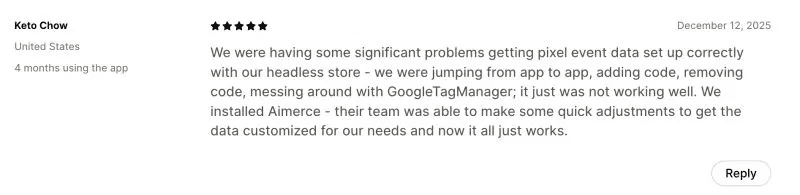 Keto Chow's five-star Shopify App Store review of Aimerce describing their headless tracking fix
Aimerce supports headless Shopify stores on the Growth plan, with separate integration paths for Hydrogen and for custom JavaScript builds like Next.js. Because purchases reach Meta and Google server-side from Shopify's order data, orders placed through Shop Pay, Apple Pay, or PayPal are captured the same way as any other. The verification steps above still matter. The gap they're built to catch is just smaller from the start when the implementation isn't being pieced together by hand.
FAQ
When should tracking be verified after a Shopify headless migration? Within the first week of launch, not the first quarter. Use Meta's Test Event Code tool immediately after launch, then confirm with a Meta-to-Shopify order comparison within a few days.
What's the most commonly missed event in a headless migration? Express checkout coverage, meaning Shop Pay, Apple Pay, and PayPal, since these skip the standard checkout flow most manual implementations are built around.
Does a headless migration checklist need to include multiple Meta Pixels? Yes, if the brand runs more than one. Each pixel needs its own verification. A clean check on one pixel doesn't confirm anything about a second.
What's the fastest way to catch a tracking gap right after migration? Meta's Test Event Code tool in Events Manager shows events landing in real time as you test your own storefront, so gaps show up within minutes instead of waiting for weekly data to look off.
Do I need cross-domain tracking after moving to headless? If your new frontend and your checkout run on different domains, yes. Without it, a shopper's session splits in two and purchases lose the click data that led to them.
Sources
[1] Shopify App Store, "Aimerce reviews,"
[2] Aimerce, "The Truth About Your EMQ Scores,"
[3] Aimerce, "How to Fix Event ID Deduplication Errors in Meta Events Manager,"
[4] Aimerce, "How to Set Up Server-Side Tracking for Shopify,"
Related reading
30-Day Aimerce Pixel Free Trial