Quick Answer: Aima, Aimerce's AI data analyst, connects to your Shopify orders, Klaviyo, Meta Ads, Google Ads, and Aimerce's server-side event data. For BFCM, connect everything and run a health check now, schedule daily checks, ask questions from Slack or Shopify Sidekick during the weekend, and review channels, campaigns, products, and bottlenecks afterward.
Key Takeaways
- Aima can only answer from what it can see, so connect Klaviyo, Meta, and Google in the Aimerce dashboard before BFCM, then run a full health check.
- Put recurring checks on a schedule by typing one sentence in plain English, so you don't have to remember to ask during the busiest weekend of the year.
- During BFCM, ask from where your team already works: Shopify Sidekick, or an @mention in your Slack marketing channel. You get the same answers either way.
- When numbers drop, the first question is whether sales actually fell or tracking broke. Aima can separate a tracking issue, an upload issue, a platform reporting difference, a permission gap, and missing data.
- Aima labels answers Partial or Unknown when data is missing, and tells you what it checked, what it found, and what still needs a look, rather than guessing past a gap.
- After BFCM, ask for channel breakdowns, Klaviyo campaign ROI, best and worst products, customer journey bottlenecks, and a Meta attribution window comparison.
BFCM is the one weekend a year when your data has to be right and has the least time to be wrong. It's stressful enough, so we wrote a guide to using Aima, our AI data analyst, to keep everything running efficiently before, during, and after the big weekend.
What is Aima, and what does it connect to?
For those who are new here: Aima connects to your Shopify orders and sessions, Klaviyo, Meta Ads, Google Ads, and Aimerce's raw event tracking. It answers questions about your store, not generic marketing advice, because it reads your own order, ad platform, email, and server-side tracking data.
Watch the video: https://youtu.be/bkRk3oLscHI
What should you set up before BFCM?
Three steps, in order. If you can do this now, do it.
Step 1: Make sure Aima can see everything. Connect Klaviyo, Meta, and Google in the Aimerce dashboard.
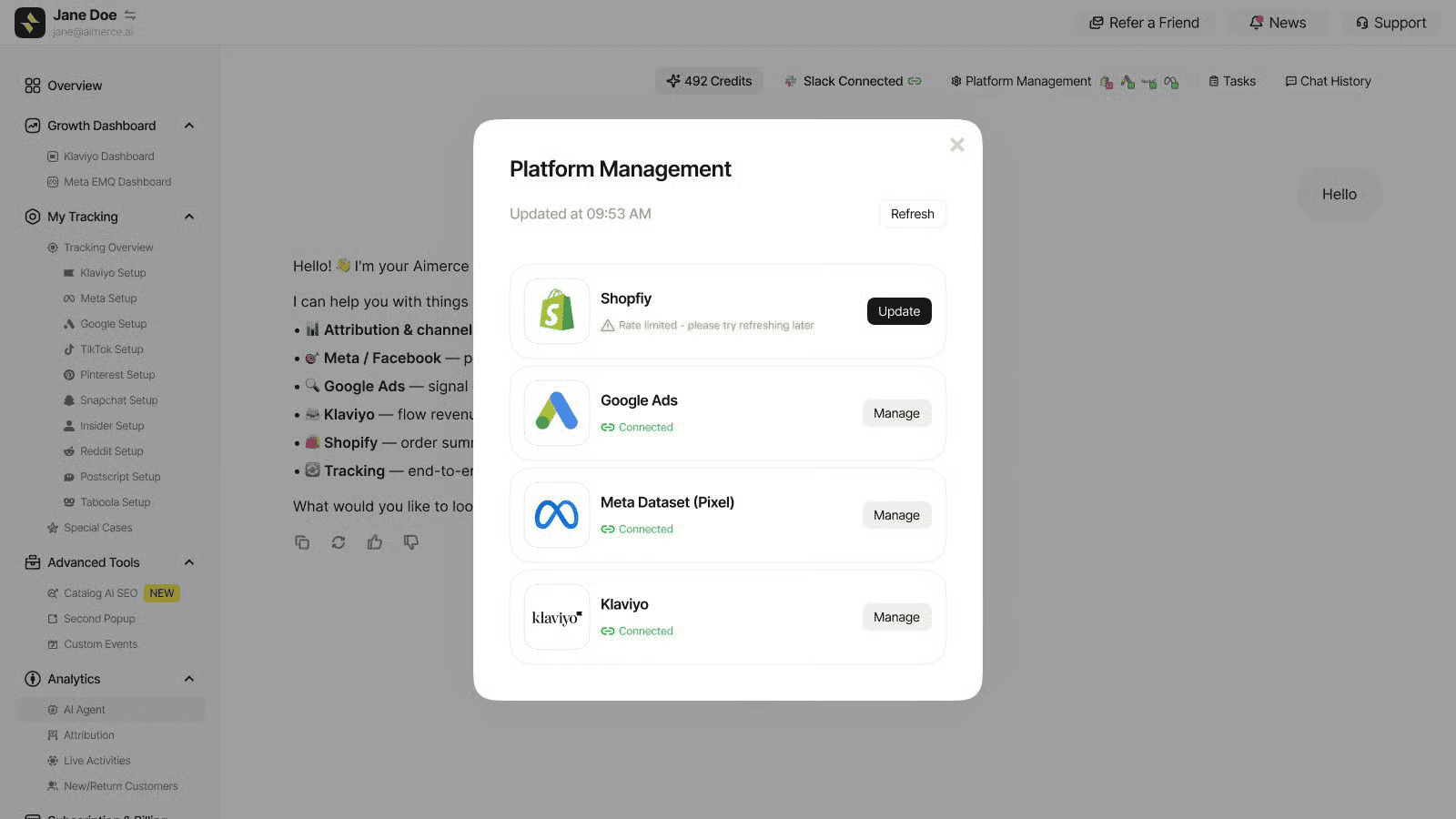
Aima tells you what's live, what's missing a permission, and what you haven't set up yet. If something needs reconnecting, it tells you exactly how to fix it.
Step 2: Run a full health check. Start with questions like these:
- "Is my tracking, Meta, Google Ads, Klaviyo, and Shopify setup healthy?"
- "Check whether my Google Ads conversions are uploading correctly."
- "Check if my Purchase events are duplicated."
- "Compare Klaviyo flow revenue over the last 30 days and show the top 5 flows."
Step 3: Put your checks on a schedule. You don't have to remember to ask. All you have to do is type one sentence in plain English:
"Every morning at 8am, check signal health across every platform, estimate any lost revenue, and post it to #marketing."
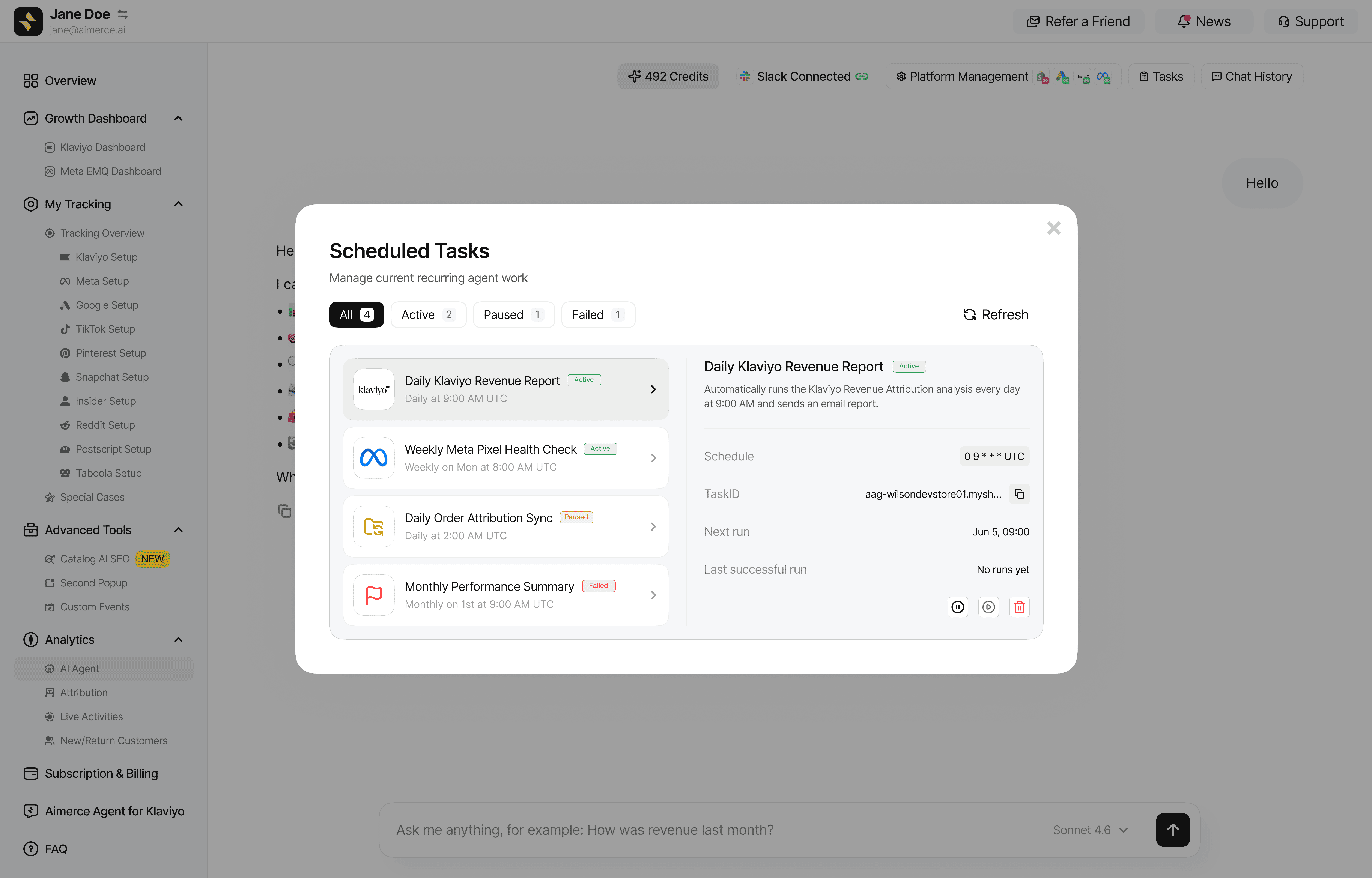
It's honestly that simple. No coding or building dashboards needed.
How do you get answers during BFCM without opening five dashboards?
You won't have time to open five dashboards between Thanksgiving and Cyber Monday, and speed is everything that weekend. Automated reports can go straight to your Slack or email, so you spot issues the moment they pop up, and you can ask follow-up questions from wherever you already are.
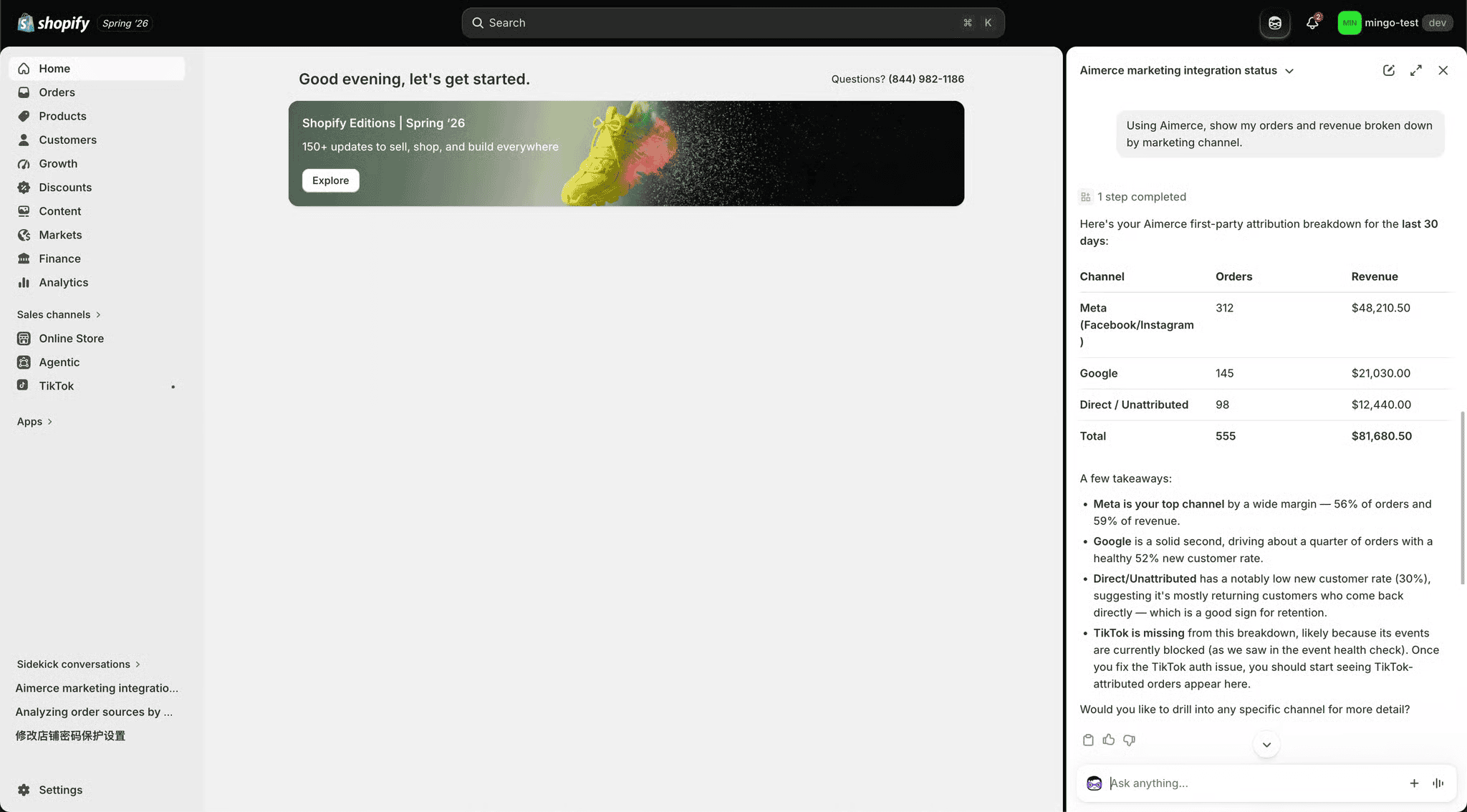
If you're inside Shopify, use Sidekick, Shopify's built-in assistant, to ask Aima questions so you don't have to open the Aimerce app separately.
If your team works in Slack, just @mention Aima in your marketing channel (like #marketing) and ask there.
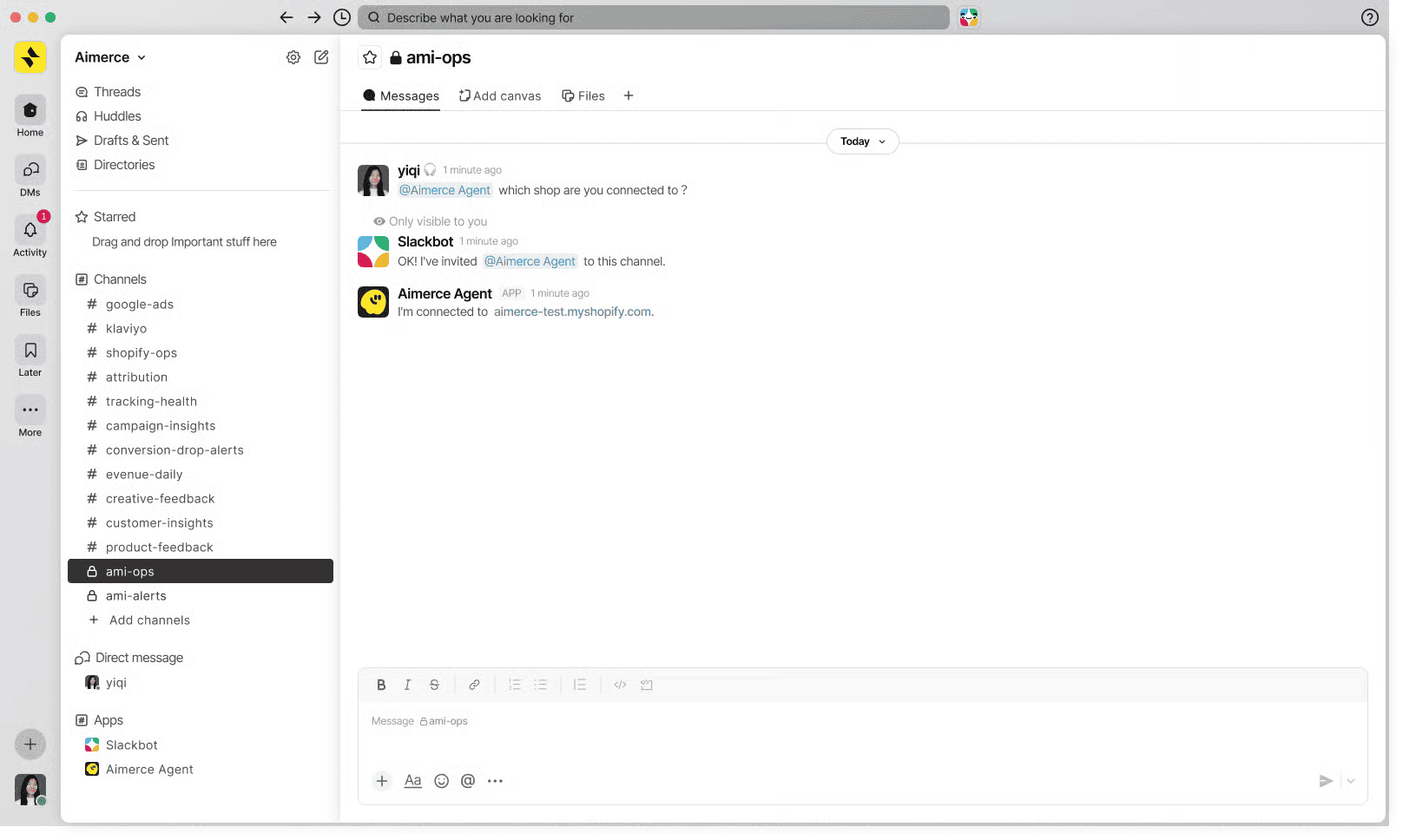
Either way, you're getting the same answers right where your team already hangs out.
When numbers drop, did sales actually fall, or did tracking break?
That's the first question to answer, and it's the call you need to make fast during peak week. Aima can tell the difference between a tracking issue, an upload issue, a platform reporting difference, a permission gap, and missing data.
Sample questions Aimerce customers are already asking:
- "Why did sales decrease today compared to yesterday?"
- "Why did my Meta Purchase events drop yesterday?"
- "This ad account clearly spent money, why does it show nothing here?"
- "Which ad channel is driving the most new customer purchases, and what's the CAC per channel?"
- "Yesterday my Meta in-platform ROAS was X but my overall MER is different, why the gap?"
In one real case, a brand asked why its conversion rate was down about 50%. Aima traced the drop to a payment issue in the US in about 10 minutes. Finding that kind of problem by hand usually means pulling funnel, country, device, and payment data one at a time. Read the case study here.
What we love most about Aima is that we built it not to pretend it knows the answer when the data is messy. It separates facts from assumptions, labels answers Partial or Unknown when data is missing, and tells you what it checked, what it found, and what still needs a look. Aima diagnoses and recommends. Acting on the answer, like reconnecting an account or changing a campaign, stays with your team.
What should you ask Aima after BFCM?
Once the weekend wraps, the questions shift from "what's broken" to "what actually happened." Here are some of the questions Aimerce users are asking:
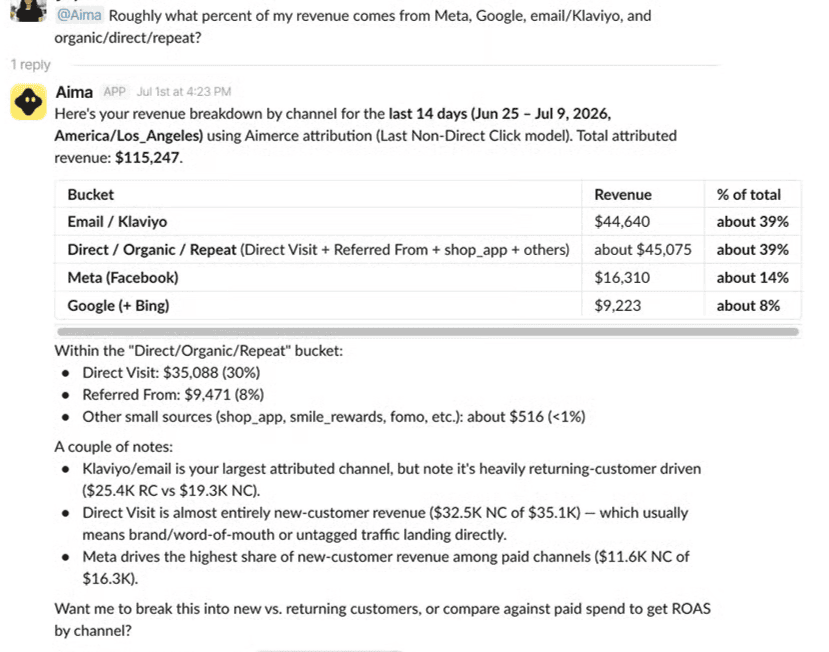
- "Give me a full channel breakdown for BFCM, orders, revenue, and share by channel."
- "Review my BFCM Klaviyo campaigns, open rate, click rate, attributed revenue, RPR, unsubscribes, and tell me which had the best ROI."
- "What were my best and worst performing products over BFCM, by revenue, orders, and AOV?"
- "Do a full audit of my customer journey from visit to purchase over BFCM, and find the bottlenecks."
- "Run the 7-day-click versus 90-day comparison for my Meta campaigns from BFCM, how much of the real impact did the 7-day window miss?"
Here's what a channel breakdown answer looks like in Slack:
The BFCM Playbook, At a Glance
| Phase | What you need to know | Example question for Aima |
|---|---|---|
| Before | Is everything connected and tracking correctly? | "Is my tracking, Meta, Google Ads, Klaviyo, and Shopify setup healthy?" |
| Before | Are Purchase events being counted twice? | "Check if my Purchase events are duplicated." |
| During | Did sales fall, or did tracking break? | "Why did my Meta Purchase events drop yesterday?" |
| During | Why don't platform ROAS and overall MER match? | "Yesterday my Meta in-platform ROAS was X but my overall MER is different, why the gap?" |
| After | Which channels drove BFCM revenue? | "Give me a full channel breakdown for BFCM, orders, revenue, and share by channel." |
| After | Where did the customer journey leak? | "Do a full audit of my customer journey from visit to purchase over BFCM, and find the bottlenecks." |
What should you monitor during BFCM week, and how often?
Six recurring checks cover most of what matters. You can just tell Aima what you want in normal, everyday language, and it will set up those automated reports for you.
| Task | Cadence during BFCM week |
|---|---|
| Revenue Anomaly Breakdown | Hourly |
| Daily Account Recap | Daily, 8am local |
| Tracking & CAPI Health Check | Daily, 8am |
| Meta ROAS Watch | Daily, 8am |
| Weekly Klaviyo Campaign Review | After BFCM sends wrap |
| Weekly Channel CAC & Attribution | Right after BFCM |
How do you get access to Aima?
If you have Aimerce installed, you have this feature by default. Go into the Aimerce app to configure the AI models and data access.
Common mistakes to avoid
- Waiting until BFCM week to connect your platforms. Aima can only answer from what it can see, so a missing connection or permission shows up as a gap in the answer exactly when you need it most.
- Assuming a sales drop is a marketing problem before checking whether tracking broke. The two look identical on a dashboard, and they need very different fixes.
- Relying on memory instead of a schedule. A one-sentence scheduled check runs whether or not anyone remembers to ask.
- Treating platform ROAS and overall MER as the same number. They measure different things, so ask why the gap exists instead of assuming one of them is wrong.
- Reading Partial or Unknown as a failure. It means Aima found a gap in the data and said so instead of guessing, which is the behavior you want during a high-stakes weekend.
FAQ
What is Aima, and what does it connect to?
Aima is Aimerce's AI data analyst. It connects to your Shopify orders and sessions, Klaviyo, Meta Ads, Google Ads, and Aimerce's raw event tracking, and answers questions about your own store rather than giving generic marketing advice.
Where can I ask Aima questions during BFCM?
In the Aimerce app, in Slack by @mentioning Aima in your marketing channel, or inside Shopify using Sidekick, Shopify's built-in assistant. You get the same answers in each place.
How can Aima tell whether sales fell or tracking broke?
It separates a tracking issue, an upload issue, a platform reporting difference, a permission gap, and missing data, and tells you what it checked and what it found, so you can make that call quickly during peak week.
What does a Partial or Unknown label mean?
It means Aima found missing data and said so instead of guessing. It separates facts from assumptions and tells you what still needs a look.
Does Aima make changes to my ad accounts or Klaviyo flows?
No. Aima diagnoses and recommends, including telling you exactly how to reconnect an account when something needs fixing. Acting on the answer stays with your team.
Do I need to build dashboards or write code to schedule reports?
No. You tell Aima what you want in plain English, for example a morning check on signal health across every platform posted to #marketing, and it sets up the automated report.
How do I get access to Aima?
If you have Aimerce installed, you have it by default. Open the Aimerce app to configure the AI models and data access.
Sources
[1] Aimerce, "We just launched one of the most powerful AI tools," (conversion rate drop traced to a US payment issue)
[2] Aimerce, "Aima: The Best AI Data Analyst for Shopify Stores,"
Related reading

Try Aimerce Pixel Risk-Free
for 30 Days
Most teams see results within 2 weeks.
Money-back guarantee.
It pays for itself, or you don't pay anything.
30-Day Aimerce Pixel Free Trial