Quick Answer: Onboarding isn't the finish line. Aimerce runs continuous checks after install, twice-daily health checks from day one, 30-minute Meta connection scans, daily Google Ads checks, continuous purchase reconciliation, event quality monitoring, subscription renewal verification, and attribution accuracy fixes, all running whether or not anyone asks, with specific fixes sent directly rather than a vague dashboard alert.
Key Takeaways
- New install health checks run twice a day from the moment you install, confirming the pixel is verified, a destination is connected to a real account, and events are actually arriving. A connected-but-silent store gets caught the same day, not weeks later.
- Meta connection monitoring runs every 30 minutes, every day, cutting detection time for a broken connection to under 30 minutes, with the specific fix sent directly rather than a generic alert.
- Purchase reconciliation runs continuously, comparing Shopify orders, events sent, and events the platform confirms receiving, regularly catching a second, forgotten pixel double-counting purchases.
- Event quality monitoring checks that purchase events carry the identity and address details driving match quality, not just whether an event fired at all, since a "complete" looking event can still have a hollow payload that quietly underperforms.
- Every check runs automatically, whether or not you ask. When something needs your attention, you get a specific fix, not a vague dashboard alert, and when something is on Aimerce's side, it gets fixed and you're told, not silently patched.
People often ask, "Once we onboarded Aimerce, do you do anything else afterward?" The answer is 100% yes.
Here's full transparency about what's happening after onboarding. There's a lot happening behind the scenes to make sure everything stays correct, not just at setup, but every day after.
What runs from the moment you install?
Two checks specifically, both starting immediately rather than waiting for your first full day of data.
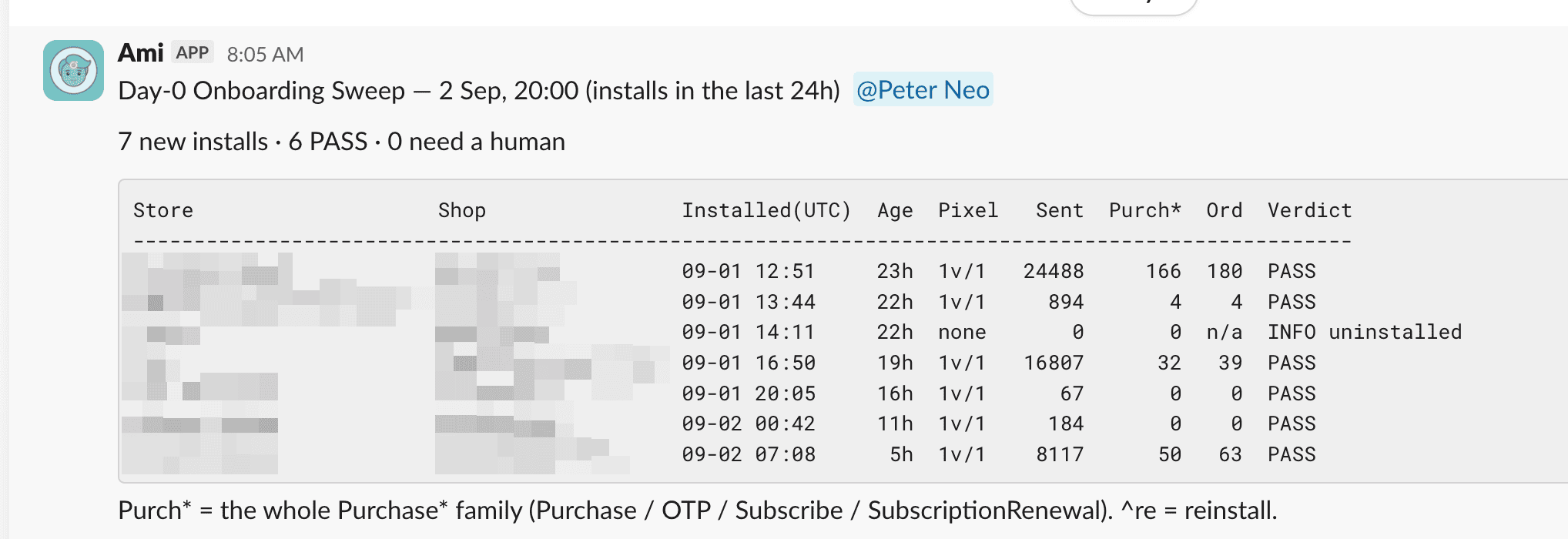
New install health checks run twice a day, starting the moment you install. This confirms the pixel is verified, a destination is connected to a real account, and events are actually arriving, not just configured to arrive. A connected-but-silent store gets caught the same day. A deeper reconciliation runs the morning after your first full day, so "healthy" isn't a guess.
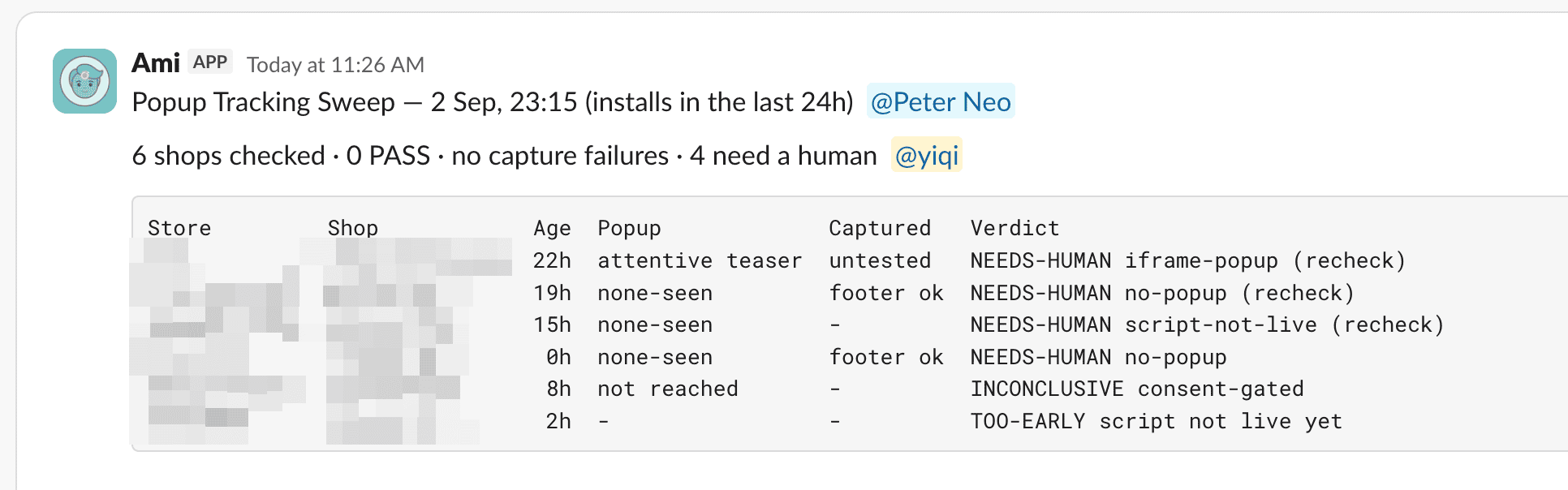
Email popup capture runs twice a day via an automated browser acting like a real shopper. It waits for the popup, types a test email, and confirms it's captured as a Lead. This catches popup tools that quietly stop exposing email to tracking after an update, flagging the gap before your first campaign depends on that data.
What runs every day after that?
Five ongoing checks, each covering a different way tracking quietly breaks after the initial setup is already confirmed working.
Meta connection monitoring runs every 30 minutes, every day, scanning for stores whose Meta events are being rejected due to a broken connection. It confirms a failure is real, not a momentary blip, before reaching out, and tells you exactly what to reconnect, cutting detection time to under 30 minutes.
Google Ads connection monitoring runs daily, checking every connected ad account individually. This catches a dead account hiding behind a healthy one, and sends the right fix for your specific failure rather than a generic message. Its first run found more than a dozen stores with dead connections, some dark for over a month.
Purchase reconciliation runs continuously, comparing orders in Shopify, events sent, and events the platform confirms receiving. It flags mismatches with a specific cause, not a vague "numbers look off," and regularly catches a second, forgotten pixel double-counting purchases, letting you shut off the duplicate and trust your numbers again.
Event quality monitoring checks that purchase events carry the identity and address details that actually drive match quality, running continuously alongside volume monitoring. This catches "complete" looking events with hollow payloads that quietly underperform, keeping "looks fine" and "is fine" meaning the same thing.
Subscription renewal verification runs as a daily sweep for stores selling subscriptions, verifying every order against real order history before changing anything. This catches renewal orders misclassified as brand-new purchases, so a loyal subscriber's renewal isn't reported as a fresh win.
Attribution accuracy checks detect affected stores within days of install and fix how the real campaign ID is read, turning unnameable rows in attribution reports into actual campaign names. This runs as standard coverage, no separate request needed.
What Runs When, At a Glance
| Check | Frequency | What it catches |
|---|---|---|
| New install health checks | Twice daily, from install | Verified pixel, real destination connection, events actually arriving |
| Email popup capture | Twice daily | Popup tools that stop exposing email to tracking after an update |
| Meta connection monitoring | Every 30 minutes | Rejected events from a broken connection |
| Google Ads connection monitoring | Daily, per account | A dead account hiding behind a healthy one |
| Purchase reconciliation | Continuous | Order/event mismatches, including a forgotten duplicate pixel |
| Event quality monitoring | Continuous | Complete-looking events with hollow, low-match-quality payloads |
| Subscription renewal verification | Daily sweep | Renewals misclassified as brand-new purchases |
| Attribution accuracy | Within days of install | Unreadable campaign IDs in attribution reports |
What do you actually have to do?
Honestly, nothing. Every check above runs whether or not anyone asks. When something needs your attention, you get contacted with the specific fix, not a vague dashboard alert. When something is on our side, it gets fixed and you get told, never quietly patched with the hope you never notice.
That's what trust comes down to: not a promise that nothing ever breaks, but whether you hear it within 30 minutes or from a client three weeks later. The one thing that helps on your end: keep your contact email in Shopify current, that's where 3 a.m. fix instructions go.
We're listening, every 30 minutes, every day, whether or not you ever have a reason to ask. You can trust us on that.
FAQ
Does monitoring stop once onboarding is complete? No. Health checks start twice daily from the moment of install, and several checks, Meta connection monitoring, purchase reconciliation, event quality, run continuously or daily indefinitely afterward.
How fast does Aimerce catch a broken Meta connection? Meta connection monitoring runs every 30 minutes, confirming a failure is real before reaching out, which cuts detection time to under 30 minutes from when the connection actually broke.
What happens if a duplicate, forgotten pixel is double-counting purchases? Purchase reconciliation compares Shopify orders, events sent, and events the platform confirms receiving continuously, and regularly catches exactly this pattern, flagging the specific cause so the duplicate can be shut off.
Does Aimerce check whether events are just firing, or whether they're actually useful? Both. Event quality monitoring runs continuously alongside volume monitoring, specifically checking whether purchase events carry the identity and address details that drive match quality, not just whether an event fired at all.
How does subscription renewal handling actually work? A daily sweep verifies every order against real order history before changing anything, catching renewal orders that would otherwise get misclassified as brand-new purchases and reported as a fresh conversion.
What's expected from a merchant after onboarding is done? Nothing operationally. The one thing worth keeping current is the contact email on file in Shopify, since that's where time-sensitive fix instructions get sent if something needs attention.
Related reading

Try Aimerce Pixel Risk-Free
for 30 Days
Most teams see results within 2 weeks.
Money-back guarantee.
It pays for itself, or you don't pay anything.
30-Day Aimerce Pixel Free Trial