Quick Answer: Microsoft Advertising's Conversions API (CAPI) sends conversion events directly from your server to Microsoft Advertising, covering both Bing search ads and Microsoft Copilot ads on the same campaigns, no separate setup needed for Copilot specifically. Setup requires a UET Tag ID and a separate Conversions API token, plus a distinct client-side ID Sync pixel for remarketing, since CAPI events alone don't carry the same browser context UET JavaScript captures.
Key Takeaways
- Microsoft Advertising's Conversions API sends conversion events directly from your server, and covers both Bing search ads and Microsoft Copilot ads on the same campaigns, no separate setup needed for Copilot specifically.
- Setup requires two separate credentials: a UET Tag ID and a Conversions API token, generated through a specific path inside the UET tag editor. The feature is still rolling out account by account, if you don't see the option, your account manager needs to enable it.
- MSCLKID, Microsoft's click identifier, needs a suggested 90-day retention window on your end, the same category of identifier as fbclid or ttclid, but with a longer recommended retention period than the deduplication windows used elsewhere.
- ID Sync is a separate, required mechanism for audience creation and remarketing, and it has to be implemented as a client-side pixel specifically, not a server-side call, since Microsoft needs to read browser context at the moment the sync happens.
- Deduplication requires matching eventId, eventName, and the same UET tagId across UET JavaScript and CAPI, and eventTime has to fall within the last 7 days or the event gets rejected outright.
What is Microsoft Advertising's Conversions API, and why does it need a separate token from UET?
CAPI is Microsoft Advertising's server-side solution for sending conversion and customer interaction data directly from an advertiser's systems, rather than relying solely on browser-based Universal Event Tracking (UET).
Microsoft recommends running CAPI alongside UET, not instead of it. UET captures browser-based activity and page context; CAPI provides a server-side path for events and details that occur after UET fires, or that a browser can't reliably capture at all. The two need separate authorization because they're technically distinct delivery paths to the same UET tag, the token authorizes server-to-server delivery specifically, generated through Use Conversions API in the tag's Set up tagging section, and it's a different credential from the tag ID itself. A single customer account can contain multiple UET tags, and if your account has multiple customer IDs, use the primary one unless Microsoft Advertising support confirms otherwise.
What is MSCLKID, and how is it different from relying on UET alone?
MSCLKID is Microsoft's click identifier, appended to your landing page as a query string parameter after someone clicks your ad, when auto-tagging is enabled. It plays the same role as Meta's fbclid or TikTok's ttclid, connecting a specific ad click to whatever conversion happens afterward.
Since a server-side CAPI event isn't generated by a browser script the way a UET JavaScript event is, capturing and forwarding MSCLKID becomes your responsibility rather than something that happens automatically. Store the most recent value in a first-party cookie, local storage, or a server-side store, and overwrite it whenever a newer one is captured. Microsoft's own suggested retention period is 90 days, noticeably longer than the 48-hour or 7-day deduplication windows used by other ad platforms, worth knowing since it changes how long you need to hold onto the identifier before it's no longer useful. Don't rely on a visitor ID alone for attribution when MSCLKID is available, it's the stronger signal of the two.
Why does ID Sync need its own separate, client-side implementation?
Because CAPI events are sent server-side and may not include the same browser context that UET JavaScript can observe directly, which matters specifically for audience creation and remarketing.
ID Sync connects your own visitor identifier to Microsoft's identifiers, and it's required for dynamic remarketing, strongly recommended for conversion measurement quality more broadly. The implementation has a specific constraint worth getting right: it has to be a client-side pixel, not a server-side call, so Microsoft can read the necessary browser context when the sync actually occurs. Fire it on as many pages as practical, at minimum once per session, ideally on the first page view. The sync pixel goes to https://c.bing.com/c.gif with specific required parameters, a customer ID formatted as BACID_

How does deduplication actually work between UET and CAPI?
By matching a shared, stable eventId, a compatible eventName, and the same UET tagId across both delivery paths, not just one of those three.
When the same conversion could be reported by both UET JavaScript and CAPI, Microsoft needs all three to line up to recognize them as the same event rather than counting it twice. Generate the eventId deterministically and reuse it across both paths for that specific conversion. Getting this wrong, sending a new random ID from the server side instead of reusing the browser-generated one, breaks deduplication the same way it does on every other platform that uses this pattern.
How do you connect Microsoft CAPI to Aimerce specifically?
Once you have your UET Tag ID and Conversions API token from Microsoft, the Aimerce side is a two-field form, not a separate integration to build.
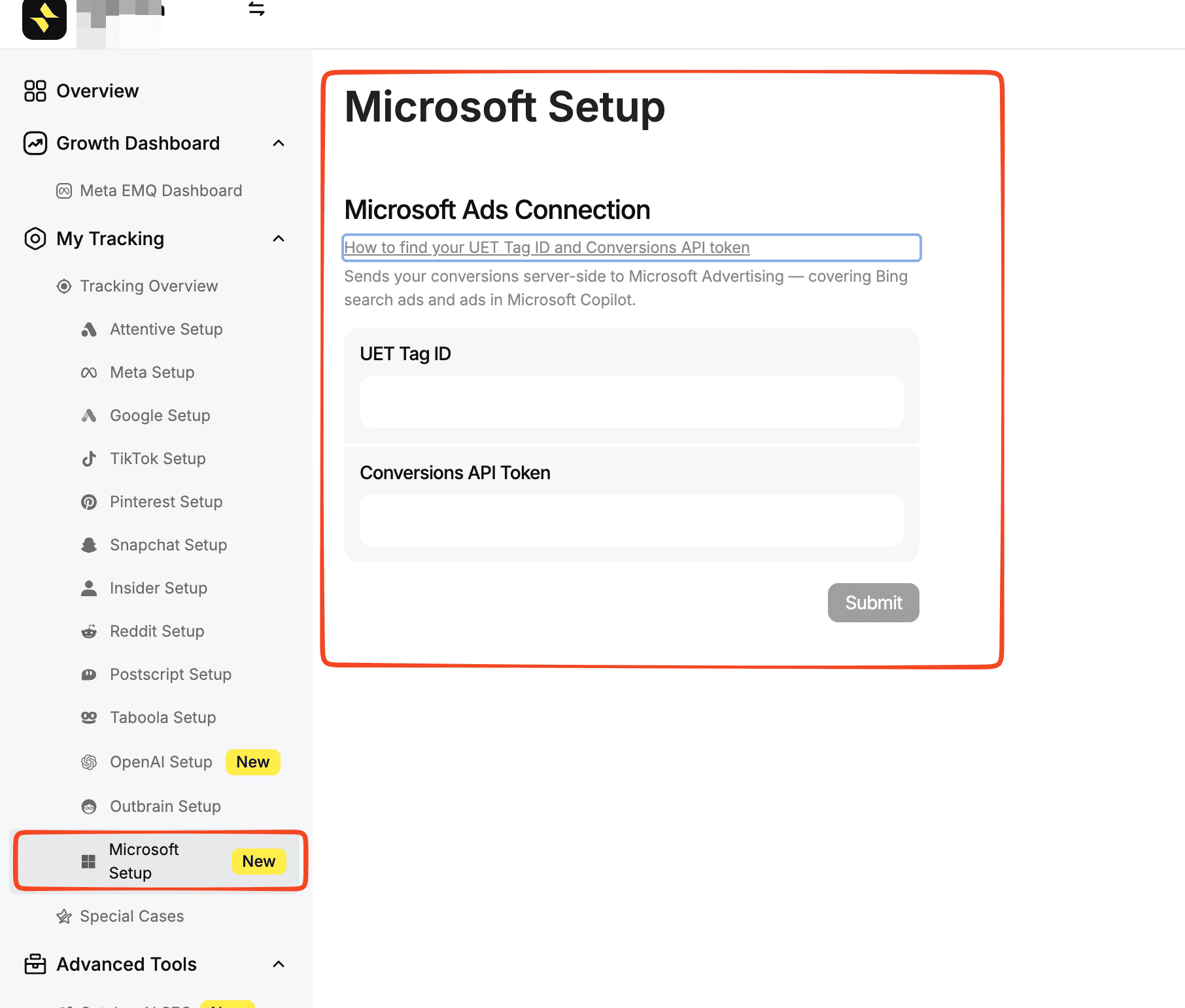
In your Aimerce dashboard, go to Tracking, then Microsoft Setup. Paste the UET Tag ID and the Conversions API token into their respective fields, then submit. Aimerce verifies both credentials immediately, before you move on to anything else, by sending a single test event named aimerce_verify. That event is designed to match no conversion goal on your Microsoft account, so it confirms the connection is live without ever showing up in your actual reporting or inflating any conversion count.
Once that verification succeeds, the connection itself is live, your store's Purchase, Add to Cart, Begin Checkout, and other mapped events start flowing to that UET tag through CAPI automatically. What's left on your end is Microsoft-side, not Aimerce-side: creating the Custom event goals that match Aimerce's event names, using the mapping table above, so Microsoft actually recognizes and reports on the events already arriving. No additional code, no separate script, and no GTM container are required for the connection itself, the credentials are the entire integration.
If the connection fails verification, double-check that the Conversions API token was copied from the same UET tag whose ID you entered, a token generated for one tag won't authorize delivery to a
What events does Aimerce actually send, and how do they map to Microsoft's conversion goals?
A set of core ecommerce events, each mapped to a specific event name Microsoft expects, which you then create as a Custom event goal on your end.
| Aimerce event | Event name sent to Microsoft |
|---|---|
| Purchase | purchase |
| Begin checkout | begin_checkout |
| Add payment info | add_payment_info |
| Add to cart | add_to_cart |
| Product view | view_item |
| Search | search |
| Sign up | sign_up |
| Email captured | lead |
For most stores, a single Purchase goal, with revenue value and currency enabled, since Aimerce sends both, is the right place to start rather than configuring every event as its own goal on day one. Page views are also sent as native page load events, so Destination URL goals work without any additional custom event configuration.different tag ID, even within the same account.
Microsoft CAPI Compared to Other Platforms Covered This Session
| Platform | Click ID name | Deduplication basis | Separate audience-sync mechanism required? |
|---|---|---|---|
| Meta | fbclid (stored as fbc) | Shared event_id and event_name, 48-hour window | No |
| Snapchat | ScCid | Shared event_id and timestamp, 48-hour window | No |
| Taboola | tblci (landing) / click-id (postback) | Single postback call, no separate dedup window | No |
| rdt_cid | Shared event_id, 7-day window | No | |
| Microsoft Advertising | msclkid | Shared eventId, eventName, and UET tagId, no separate stated window | Yes, ID Sync, a distinct client-side pixel |
What happens when an event fails validation?
Two different outcomes depending on whether the failure is a validation error or a validation warning, and the distinction matters for whether you notice the problem at all.
A validation error makes the entire event invalid, a missing required field, an unsupported eventType, or an invalid eventTime outside the accepted window. A validation warning applies to optional fields whose values can't be accepted, an invalid referrerUrl or a malformed hashed identifier, for example, the API simply removes that specific field and processes the event without it, still returning success. That second case is worth paying attention to specifically: an HTTP 200 response doesn't guarantee every field you sent actually made it through, a warning means partial data loss even though the request technically succeeded. For batch uploads specifically, one invalid event blocks the entire batch by default unless continueOnValidationError is set to true, which allows valid events to process while flagging the specific ones that failed by index.
Does this cover Microsoft Copilot ads too?
Yes, without a separate setup. Copilot ads run on your regular Microsoft Advertising campaigns, so the same UET tag and CAPI connection that handles Bing search ads covers Copilot placements automatically.
How do you actually set this up, start to finish?
Two Microsoft-side steps to get your credentials, then one Aimerce-side step to connect them, followed by creating the matching conversion goals.
Find or create your UET tag. In Microsoft Advertising, go to Tools, then Conversion tracking, then UET tags. Your UET Tag ID is the number shown in the tag list. If you don't have one yet, create one and the new tag's ID appears in the same list.
Generate the Conversions API token. Select your tag using the edit icon, select Save and next, and in the Set up tagging section, select Use Conversions API. Click Copy Token, then Next, then Done. If you don't see this option yet, that's the rollout in progress, contact your account manager to have it enabled.
Connect the two credentials in Aimerce. This step has its own section above, covering the exact navigation path and what happens during verification.
Create conversion goals for the events Aimerce sends. In Conversion tracking, then Conversion goals, create a Custom event goal whose Action matches the event name in the mapping table above. Start with a single Purchase goal if you're not sure where else to begin.
Common mistakes to avoid
- Treating ID Sync as optional or implementing it server-side. It's required for remarketing specifically, and it has to be a client-side pixel to capture the browser context Microsoft needs.
- Generating a new random eventId for the CAPI event instead of reusing UET's value. This breaks deduplication across all three required matching fields, not just one.
- Assuming an HTTP 200 response means every field was accepted. A validation warning silently strips an invalid field while still returning success, worth checking warning details, not just the status code.
- Sending eventTime outside the accepted 7-day window. This produces a hard validation error, not a warning, and the event is rejected outright.
- Assuming Copilot ads need a separate connection. They run on the same campaigns as Bing search ads, covered by the same UET tag and CAPI setup.
FAQ
Is Microsoft Advertising's Conversions API available on every account yet? Not universally. It's rolling out account by account. If the Use Conversions API option isn't visible in your UET tag setup yet, your Microsoft Advertising account manager needs to enable it.
What is MSCLKID, and why does it matter for server-side tracking? MSCLKID is Microsoft's click identifier, appended to a landing page URL after an ad click. Since CAPI events are sent server-side rather than from a browser script, capturing and forwarding this value becomes the advertiser's responsibility, with a suggested 90-day retention window.
Do I need ID Sync if I'm already sending CAPI events? Yes, if audience creation or remarketing matters to your account. ID Sync is a separate, required mechanism, implemented as a client-side pixel, since CAPI events alone don't carry the same browser context Microsoft needs for those specific use cases.
How does Microsoft's deduplication actually work between UET and CAPI? By matching a shared eventId, a compatible eventName, and the same UET tagId across both delivery paths. All three need to align, not just the event ID alone.
Does Microsoft Advertising's Conversions API cover Microsoft Copilot ads? Yes, without any separate setup. Copilot ads run on the same Microsoft Advertising campaigns as Bing search ads, so the same UET tag and CAPI connection covers both.
What happens if I send an event with an invalid optional field, like a malformed hashed email? That specific field gets removed as a validation warning, and the event is still processed and returns success. The rest of the event's data goes through; only the invalid field is dropped.
How do I actually connect Microsoft CAPI to Aimerce once I have my credentials? In your Aimerce dashboard, go to Tracking, then Microsoft Setup, and paste your UET Tag ID and Conversions API token into their fields. Aimerce verifies the connection immediately with a test event that never shows up in your reporting, no code or GTM container required beyond entering the two credentials.
Sources
[1] Microsoft Advertising, "What is Conversions API?,"
[2] Aimerce, "Microsoft How to find your UET Tag ID and Conversions API token
Related reading

Try Aimerce Pixel Risk-Free
for 30 Days
Most teams see results within 2 weeks.
Money-back guarantee.
It pays for itself, or you don't pay anything.
30-Day Aimerce Pixel Free Trial