Quick Answer: The most useful Klaviyo hacks for BFCM are settings that already exist in your account. Check "Determine recipients at send time" on scheduled campaigns, send to several non-overlapping segments to unlock Audience Breakdown, turn on anonymous visitor tracking, switch off Smart Sending in your flows, match your popup trigger to your offer and add a teaser, link a preference page, check UTM tracking on every flow email, send your first abandoned cart email within 20 minutes to 2 hours, save your best offers for high predicted CLV customers, suppress unengaged profiles, write subject lines people want to open, and test every email on mobile.
Key Takeaways
- Most of these hacks are settings that already exist in Klaviyo and take minutes to change.
- How fast you see results depends on traffic. Prioritize high-impact, low-effort changes if your volume is small.
- Sending to several non-overlapping segments unlocks Audience Breakdown, so you can see which groups actually buy.
- Turn Smart Sending off in flows during BFCM, so daily campaigns don't block your most important reminders.
- Suppress unengaged profiles instead of deleting them, to protect deliverability and lower your bill.
With Black Friday days away, here are some of the hacks our Klaviyo partner has used across more than 800 projects.
Most of them are settings that already exist in your account and are pretty easy.
Before we start, keep in mind that the impact of your optimizations depends entirely on how much traffic you're getting. If you've got 5,000 people hitting your abandoned checkout every month, you'll see the results of a change pretty fast. But if it's only 50, you'll be waiting forever for real data, so just stick to the high-impact stuff that takes the least amount of work.
So, let's start.
1. Why turn on "Determine recipients at send time"?
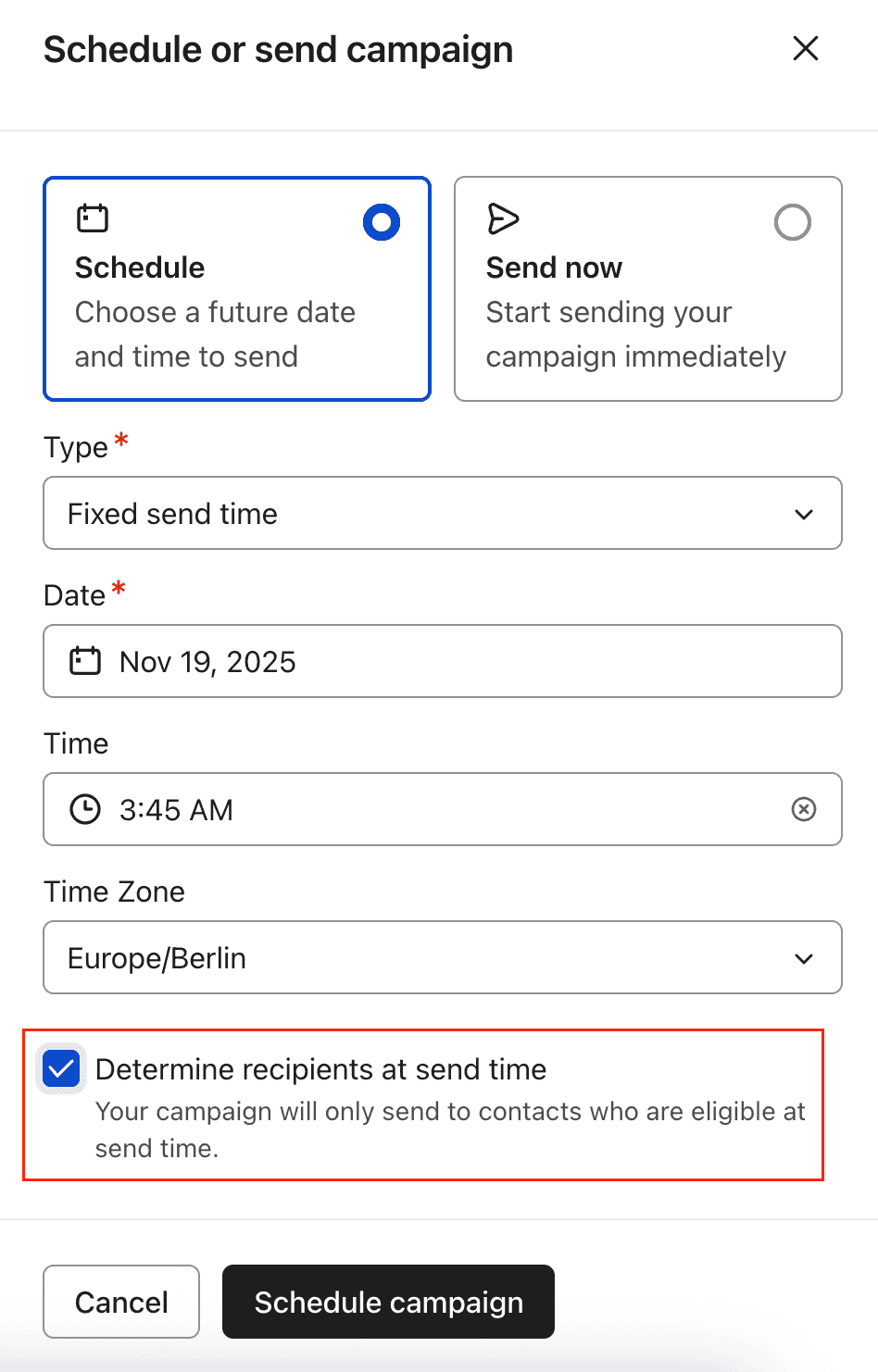
When you schedule a campaign, check "Determine recipients at send time." It's in the last step of scheduling, and it's off by default.
With it on, Klaviyo takes a fresh snapshot of your list or segment right before the email goes out. With it off, the audience is locked the moment you hit Schedule.
A lot changes in those days. You might send a bigger discount to someone who just bought with a smaller one, and that's a quick way to deal with a mountain of returns. You might also email people who no longer fit your segment's filters.
You can't combine it with sending in each recipient's local time zone, though. Klaviyo makes you pick one.
It's super easy to skip over this box, so add it to your pre-send routine.
2. How do you unlock Klaviyo's Audience Breakdown?
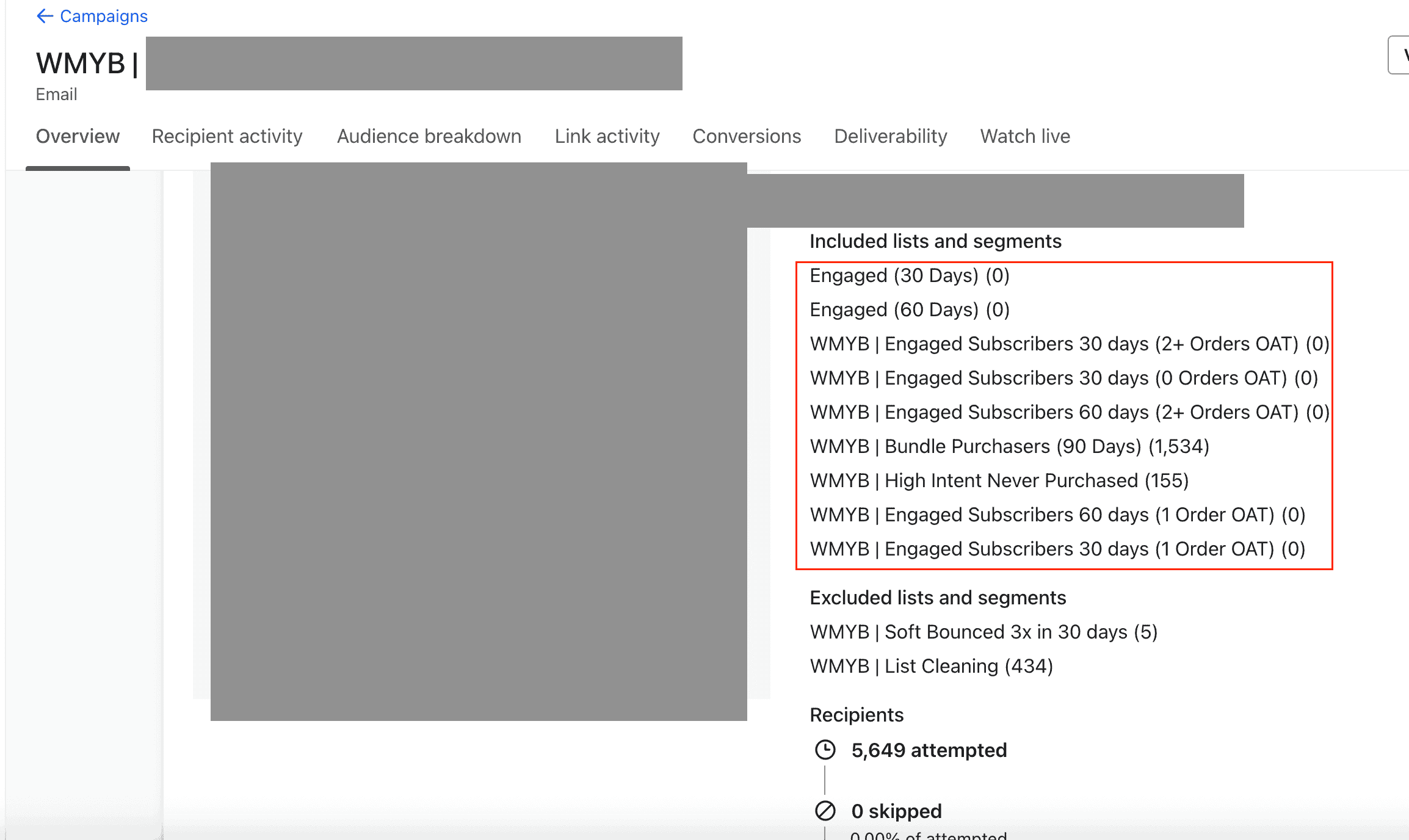
Audience Breakdown is effectively a hidden Klaviyo feature. It only appears when a campaign is sent to more than one list or segment.
Send to a single segment and you get one blended number. Send to several (engaged 30, 60, 90, and 120 days, split by 0, 1, and 2+ orders) and you can see exactly which group opened, clicked, and bought.
Here's the setup I'd use:
- Engagement windows that don't overlap: engaged in the last 0 to 30, 31 to 60, 61 to 90, and 91 to 120 days. For example, "engaged in the last 60 days but not the last 30."
- Order count: 0, 1, 2, and 3+ orders, all time.
Avoid overlapping segments in your BFCM campaigns. By using distinct segments, like 0 to 30 days vs. 31 to 60 days, you make sure each subscriber is counted only once, which keeps your data clean and your reporting accurate.
Focus on click and order metrics rather than open rates, because Apple's Mail Privacy Protection makes open data unreliable and inflated.
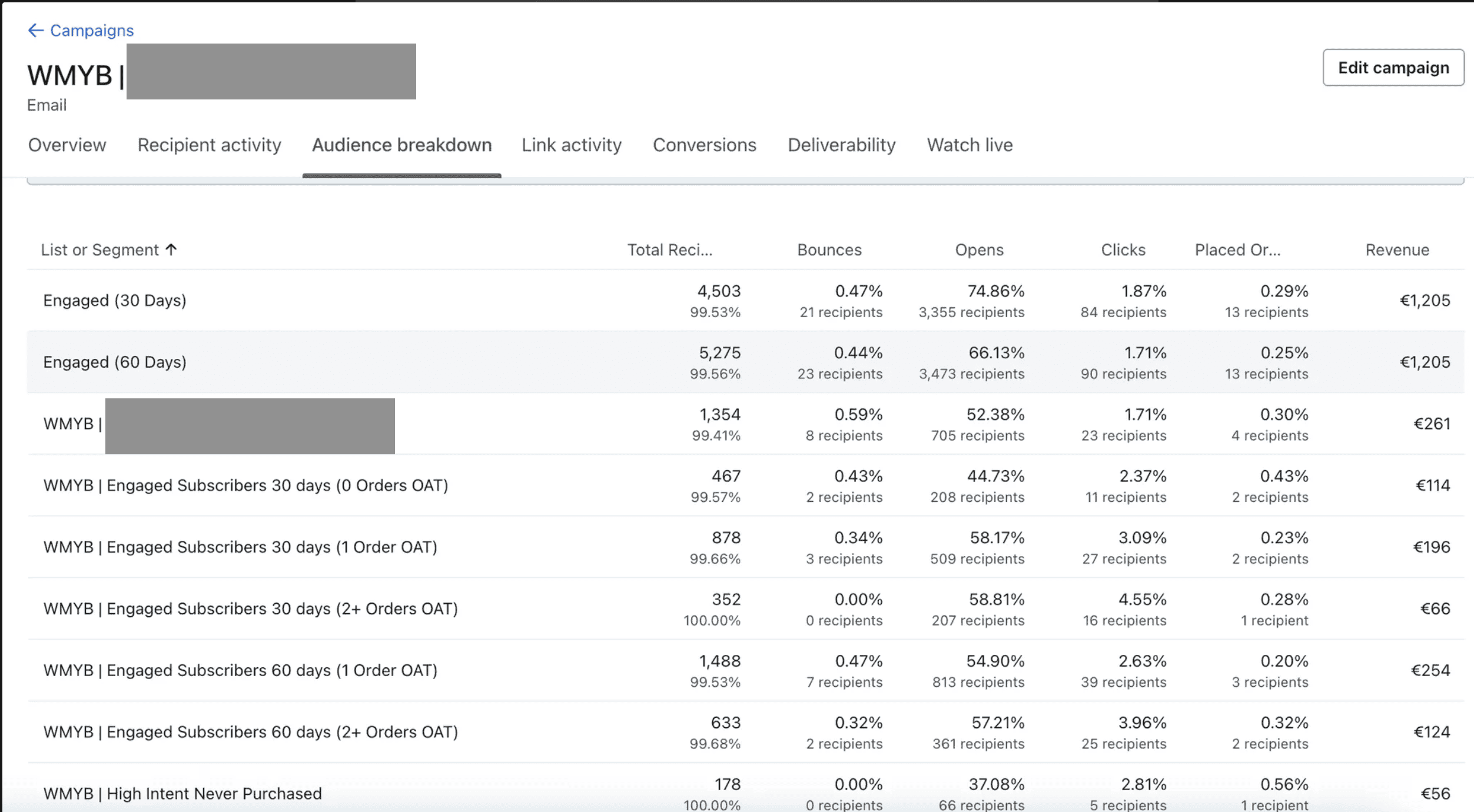
That's how you learn who buys what, and see which groups need bigger discounts to move and which loyal customers are happy with smaller offers, so you can build your future strategy on actual data.
If you've got a smaller list, don't try to use all 16 segments right away. The data will be too thin to tell you much. Start by segmenting by engagement or order history first, then layer them once you've got enough volume to see what's working.
3. Why turn on anonymous visitor tracking?
Make sure you've got anonymous visitor tracking turned on. It lets you see what people are doing on your site even before they sign up or buy, and once they do, Klaviyo automatically fills in all that past activity so you can see their full journey.
Think of a clerk in your store quietly watching a shopper: "Visitor X walked in, checked out the jackets, tried one on, and left." They're anonymous for now, but the second they sign up as Julia, Klaviyo automatically links that entire history to her. That's first-party data you'd otherwise throw away.
Klaviyo anonymous visitor tracking setting
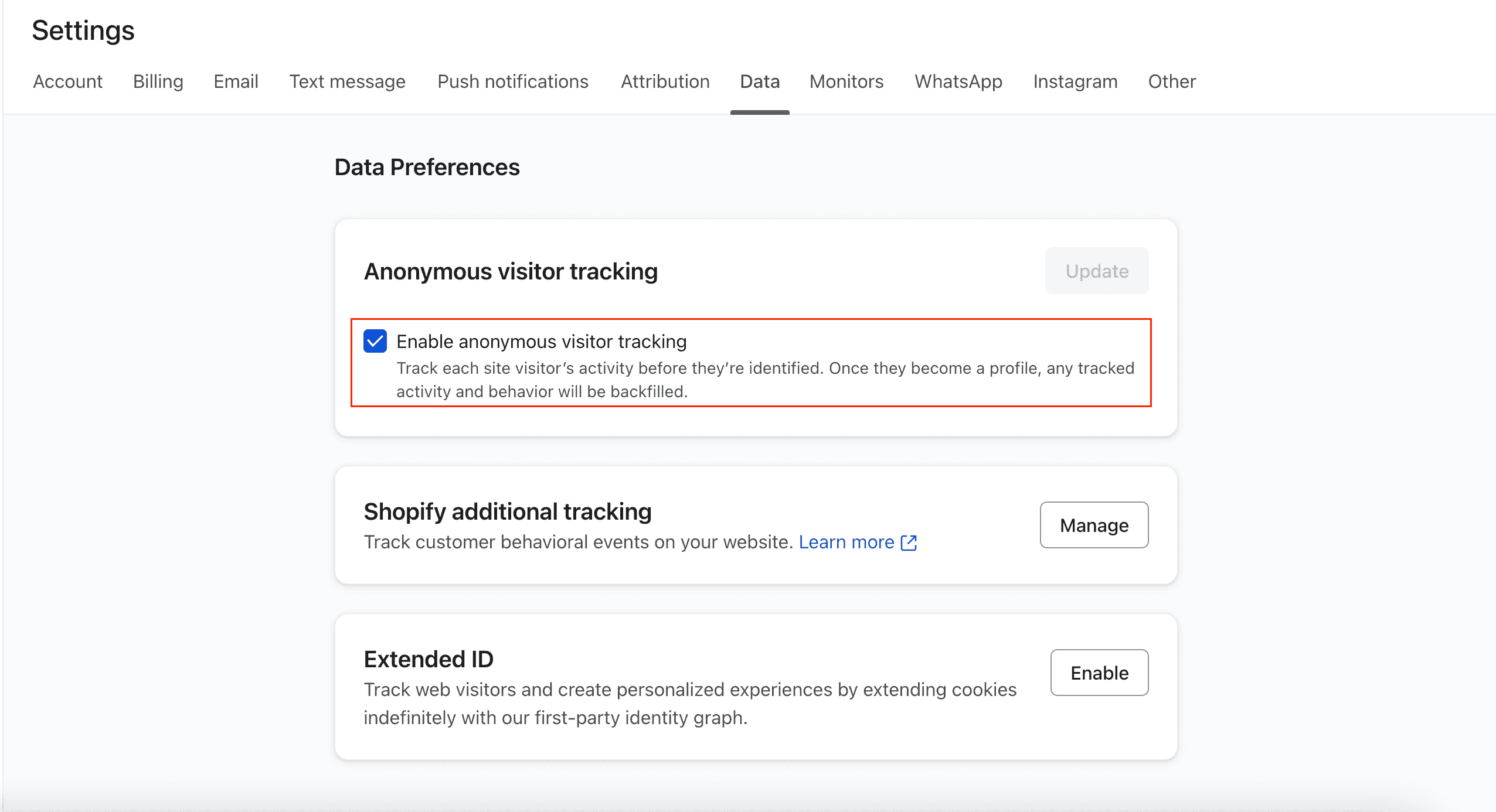 Keep in mind these three limitations for anonymous visitor tracking:
- Users have to opt into cookies.
- Data only sticks around for 14 days, or 7 if they're on Safari.
- You've got to make sure Shopify's additional tracking is actually turned on.
4. Should you turn off Smart Sending in your flows?
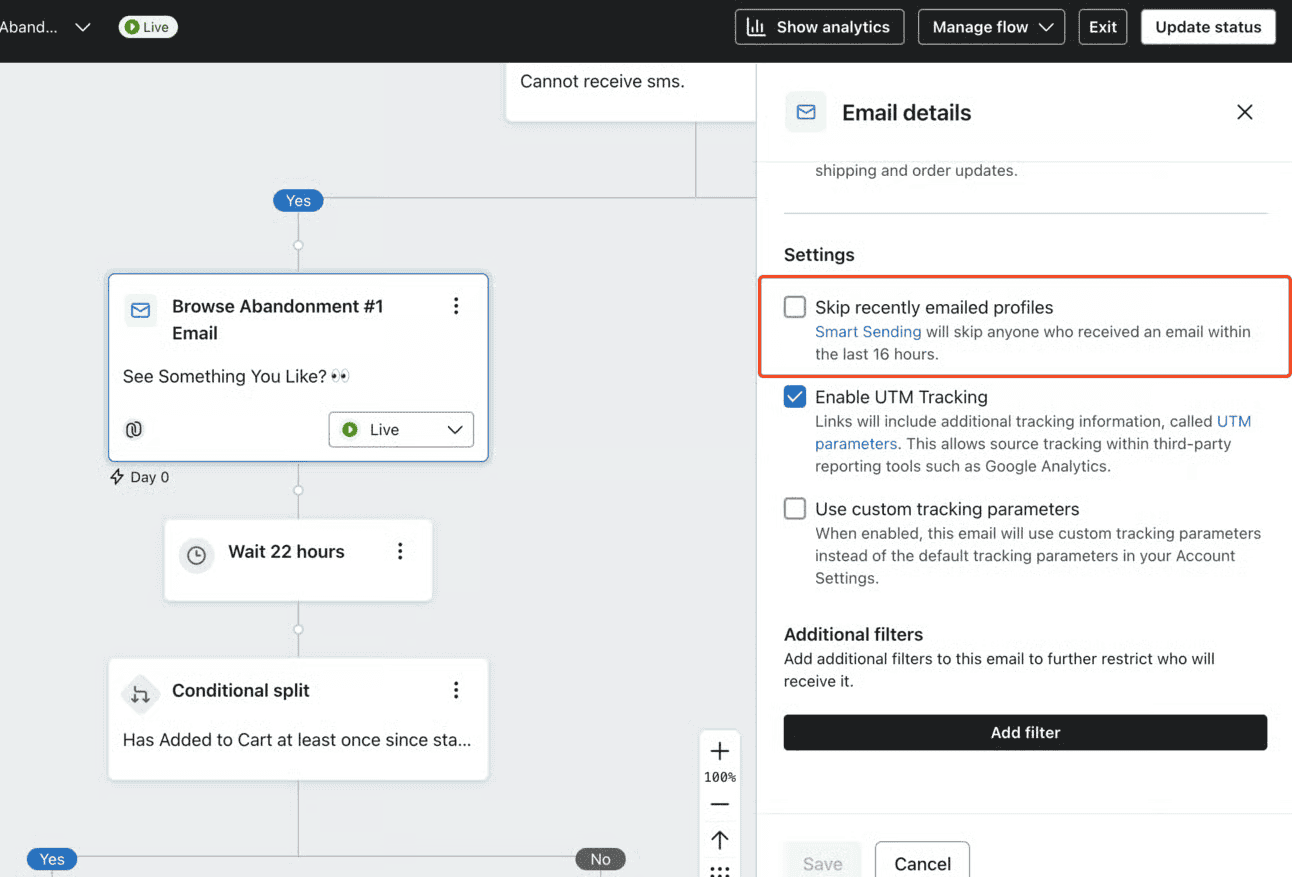
Yes, during BFCM. Smart Sending blocks your abandonment emails if a customer got another message in the last 16 hours. Since you're sending daily campaigns during BFCM, you don't want your most important reminders getting filtered out. Turn Smart Sending off for your flows and use flow filters instead.
Keep Smart Sending on for your regular campaigns, so you don't overwhelm your subscribers.
5. Which popup trigger should you use for BFCM?
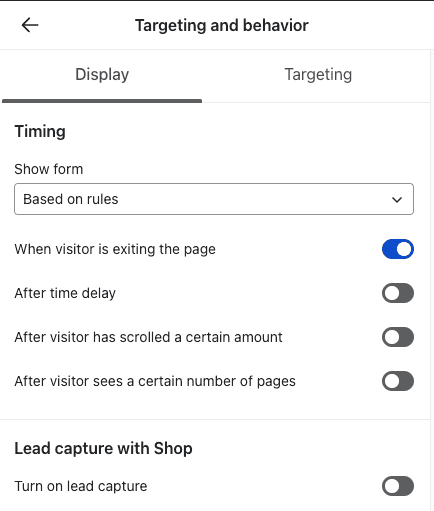
If you want to keep conversions high during BFCM, make sure your popup settings match your offer:
- Exit-intent: use it only for your regular campaigns.
- Load immediately: use it for a big BFCM sale.
6. How do you bring back a popup someone closed?
Most people close the popup the second they land, and some of them decide to buy a few minutes later, with no way back to your discount.
A teaser leaves a small tab on the page that reopens the form. In Klaviyo's form builder, set it to show "after form is closed." It's an easy way to let people reopen the offer if they change their minds and decide to buy.
Note: teasers work only with popup, flyout, and full-page forms. They don't work with embedded forms.

7. Why link a preference page instead of just unsubscribe?
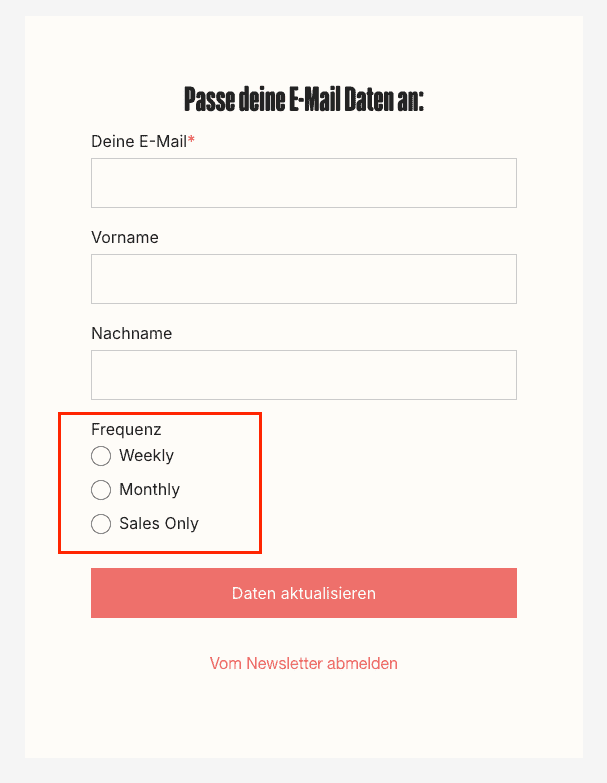
Don't just give people an unsubscribe link, as that's the fastest way to lose them for good. People get overwhelmed during BFCM, so give them a preference page instead, letting them choose to get emails weekly, monthly, or just for sales, instead of saying goodbye forever.
It isn't a default setting, so you have to build it, but it only takes a few minutes.
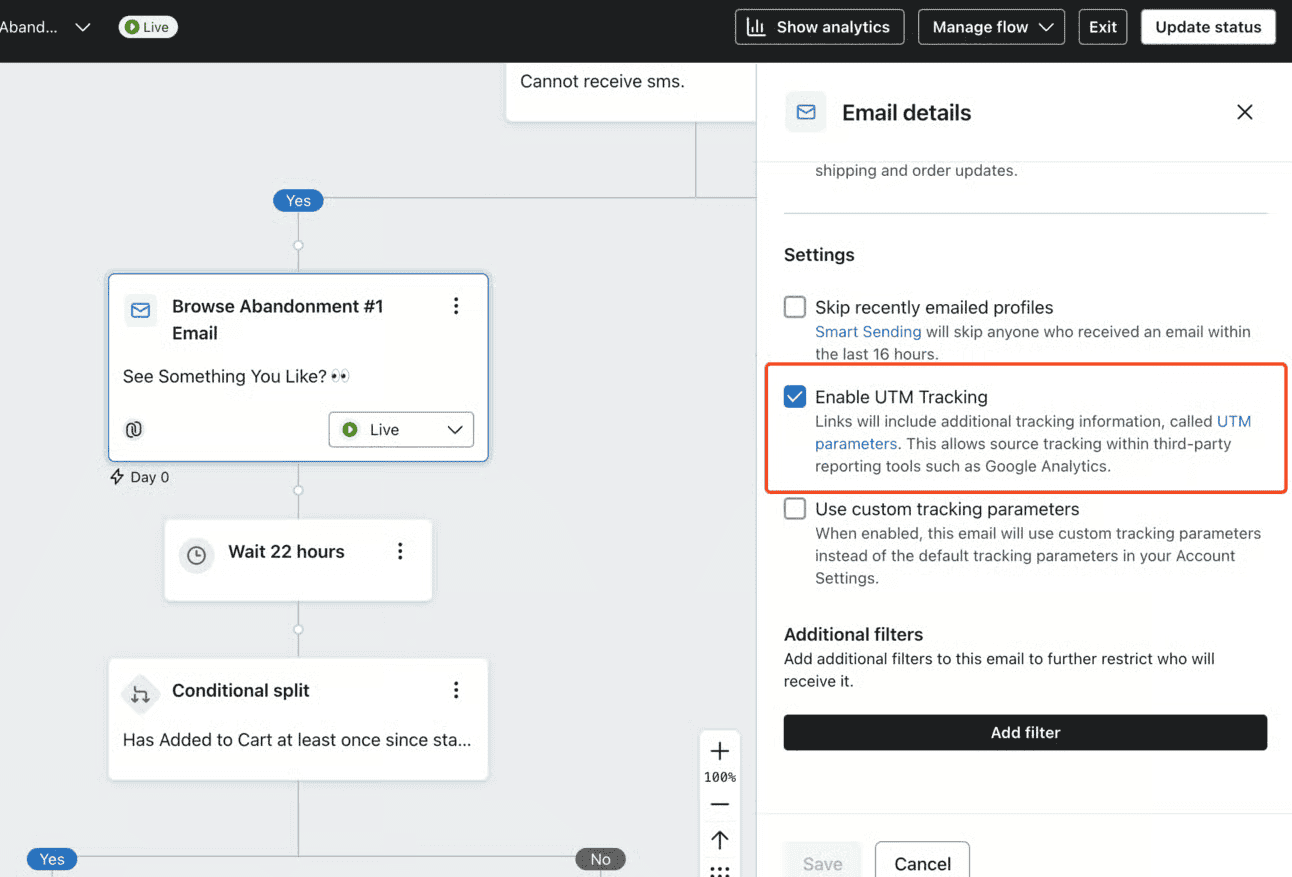
8. How do you check UTM tracking on every flow email?
Klaviyo's revenue only shows up correctly in your analytics or attribution tool, like Triple Whale or Northbeam, when your UTMs are right. Get them wrong and your email numbers are off, which throws off everything else.
Two places to check:
- Settings, then Other, then UTM tracking. Confirm UTM tracking is set up and "Automatically add UTM parameters to links" is on.
- Each flow email. Confirm "Enable UTM Tracking" is ticked. The account setting doesn't reach a flow email where that box is unticked.
9. How fast should your first abandoned cart email go out?
Stop waiting 4 hours for your first abandoned cart email. That's way too long for BFCM.
Send that first one within 20 minutes to 2 hours instead. Klaviyo's own guidance is slower, at 2 to 4 hours, and its pre-built flow waits 4. We've found that reaching people while they're still in "shopping mode," actively comparing your deal to others, is an easy win.
10. Who should get your best BFCM offers?
We use Klaviyo's predictive analytics, which looks at order history to estimate a customer's lifetime value over the next year. We use it a lot with brands that struggle to identify their VIPs.
By focusing your biggest discounts on the loyal crowd, you'll boost your ROI and make sure your best deals go to the people most likely to keep buying from you.
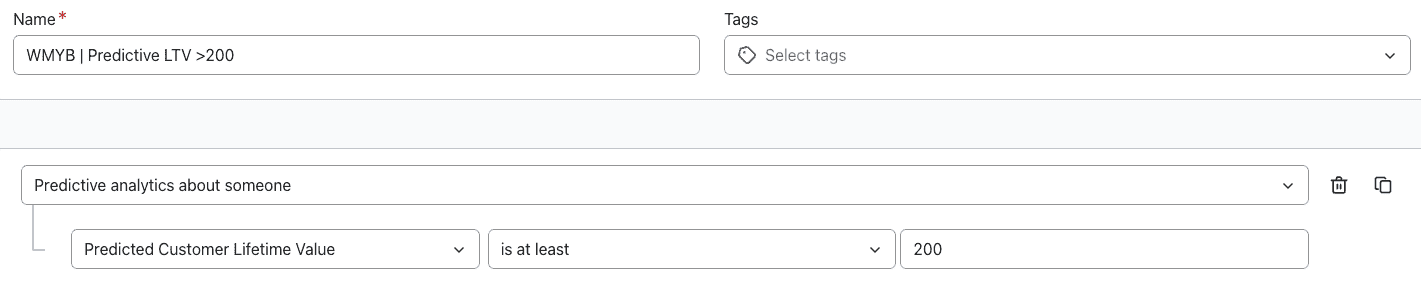
For example, if your average CLV is $100, giving someone with a predicted CLV of $200 a great offer is usually a really good idea.
Keep in mind that Klaviyo's predictive analytics only appears once you've got enough data: at least 500 customers who have ordered, 180 days of history, orders in the last 30 days, and some customers with 3+ orders.
If you're not seeing those features yet, use the order-count segments from hack #2 as a solid workaround to find your VIPs.
11. How do you suppress unengaged profiles?
Unengaged profiles cost you twice: they add to your Klaviyo bill, and they drag down your deliverability over time. Clear them out before BFCM.
Here's how we do it:
- Build a segment of your unengaged profiles.
- Send them 2 breakup campaigns to try to win them back one last time.
- Suppress everyone who didn't engage with the breakup campaigns within 48 hours.
- Set up a winback flow (optional).
Again, suppress, not delete. Suppressed profiles don't count toward your plan, and you keep their data. Deleted data is gone for good. Klaviyo will also suggest profiles to suppress under Audience, then Profiles, then View suppressed profiles.
12. How do you make people want to open your emails?
A lot of brands still send generic subject lines and preview text from a generic brand name. Please don't be one of them. Give people a real reason to open, and make the email feel personal.
Here's what's working for us:
- An emoji as the first character
- "You," "your," or "yours" in the subject line
- A short subject line, under 7 words if possible
- A person as the sender, like "Yiqi from Aimerce" instead of just "Aimerce"
- The customer's name in the subject line where you can
- A hook in the subject line, then urgency and curiosity in the preview text
None of it matters if you land in spam anyway. Make sure you're set up for Gmail's and Yahoo's sender requirements: use a dedicated sending domain, configure DMARC, add one-click unsubscribe, and keep spam complaints under 0.3%. Seriously.
13. How do you optimize Klaviyo emails for mobile?
We've noticed that very few brands test and optimize for mobile properly. You'll want to, because most of your subscribers read email on their phones.
 Three quick fixes:
- Compress every image. People open email on the go, and their connection won't always be great.
- Split text into mobile-only and desktop-only blocks, so font sizes work on both. Don't do this with images, though. The email then carries every image twice and gets heavy.
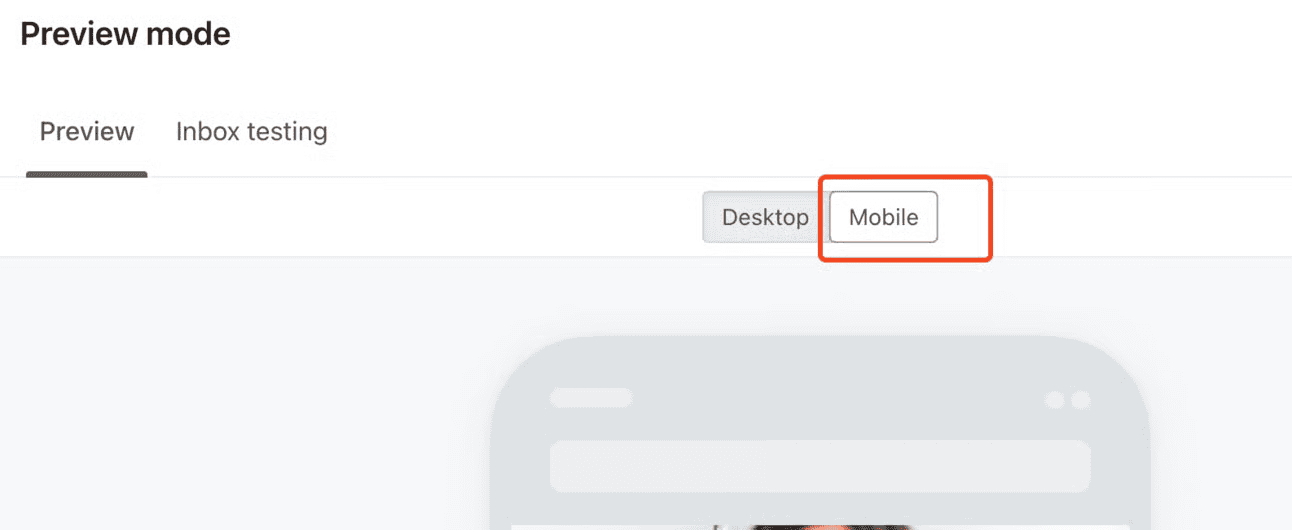
- Use Klaviyo's mobile preview, then send a test to your own phone before anything goes out.
This playbook is part of our BFCM Klaviyo & Meta Academy, a free series for DTC brands running through mid-December, with new sessions every week. Join the BFCM Academy.
The 13 Klaviyo hacks at a glance
| Hack | What to do |
|---|---|
| 1. Determine recipients at send time | Turn it on for scheduled campaigns |
| 2. Audience Breakdown | Send to several non-overlapping segments |
| 3. Anonymous visitor tracking | Turn it on, and check Shopify's additional tracking |
| 4. Smart Sending | Off in flows, on in campaigns |
| 5. Popup trigger | Load immediately for BFCM, exit-intent otherwise |
| 6. Popup teaser | Show after the form is closed |
| 7. Preference page | Offer frequency choices, not just unsubscribe |
| 8. UTM tracking | Check the account setting and every flow email |
| 9. Abandoned cart timing | First email within 20 minutes to 2 hours |
| 10. Predicted CLV | Save your best offers for high predicted CLV |
| 11. Suppression | Breakup campaigns, then suppress, not delete |
| 12. Subject lines and sender | Personal sender, short subject, meet Gmail and Yahoo requirements |
| 13. Mobile | Compress images, split text blocks, test on your phone |
FAQ
What does "Determine recipients at send time" do in Klaviyo? It makes Klaviyo take a fresh snapshot of your list or segment right before a scheduled campaign sends, instead of locking the audience when you schedule. It's off by default and can't be combined with sending in each recipient's local time zone.
How do I see Audience Breakdown in Klaviyo? Send a campaign to more than one list or segment. Audience Breakdown only appears for multi-segment sends, and it shows how each group opened, clicked, and bought.
Should I turn off Smart Sending for Klaviyo flows during BFCM? Yes. Smart Sending blocks emails if a customer got another message in the last 16 hours, which can stop abandonment emails during daily BFCM campaigns. Turn it off in flows and use flow filters instead, but keep it on for campaigns.
How soon should the first abandoned cart email go out during BFCM? Within 20 minutes to 2 hours, while shoppers are still comparing deals. Klaviyo's own guidance is 2 to 4 hours.
Should I delete or suppress unengaged Klaviyo profiles? Suppress them. Suppressed profiles don't count toward your Klaviyo plan, and you keep their data, while deleted data is gone for good.
When does Klaviyo's predictive CLV become available? Once you have at least 500 customers who have ordered, 180 days of order history, orders in the last 30 days, and some customers with 3 or more orders.
Sources
[1] Aimerce, "The Ultimate 2026 BFCM Klaviyo Hacks Playbook: The Ones Nobody Talks About,"
[2] Aimerce, "The Ultimate 2026 BFCM Klaviyo Flows, Segments & Discounts Playbook"
Related reading

Try Aimerce Pixel Risk-Free
for 30 Days
Most teams see results within 2 weeks.
Money-back guarantee.
It pays for itself, or you don't pay anything.
30-Day Aimerce Pixel Free Trial