Quick Answer: Before BFCM, check Meta Events Manager, not just Ads Manager. Confirm your Purchase event volume is within about 5% of your Shopify orders, that Purchase is coming through the Conversions API, that browser and server events share an event ID so Meta can deduplicate them, and that your Purchase Event Match Quality (EMQ) is healthy, generally 8.8 to 9.3. Clear any diagnostics flags, check the parameters on a real Purchase event, and walk through the corner cases that break tracking: email popups, custom landing pages, third-party checkouts, subscriptions, and quizzes. If you plan to use Meta's Profit or pLTV optimization, confirm your product costs and conversion volume first.
Key Takeaways
- Ads Manager shows ad performance. Events Manager shows whether the data behind it is right. If Events Manager is wrong, so is Ads Manager.
- Purchase should come through the Conversions API. If it's Meta Pixel only, you're likely missing conversions the browser never reports.
- A high Purchase EMQ mostly reflects how many sales come from Meta ad clicks. It's a health check, not a target to chase.
- Most tracking problems are corner cases: popups, custom landing pages, third-party checkouts, subscriptions, and quizzes.
- Meta's Profit and pLTV optimization can improve targeting, but both need clean data and enough conversions before Meta will turn them on. This is everything I've written this year about event tracking, pulled into one place, plus the special cases to look at while you prepare tracking for BFCM.
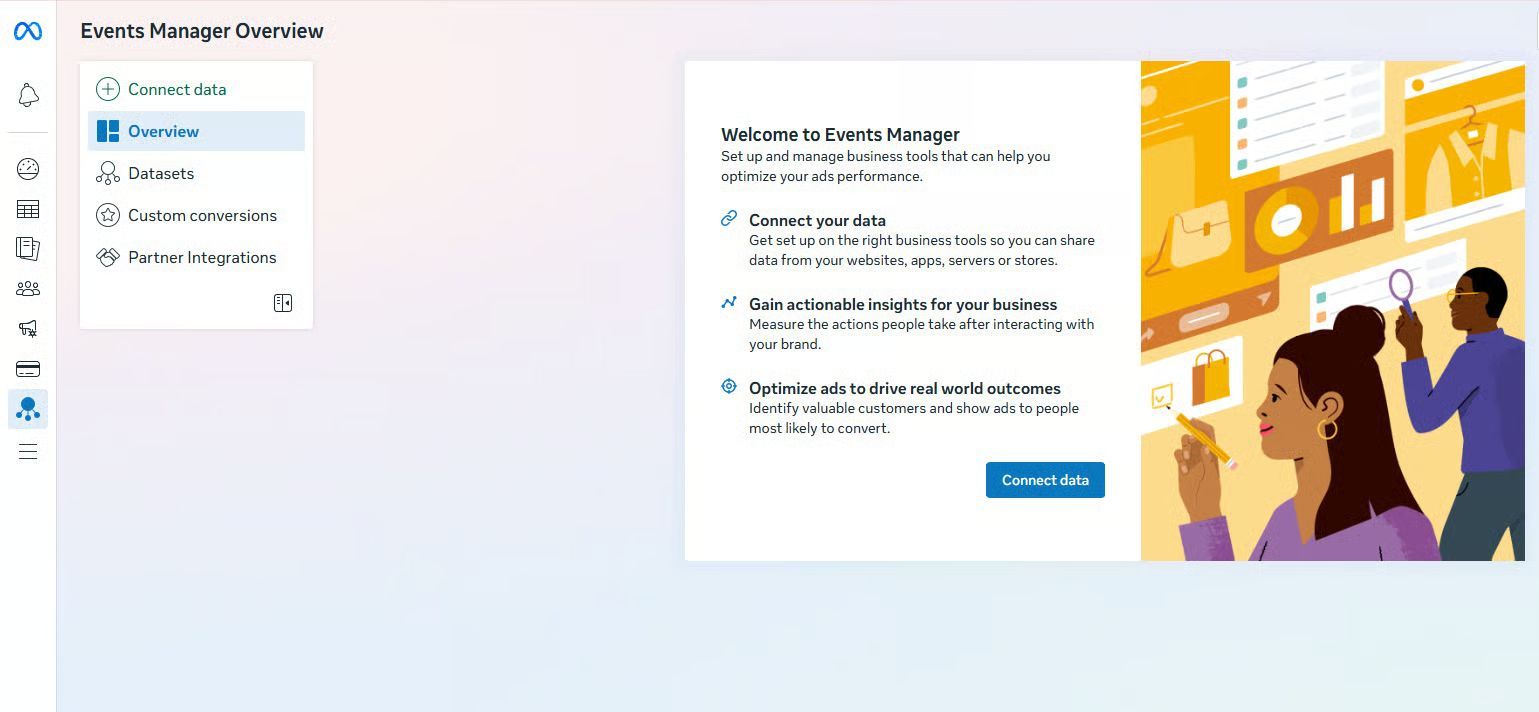
1. Ads Manager and Events Manager are not the same tool
Most people spend all their time in Ads Manager and almost never open Events Manager. But if your Events Manager tracking is wrong, your Ads Manager numbers are wrong too. Events Manager shows your tracking quality: how accurately and completely your pixel and server-side integrations capture customer behavior on your site and send it to Meta for its targeting algorithm. It's not your ad performance dashboard. That's Ads Manager.
Read the Overview chart
Click into your pixel and you land on Overview. The chart at the top shows event volume over your selected window, one line per event: PageView, ViewContent, AddToCart, InitiateCheckout, and Purchase.
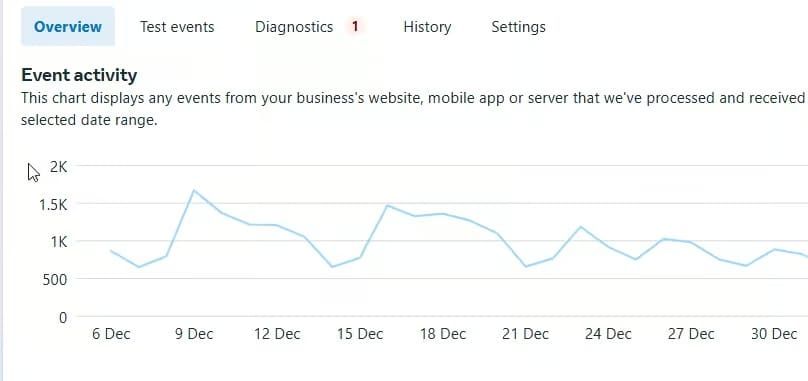
You're looking for consistent volume and a logical funnel. PageView should be highest, tapering down to Purchase.
Check the Integration column
Next to each event type, you'll see one of three labels:
- Conversions API: server-side events are reaching Meta. This is what you want for Purchase specifically.
- Meta Pixel only: your purchase data comes entirely from the browser, which means you're likely losing conversions to ad blockers, browser privacy limits, and pages that don't finish loading.
- Multiple: browser and server-side sources are both active. If you use both the Pixel and the Conversions API, you need to send events with matching event IDs so Meta can deduplicate them. If you're already using Aimerce, that's handled for you, and using server-side events on their own is fine too. Meta Browser Events Are Not Required with Aimerce.
2. Common diagnostics you'll see in Events Manager
"Pixel hasn't received events recently." Your Pixel isn't firing. Check that it's still installed correctly and that a Shopify update or app change hasn't broken it, or whether you simply had no traffic. The trick is to select "Today" when you check the pixel data. "Event match quality can be improved." This is Meta telling you your EMQ score is lower than it could be. Click through to see which parameters are missing. It almost always comes down to not enough email addresses, so collect more through popups, quizzes, or newsletter signups. "Possible duplicate events detected." Meta is seeing the same Purchase counted more than once. For Meta to deduplicate, the browser and server versions of an event need the same event_name and the same event_id. Our guide to deduplication errors in Meta Events Manager walks through the fix. "Invalid Purchase or AddToCart value." This is mostly caused by $0 purchases and $0 products. Make sure you remove those events. Aimerce has a simple setting, "Skip $0 Purchase (Exchange) Events," that does this for you.
3. What your EMQ score actually means
Event Match Quality (EMQ) is Meta's 0 to 10 score for how well it can match your events to real Facebook and Instagram users. For most Shopify brands, it's the single most important number in Events Manager.
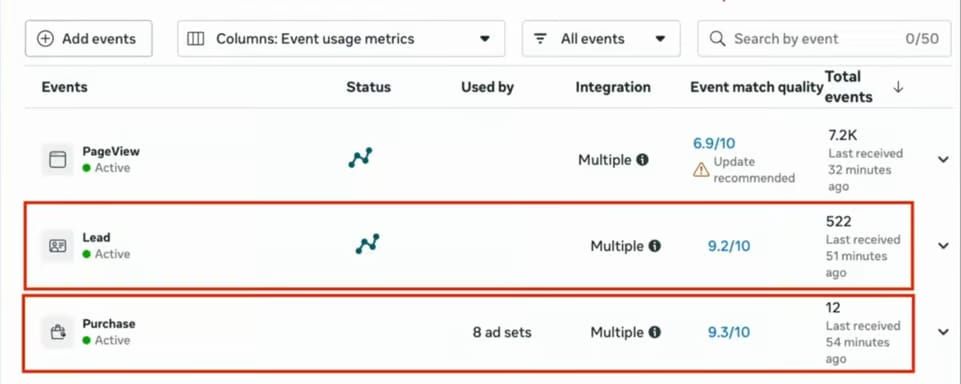
A client recently told me he needed a 9.3 Purchase EMQ to know his pixel was working. That's not how it works. You already have most of the customer data you need at the Purchase step by default. What really moves your Purchase EMQ is the fbc, or click ID, which basically reflects how many of your sales came from Facebook ads. A high score doesn't automatically mean your pixel is healthy. It usually means you're driving a lot of traffic through paid ads. It's honestly much healthier for your business when only 20% of your sales come from paid ads. That shows you've built a brand that can stand on its own, instead of surviving on ad spend. Here's what healthy ranges look like by event, in our experience:
| Event | Healthy | Concerning |
|---|---|---|
| Purchase | 8.8 to 9.3 | Below 8.0 |
| AddToCart and InitiateCheckout | 7.5 to 8.5 | Below 7.0 |
| ViewContent and PageView | 6.0 to 7.5 | Below 5.5 |
Higher-funnel events naturally score lower because you have less customer data at those steps. A PageView EMQ of 6.5 is fine. A Purchase EMQ of 6.5 is not. Across customers who fixed broken tracking and took their EMQ from around 4 to 9, we've seen:
- Cost per acquisition drop by an average of 18%
- Customer match rates increase by 24%
- Average ROAS improve by 22%
- About $2,100 a month in ad spend efficiency at $1,000 a day in spend
The technical foundation of high EMQ
Meta prioritizes certain parameters to find your customers. Focus on the high-priority ones at the touchpoints where you collect them, like email capture and checkout.
| Parameter | Priority |
|---|---|
| High | |
| Click ID (fbc) | High |
| Country | Medium |
| Phone number | Medium |
| External ID (a unique ID from the advertiser) | Medium |
| Browser ID (fbp) | Medium |
| Lead ID | Low |
| First name | Low |
| Last name | Low |
| City | Low |
| Zip or postal code | Low |
Source: Meta's documentation, "About event match quality." For more on reading the score, see The Truth About Your EMQ Scores.
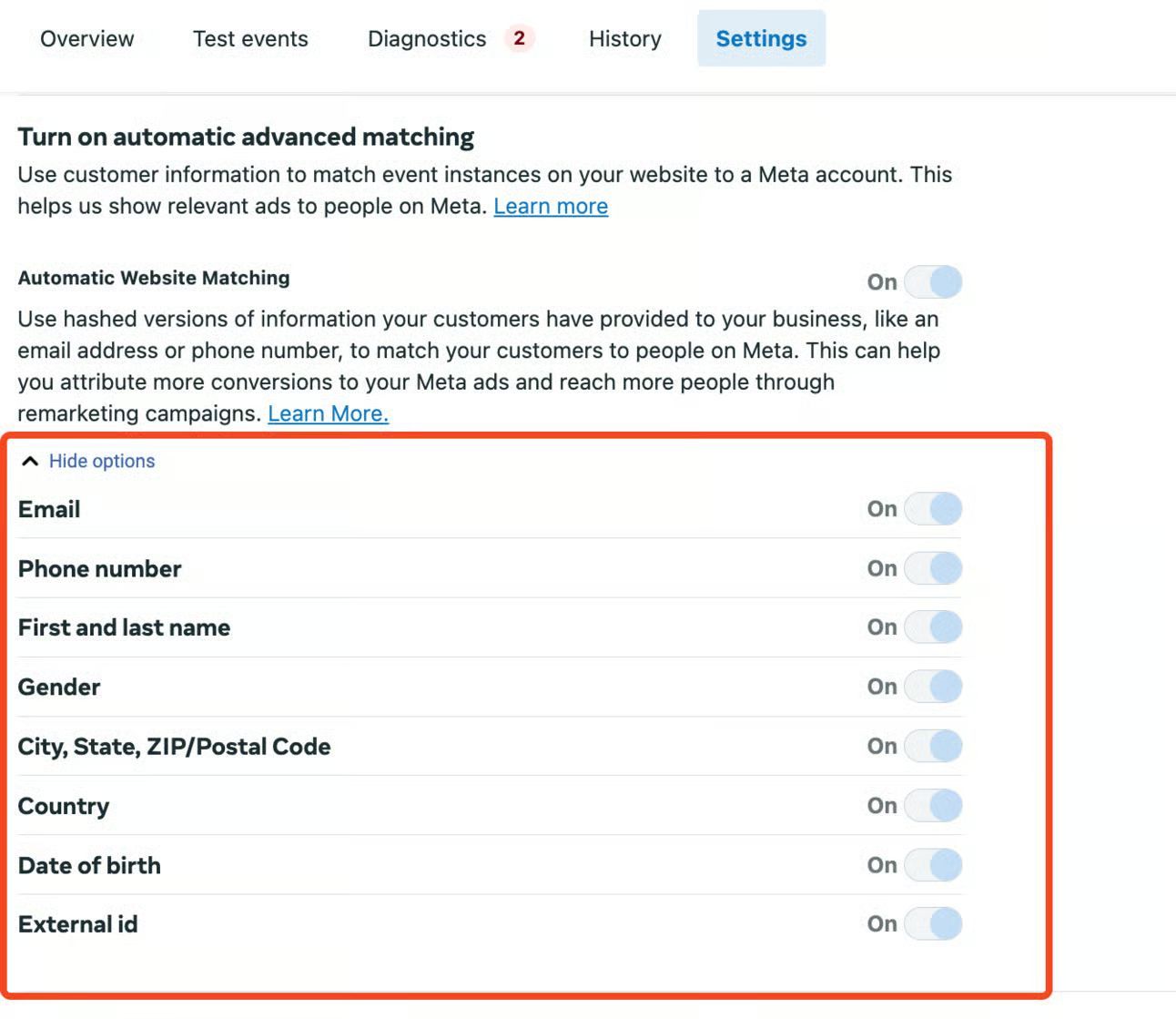
Turn on Automatic Advanced Matching
To get the most out of Meta's tracking, go to your pixel settings in Events Manager and turn on Automatic Advanced Matching. It uses hashed customer information like emails and phone numbers to make your event matching more accurate, which helps you capture more conversions and build better custom audiences.
4. What to check in your event details
Click into a Purchase event in Events Manager to see the full event data. If any of these are missing or wrong, you know exactly where your EMQ and attribution problems are.
| Parameter | What to confirm |
|---|---|
| event_name | Purchase, identical on the browser and server versions |
| event_id | Matches between the Pixel and Conversions API, so Meta can deduplicate |
| action_source | Set for every event, with "website" for online orders (required by Meta) |
| event_source_url | The page where the purchase happened (required for website events) |
| client_user_agent | The shopper's browser user agent, not hashed (required for website events) |
| client_ip_address | The shopper's IP address, not hashed |
| email (em) | The most important match key. Lowercase and trim it before hashing |
| phone (ph) | Digits only, with country code, before hashing |
| fbc (click ID) | Ties the purchase back to the Meta ad click. Not hashed |
| fbp (browser ID) | The browser cookie that links events in a session. Not hashed |
| external_id | A stable ID from your side, like the customer ID. Helps link repeat purchases |
| name, city, zip, country | Weak alone, but they lift matching when email or phone is missing. Normalize before hashing |
| value | A number, not a string, with no currency symbol. Equals the order total |
| currency | Three-letter uppercase code (USD, GBP, EUR) matching your store |
| contents | One entry per product with id, quantity, and item_price. The id must match your Meta catalog |
5. Special cases to check when you set up event tracking
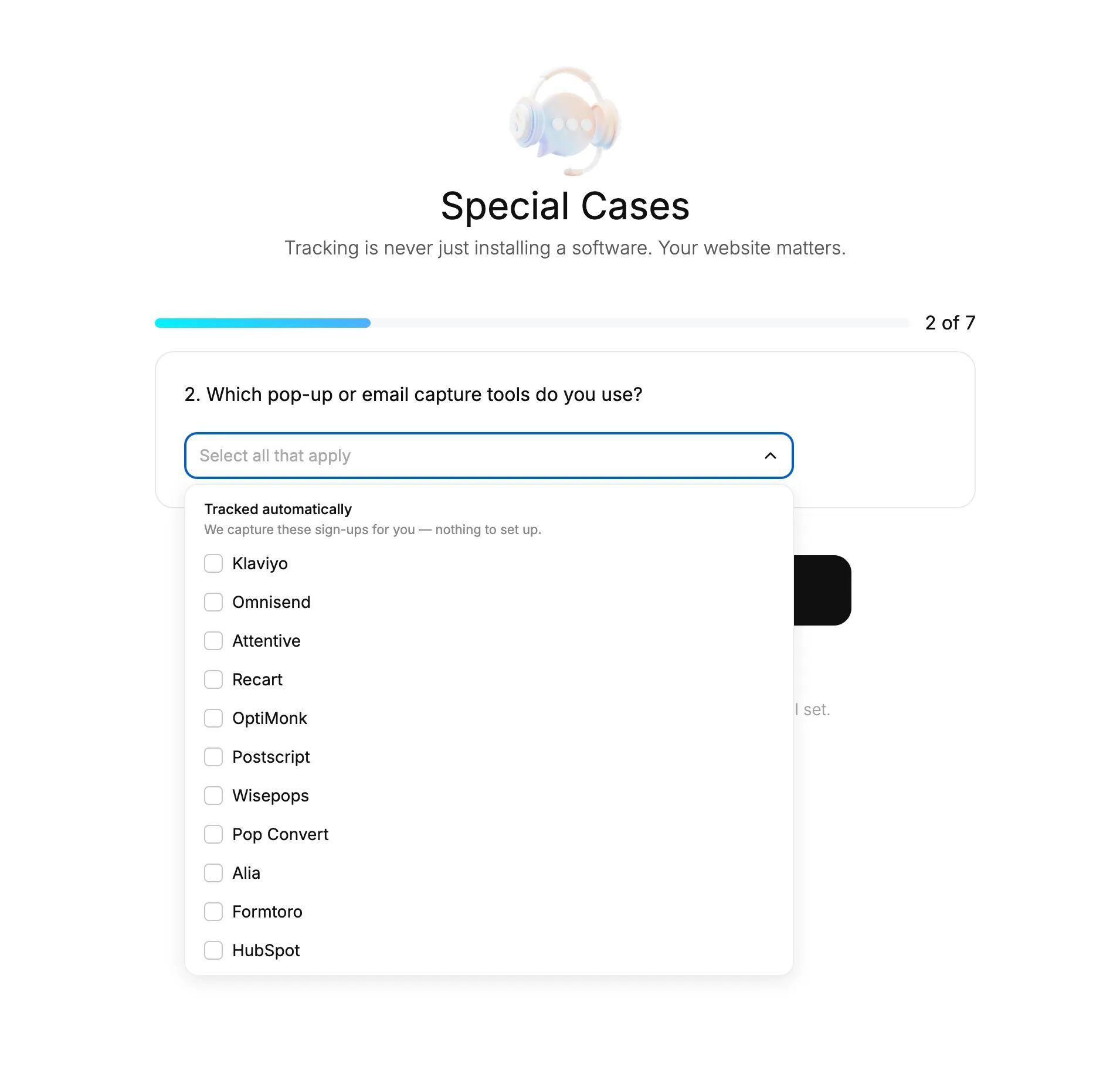
If a tracking company never asks any questions about your website, I don't think it's doing the job right. Tracking is never just installing software. It's mostly about handling all the corner cases on a website properly. Here are the ones to look at:
- Email popups. Native platform popups, like Klaviyo and Omnisend, connect to your events automatically. Custom-built ones might not.
- Custom ad landing pages. Pages built outside your Shopify theme, or on a headless setup, need to capture the click ID directly, or attribution breaks completely.
- Third-party checkout. It needs the "aimPK" order note passed back to Shopify to preserve the click ID.
- Subscriptions and rebills. Decide whether renewals should count as new conversions. Aimerce can strip them out while keeping first-time subscriptions, and adds OTP, Subscribe, and Renewal events.
- Quizzes. These only matter for tracking if they capture personal data. All five are covered during Aimerce onboarding. If you're not sure where your setup lands, ask before Black Friday.
6. New: Meta added Profit and pLTV optimization
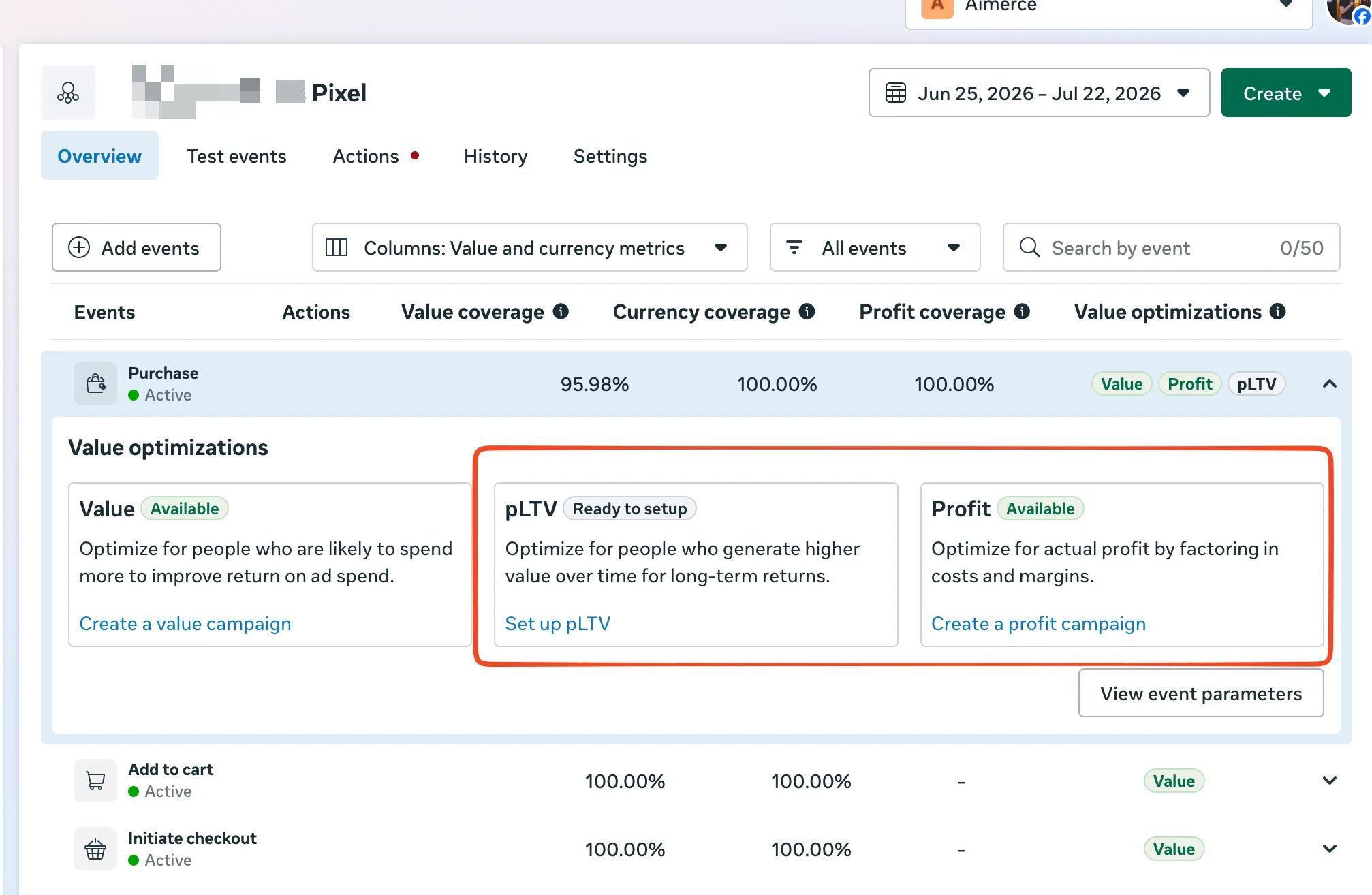
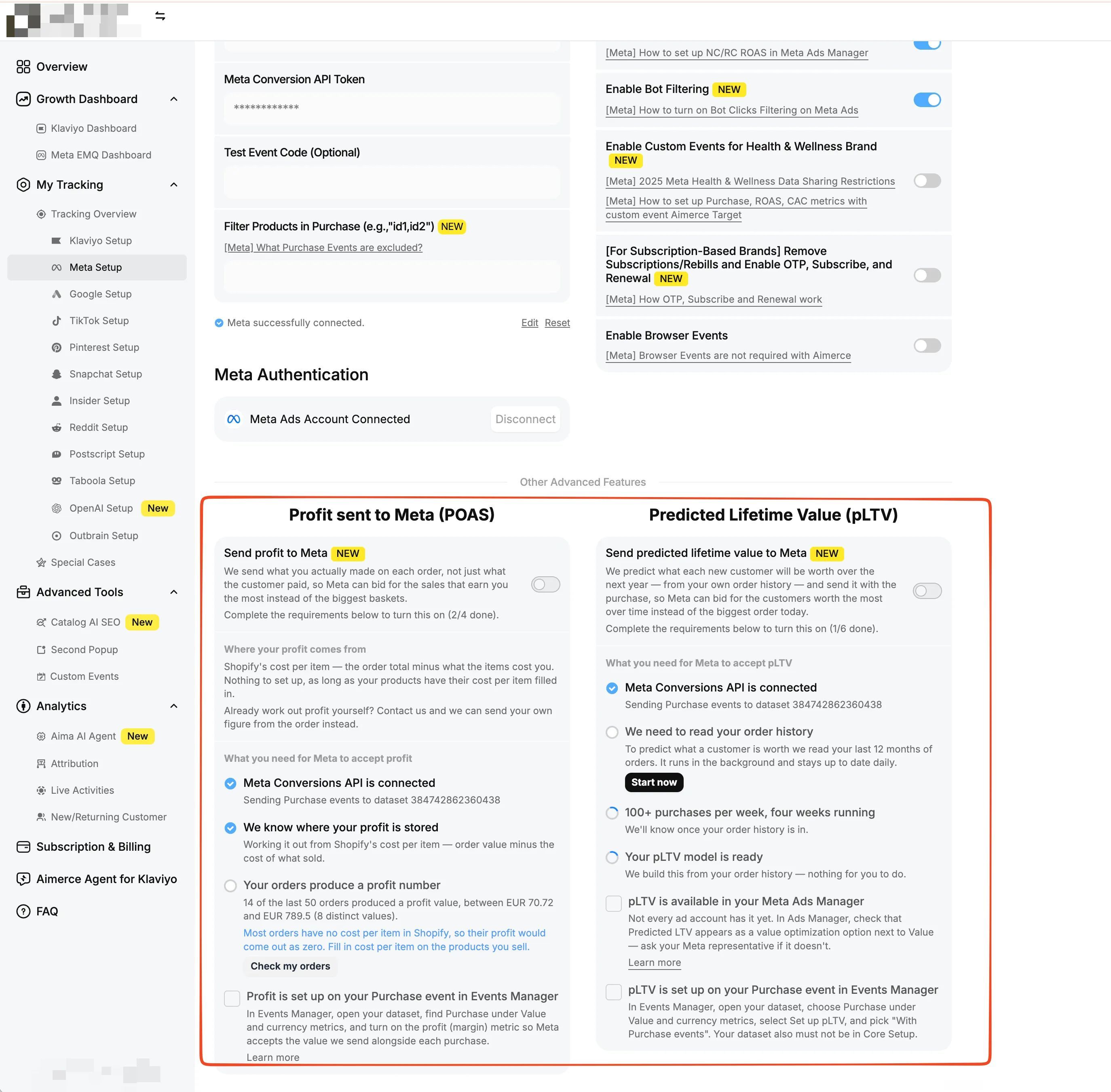
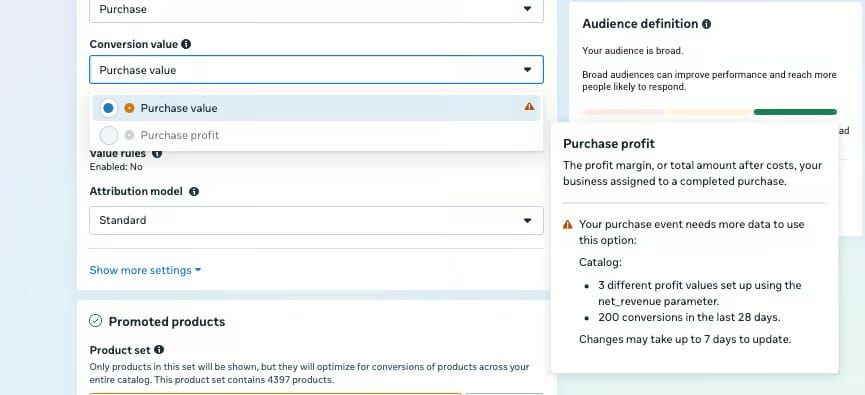
Meta added two optimization options next to standard Value: Profit and pLTV. Profit, Aimerce handles end to end. We read the cost per item from your Shopify variants, calculate net revenue (subtotal minus discounts minus cost), and attach it to the Purchase event as net_revenue. Your only job is keeping that cost field filled in across your catalog. pLTV is different. The prediction model is yours to build and validate. We handle delivery, either in real time or through a delayed AppendValue call within 7 days.
Both live in the Aimerce dashboard under Advanced Tools, and both need Meta to have granted your account the feature. They promise better targeting, but they're more technical than Meta makes them sound. Here's the full breakdown.
| Optimization | Bids on | Requires | Best for |
|---|---|---|---|
| Value | Order revenue | value and currency | Any store |
| Profit | Order profit after costs | net_revenue across 3+ distinct values, 200+ conversions in 28 days | Brands with different margins across products |
| pLTV | Predicted long-term value | predicted_ltv with 5+ distinct values (3x spread), 100+ conversions a week for 4 weeks | Subscription and high-repeat brands |
Not every account has these yet, and you may need to ask Meta to turn them on. To check, open the conversion value dropdown in an Ads Manager campaign. Until you qualify, Profit sits grayed out with a warning icon, and it can take up to 7 days to activate once your data starts flowing.
If you haven't opened Events Manager in the last 30 days, do this
- Compare Purchase event volume to actual Shopify orders. They should be within about 5%.
- Check Purchase EMQ. Below 8.0 points to an enrichment gap.
- Clear any "Issue detected" flags in Diagnostics.
- Walk through every corner case above that applies to your store.
- If you're going after Profit or pLTV, confirm your cost-per-item coverage, your conversion volume against the thresholds, and that Meta has given your account access. If you're using Aimerce, we automatically handle:
- Real-time event processing
- Parameter formatting and validation
- Deduplication across all events
- Express checkout tracking
- Cross-device user stitching
- Edge case optimization
FAQ
What's the difference between Meta Ads Manager and Events Manager? Ads Manager shows how your ads perform. Events Manager shows the quality of the tracking data behind them: which events reach Meta, from which source, and how well Meta can match them to people. If Events Manager is wrong, Ads Manager numbers are wrong too. What is a good Purchase Event Match Quality score? In our experience, 8.8 to 9.3 is healthy for Purchase, and below 8.0 is concerning. A high Purchase EMQ mostly reflects how many sales come from Meta ad clicks, so treat it as a health check rather than a target. Why does Events Manager say "possible duplicate events detected"? Meta is seeing the same Purchase more than once. The browser and server versions of an event need the same event_name and event_id so Meta can deduplicate them. How close should Meta purchases be to Shopify orders? Within about 5%. A bigger gap usually means missing server-side events, duplicates, or orders that shouldn't be counted. What causes an "invalid purchase value" warning in Events Manager? Mostly $0 purchases and $0 products. Remove those events from what you send to Meta. What do I need for Meta's Profit optimization? A net_revenue value on purchases with at least 3 distinct values, at least 200 conversions in 28 days, and Meta enabling the feature for your account. Aimerce calculates net revenue from the cost per item on your Shopify variants.
Sources
[1] Aimerce, "Meta Browser Events Are Not Required with Aimerce - Internal Documentation,"
[2] Aimerce, "How to Fix Event ID Deduplication Errors in Meta Events Manager,"
[3] Aimerce, "The Truth About Your EMQ Scores,"
[4] Aimerce, "How to Set Up Server-Side Tracking for Shopify,"
[5] Meta Business Help Center, "About event match quality,"
[6] Aimerce, "Meta Added Profit and pLTV Optimization, and Aimerce Supports Them Now,"
[7] Aimerce, "The Ultimate 2026 BFCM Pixel Tracking Setup Playbook,"
Related reading

Try Aimerce Pixel Risk-Free
for 30 Days
Most teams see results within 2 weeks.
Money-back guarantee.
It pays for itself, or you don't pay anything.
30-Day Aimerce Pixel Free Trial